Most articles about user intent break it into four tidy buckets: informational, navigational, commercial, transactional.
That sounds useful, but it doesn’t tell you the full story about why users are on your site, what they are trying to accomplish, and what your content should be doing to help them.
In this post, I’ll show you a few different ways to investigate user intent that go beyond these simple search intent categories. You’ll be able to get a richer picture of what users need, and simple changes you can make to help them get there.
What Is User Intent?

User intent is what people are trying to achieve when they interact with a product, use a website, or type a question into a search engine.
Sometimes, it’s straightforward to understand. When people type, “coffee near me,” into the Google search bar, it’s pretty obvious they are looking for the closest place to get coffee.
Or when someone visits the Careers page, it’s highly likely they are looking for a job.
But what about a homepage? User intent varies widely there. One person might be coming to log in and another might be there for the first time looking to get ballpark pricing.
Figuring out user intent can be really hard. It’s not an exact science. People certainly don’t announce their intent.
Often, users don’t even fully know what they’re after until they see the next steps laid out on your page.
And that is the million-dollar opportunity.
Aligning content with user intent creates a positive feedback loop
If you understand what users are trying to accomplish, then you can anticipate what they need, and design a site that genuinely helps them. This usually involves:
- Speaking to their most pressing concerns
- Organizing information in a way they understand
- Providing tools and data that help them make a decision
- Making options clear and next steps obvious
All of this sounds like common sense, like something brands should just do. Of course it is, but it’s challenging because human users have a range of intents.
Two people who both want project management software looking at the same SaaS pricing page each have their own needs, constraints, budgets, etc. Designing a page that helps both of those people (and thousands of other website visitors) is no easy task.
But the payoff is huge. When you do a good job identifying and planning around user intent:
- Visitors can find what they need faster
- They are more confident that your brand can help them
- They engage with your content longer
- More of them convert into customers
This creates a positive feedback loop. Google sees that engagement and rewards it by ranking your pages higher in search results. This increases traffic to your site, which allows you to keep spending more money making top-level content and satisfying user intent.
Example website aligned with user intent
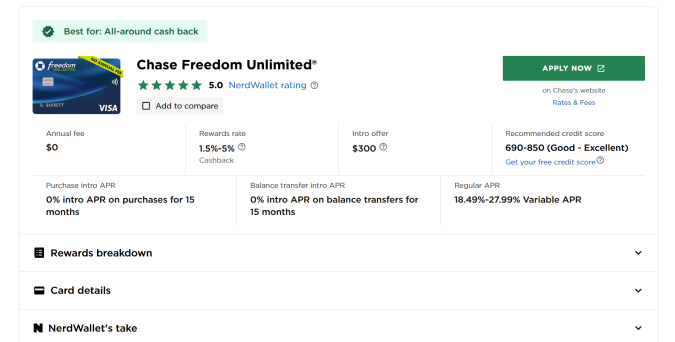
Nerdwallet, the popular personal finance platform, does a great job understanding user intent and providing website visitors with content that helps them solve problems.
For example, when I searched, “best credit cards”, Nerdwallet had the #1 ranked post in search results. That is not an easy keyword to win. According to SEMRush, 27,100 people in the U.S. search this keyword per month, and the average cost per click is $6.51.
Based on my experience in SEO and affiliate marketing, I am confident that #1 slot is generating hundreds of thousands of dollars per month for Nerdwallet.
And a huge part of why they are winning this competitive place in search results is because they are giving users exactly what they need. I see this page as satisfying user intent by:
- Listing top picks with quick takeaways to help users compare. There’s no information overload, even on a small screen, and yet they provide tons of helpful info.
- Organizing options into clear categories so users can explore based on what they already know (e.g. I’m a student, I want a points card, I care about travel, etc.)
- Highlighting key decision factors like rewards, APR, and fees so that users don’t have to dig.
- Making their credibility obvious by using a variety of visual and microcopy trust signals, which are crucial in a high-stakes, financial product category.
- Using consistent formatting for all cards, which makes it easier for users to make an apples-to-apples comparison between their options.
- Avoiding pushy features or intrusive ads. There are no urgency tricks to pressure users (like “sale ends in 5 minutes”), and the CTA button is located far enough away from the information that people can click around easily without accidentally hitting it.
The end result is a page that serves a wide range of user intents. People from all walks of life can come to this page and find the information they need to make a decision in a few clicks.
Example website misaligned with user intent
When websites don’t align with user intent, or they push their own agenda at the expense of what users are trying to do, the results are often disastrous.
Consider this post from Glenn Gabe, the well-known SEO analyst, who shared an example of what not to do. He noticed that a site he liked had made a bunch of bad UX mistakes and become really aggressive with their advertising.
Gabe reached out to the Editor-in-Chief to warn them that these changes were not serving users at all, even if they were profitable in the short term.
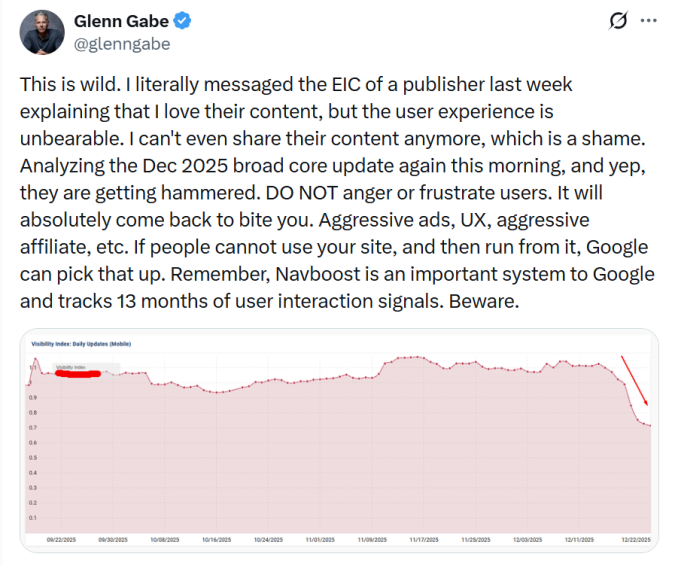
Sure enough, the site plummeted in rankings and its visibility dropped off a cliff.
“DO NOT anger or frustrate users,” wrote Gabe in his post on X. “It will absolutely come back to bite you.”
He didn’t want to shame this website, so he kept it anonymous, but we’ve all seen sites that went overboard on the ads and affiliate offers. Tons of pop-ups, lots of video ads, intrusive banners.
Here’s the thing to remember: the Nerdwallet site that was being rewarded by Google was also loaded with affiliate offers for different credit card companies.
The difference is that Nerdwallet has aligned their site experience with user intent, offering people information and deals they want. The other site, we can assume, is just pushing offers that don’t align with what users are trying to accomplish.
Let’s talk about how to find out what users are trying to do.
7 Tactics To Identify User Intent
Here are some different ways you can uncover user intent and start to build pages that help your website visitors accomplish their goals.
I’ve organized this section to loosely follow the customer journey, which maps how people discover new brands and decide to purchase their products. We’ll start off with how users search, move into their on-page behavior, and end with their brand interactions.
All of these moments are rich sources for you to understand both user intent and how to satisfy it with high quality content.
1. SERP analysis
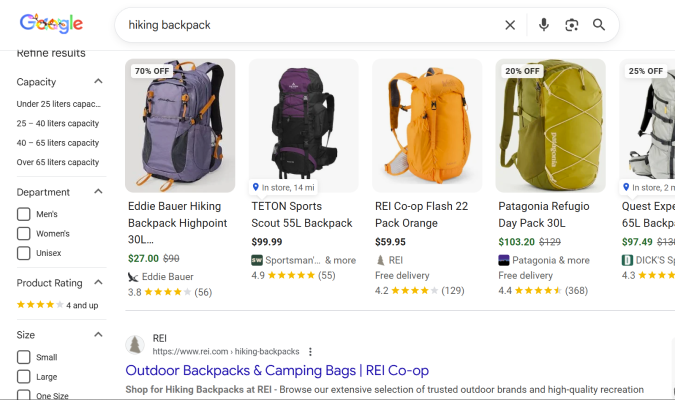
A search engine results page (SERP) is what Google (or Bing, etc.) displays to users after they have typed in a query. SERPs are loaded with information about what people are trying to accomplish.
Google is constantly experimenting to find out what users find the most helpful: which pages it should rank the highest, what SERP features it should display, what the AI overview should focus on, and so on.
You can work backwards from what Google shows to inform your understanding of user intent.
Here are some questions you should ask:
- What types of pages are ranking highly? Is it guides, listicles, “how-to” posts, or tools like calculators and templates?
- How deep is the top performing content? Is the content breezy and skimmable, or in-depth and geared toward experts?
- What other SERP features are prominent? Is there a “featured snippet” that showcases what Google thinks is most important? Does it show popular products? Does it provide a sidebar that allows users to filter results?
- What do “People also ask”? What do “People also search for”? What does autocomplete suggest in the search bar?
- Are there paid ads (sponsored results)? If so, what types of brands are buying ads, and what do they offer users?
After running SERP analysis, you should have a clearer sense of what types of content are the most helpful for users exploring a particular topic. When you build pages to meet this intent, it should increase your click through rate from Google search.
You will also understand a bit more about what people searching this term are trying to accomplish and where they are in their buyer journey (i.e. just learning about a product, comparing options, or ready to purchase).
2. Keyword Research
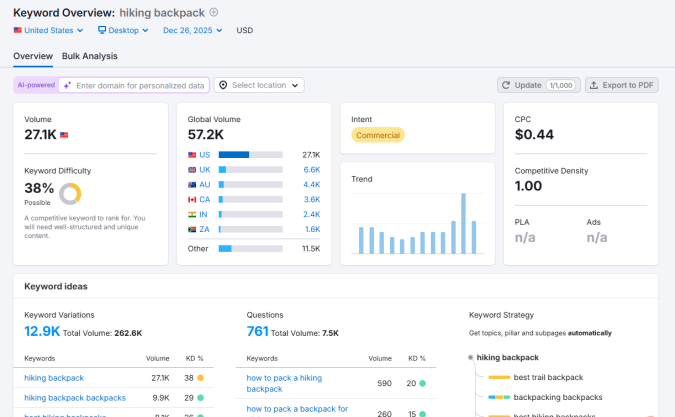
Keyword research involves analyzing the words and phrases (keywords) people type into search engines. It can help you understand how people frame the problems they have, what their level of awareness is, and what they are ultimately trying to accomplish.
Using popular SEO tools (like SEMRush, pictured), you can find out useful information about search volume (how many people searched for this keyword each month), how competitive different keywords are, and which sites have the most domain authority in the topic.
You can also see keyword variations, which some tools categorize by intent. SEMRush, for example, categorizes keywords as commercial, informational, transactional, or navigational.

I think these automated categories are a useful starting point, but I wouldn’t blindly trust them.
For example, SEMRush says the search intent for the keyword “free payroll software” is informational, meaning that users are looking for an answer to a question. I think there is a lot of commercial intent behind that keyword, i.e. someone is looking to find the cheapest way possible to pay employees.
And, when I checked the SERP for “free payroll software”, there were a bunch of sponsored results (ads) that brands were paying for. Typically, brands don’t buy ads for purely informational keywords.
So be cautious about using the automated intent categories, and cross check your keyword research with SERP analysis and common sense.
Some useful questions to ask during keyword research:
- Is the highest volume search for the keyword framed as a question, a comparison or a purchase decision?
- Is there a lot of search volume for keyword variations that use modifiers like “best” or “pricing” or “reviews”?
- Are there seasonal spikes in the search volume that could clue you into why people are searching now?
- Should you create separate pages for different keyword variations to speak to different intents?
- What are the most popular questions associated with the keyword?
- Is there meaningful search volume for tools or templates associated with the keyword?
- Are there long-tail versions of the keyword that reveal more specific goals? (e.g. payroll software for offshore contractors)
Keyword research helps you see how people define their problems and goals, and what they expect to find once they click through. Speaking to these goals can increase your visibility in search results. Delivering on their expectations will boost customer engagement metrics, which helps your pages rank higher, and it will likely increase your conversion rate.
By looking at their phrasing and modifiers, you can build out pages that meet specific user needs and demands. This works better than trying to make a single page meet the variety of intents that keyword research reveals.
3. Web analytics
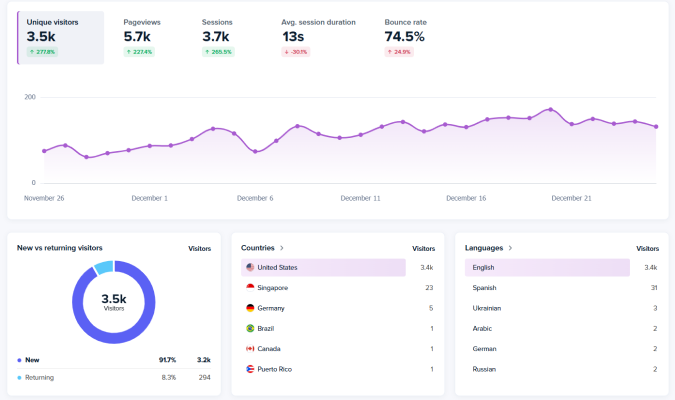
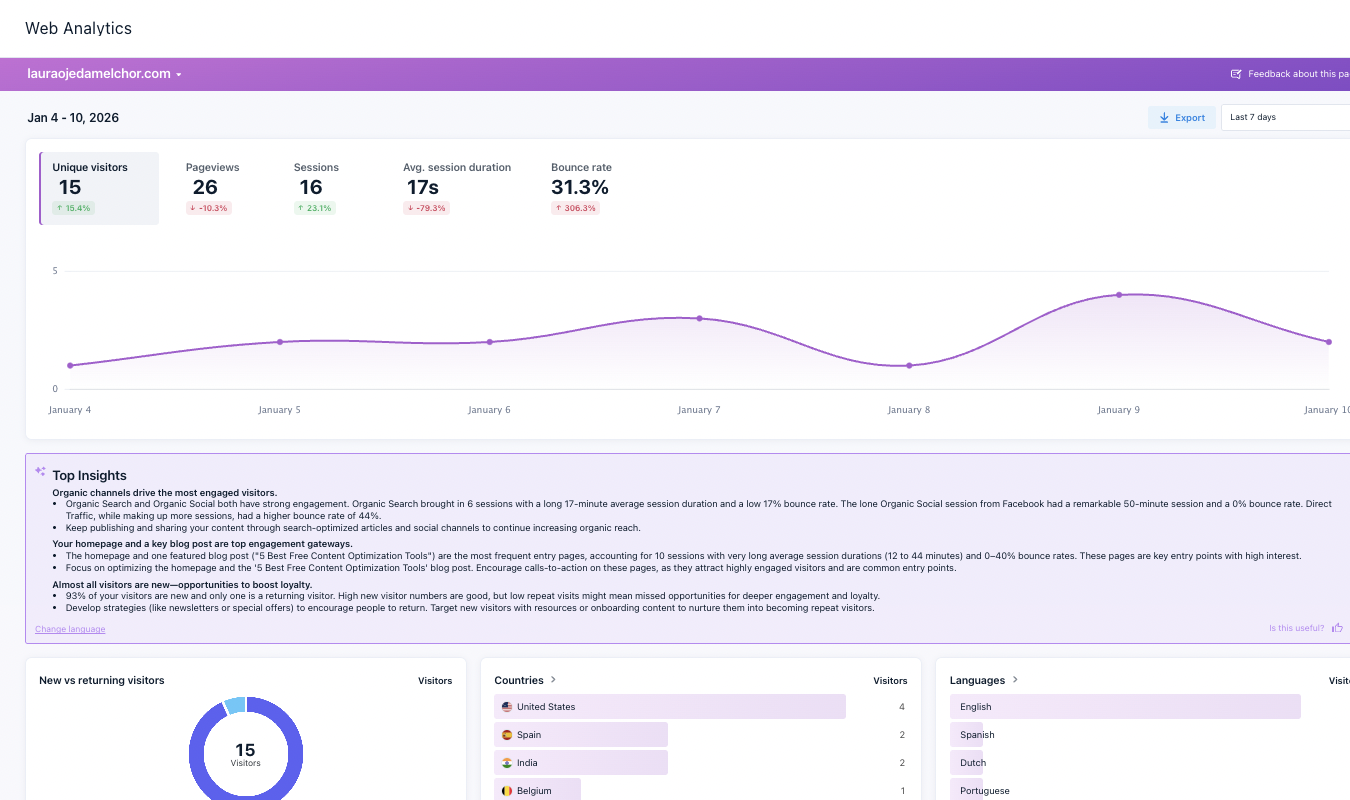
Web analytics tools like GA4 and Crazy Egg (pictured above) tell you about how many visitors come to your site and what they do once they get there.
From this data, you can build your sense of what people are most interested in, what engages them the most, and whether specific pages seem to be serving the intent of users that arrive.
Some useful questions to ask when looking at your web analytics?
- What are your most popular entry pages?
- What are your most common exit pages?
- Which pages have a lot of traffic, but don’t lead users further into your site?
- On which pages do users spend the most time?
- Which channels provide most of your traffic?
- How does traffic from different channels perform?
- Which pages have a relatively high bounce rate?
These signals can help you assess whether or not individual pages are helping users get what they need. By looking at which pages people arrive at first, where they spend the most time, and where they exit before making a decision, you can get a sense of what users are trying to do. For example, if you are getting a lot of traffic to a page, but it has a high bounce rate, your page is likely addressing the user intent, just not very well. This is an opportunity to revise the content and make it more helpful for the users who showed up.
4. On-Site Behavior
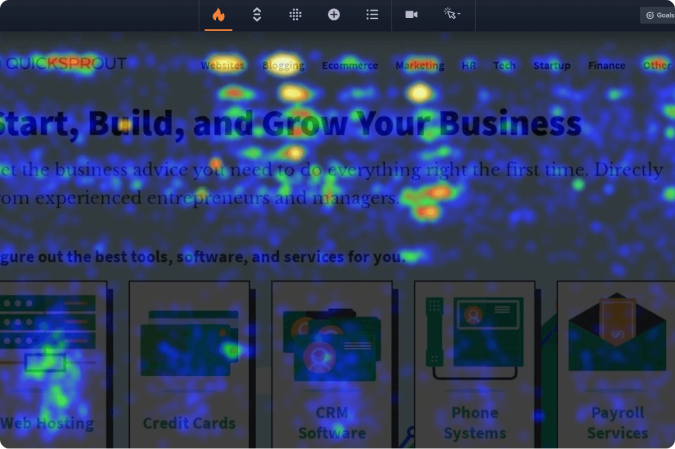
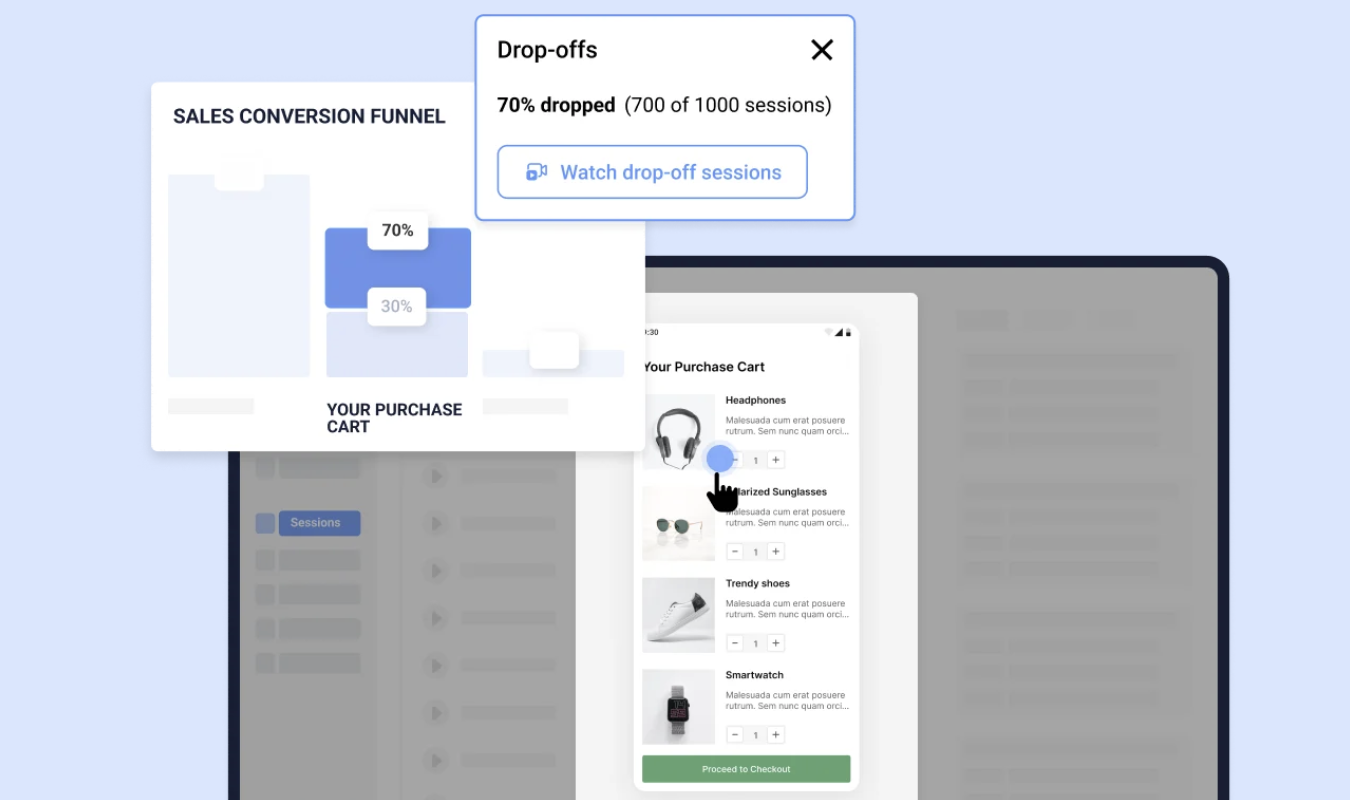
There are a variety of behavior analysis tools you can use to get a deeper sense of how users are exploring your site than you get with web analytics. Looking at this on-site behavior is useful for understanding user intent because you can see what people are trying to do, where your site enables them, and where it holds them back from making progress.
Here are a few of the most useful tools you can use and questions about user intent that they can help you answer:
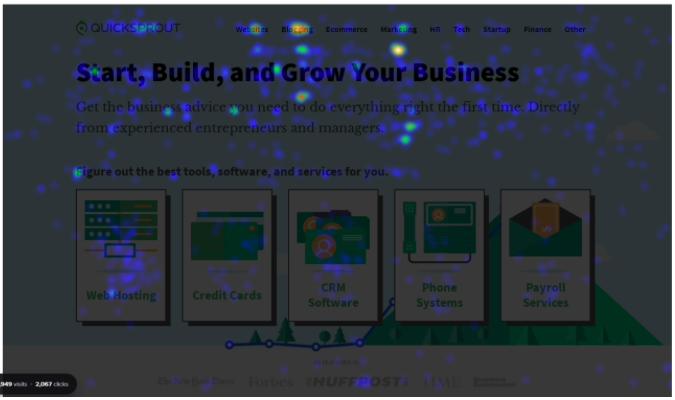
- Heatmaps: (pictured above): What are people most interested in? Where are the “dead zones” of no activity on the page? Are people engaging with our CTA buttons?
- Scrollmaps: How far down the page do most users scroll? Where is the highest intensity of attention on our page?
- Clickmaps: Are people clicking elements that don’t do anything? Do users from different channels click on different elements?
- Session recording: Where do users hesitate? Where do users seem to get confused?
- Errors tracking: Where do user interactions lead to Javascript errors? What can’t users do that they are trying to do?
The data you get from these tools can be extremely helpful in evaluating where your page design is well-aligned with user intent and where it is causing problems.
For example, if people are consistently scrolling past content you think is helpful, maybe it’s not. If they are clicking on an element that doesn’t do anything, you are probably not providing the next step that they expect.
5. Competitor analysis
Your closest competitors are trying to figure out how to appeal to a highly similar target market. By analyzing how they structure their pages, where they buy ads, and their campaign messaging, you can see what they believe users want.
Some simple questions you can ask:
- What problems and goals do they assume users have?
- What actions do they make the easiest to take?
- What do they assume users already know?
- What offers do they believe will entice new customers?
- What keywords do competitors target with ads or SEO content?
- Which of their pages get the most traffic?
Answering these questions reveal what your competitors believe about user intent. You shouldn’t copy what they are doing, but you can use this type of analysis to understand what competitors are doing well and to identify gaps in your own content.
6. Sales and support data
Your current customers were once strangers with doubts and objections. Sales conversions capture the moments where intent overcomes that hesitation. Support tickets capture moments where their intent has been frustrated.
Some simple questions you can ask:
- What triggered people to search for a solution in the first place?
- What problems do customers say they had before using your product?
- What are the most common objections people have?
- What are common misconceptions people have about your product?
- What information on your site was unclear?
Both sets of data can be valuable for understanding what potential users are trying to do, are likely to need, and how you can help them.
7. Surveys and interviews
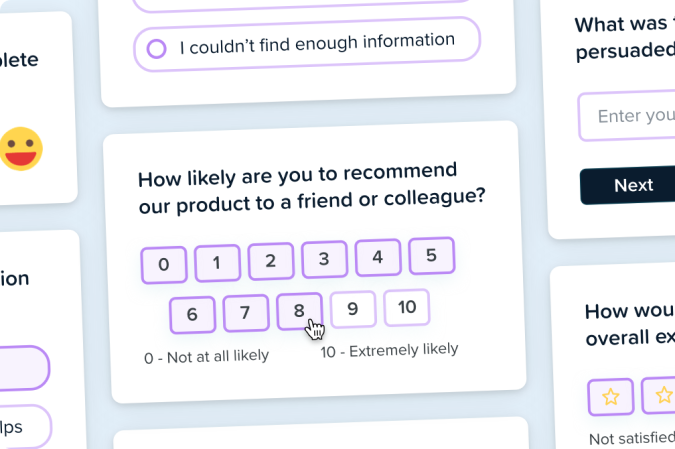
You can always ask users about their intentions. It’s really easy to add surveys to your website and start getting data on what people think, how they feel about your site, and how they feel it could be improved.
With a little effort, you can set up interviews with current customers or, better yet, prospective customers. The rich insights you can get from interviews are incredibly helpful for understanding user intent and refining the buyer persona you use for marketing.
Some useful popup survey questions that help uncover user intent are:
- What brought you to our site today?
- What are you hoping to find?
- Did you accomplish what you came here to do?
- What could we do to improve our site?
- How satisfied are you with your visit?
Some good interview questions for understanding user intent are:
- What are your top 3 priorities?
- What are your top 3 challenges?
- What triggered you to start looking for a solution?
- What happens if you don’t solve this challenge?
- What makes you hesitant about using a new solution?
There is no better way to investigate user intent than talking to users themselves. You won’t find this data anywhere else.
Be respectful about how you use surveys and exit intent popups. You don’t want to alienate potential customers by disrupting their experience. You also want to be careful in sourcing people from your target audience for interviews. Almost anyone is willing to talk, but only true potential buyers will give you useful insights.
Tips for Applying Insights About User Intent
We’ve covered what user intent is, how to think about it from a few different angles, and walked through the best places to find insights about it.
That’s great, but we’re still missing the final step where you take what you learned about user intent and translate it into changes that improve your site. Here are some tips to keep in mind as you start to make adjustments:
- Match page content to user intent. If people are seeking information, don’t try to sell them something. If people are looking to buy, don’t give them the history of the product. If your behavioral analytics indicate people ignore key parts of your page, adjust it until you find something they engage with.
- Address the main audience intent immediately. Give people what they came for without making them scroll down or hunt to find it. Whether it’s an answer to a question, steps to accomplish a task, or comparison content to help them decide, providing value as soon as possible will build trust with your audience and reduce the bounce rate.
- Use a clear, familiar page structure. Make it as easy as possible for people to accomplish their goals on your site. Avoid unfamiliar website navigation schemes, use conventional typography elements to guide visitors, and stick to page structures for blogs, guides, and pricing pages that people already understand.
- Align CTAs to funnel stages. Calls to action should fit with the likely next steps your user wants to take. If they are just learning about a new product category, they will be open to lead magnets like free guides, whereas users looking to compare or buy will be more open to bottom of the conversion funnel CTAs like “talk to sales.”
- Balance SEO and user experience (UX). Design your pages for human readers, not just search engines. Yes, you want to include keywords you discovered that speak to intent, but not at the expense of creating a helpful, people-first experience. Good UX is good for SEO.
- Track performance of intent-based revisions. Monitor your web analytics after making changes to ensure that you are seeing positive results. Monitor page rankings and consider A/B testing SEO performance, if possible.
- Create unique pages to meet specific user intents. Pick a primary keyword to build pages around, which avoids keyword cannibalization, and lets you tailor the entire page to help users with that specific query. Building clusters of related pages around target topics will help you serve individual intents better, and send a stronger signal to search engines that you have comprehensive, helpful content on the topic.
One last thing to keep in mind: user intent changes as new products enter the market and their options evolve. What makes your site valuable to users today might make it feel stale or useless next year.
Make it a point to routinely research user intent to ensure that your content continues to meet the needs and goals of users moving forward.