SeedProd is the tool people pick when they just need a landing page up today, not next week. The editor is easy, the pages load fast, and you do not have to change your whole site to use it. It slots right into any WordPress setup and lets you build clean, focused pages without getting stuck in a complicated builder.
Can it build the most beautiful site ever? No. But if you care about speed and results, it’s definitely worth checking out.
How Does SeedProd Compare to its Closest Competitors
SeedProd has competitors ranging from other WordPress page builders, like Elementor and Divi, and popular landing page builders like Leadpages. It occupies a practical middle ground: easier to set up and edit for marketers than the big-name WordPress builders, and much cheaper than dedicated landing page platforms.
Elementor is the WordPress page builder everyone knows. It’s got a generous free plan and a huge library of widgets, templates, animations, and add-ons.
You can do anything in Elementor without writing code, but the freedom comes at a cost: it’s really heavy. Unless you are disciplined about optimizing your site, Elementor pages are notorious for loading slowly. Beginners love the creative freedom, but they often create bloated pages that hurt user experience and SEO.
Divi is one of the best WordPress themes that’s packaged together with a world-class page builder. The learning curve is steeper than Elementor or SeedProd, but once you master the Divi way of doing things, it’s easy to create consistent, functional designs. For agencies, that’s appealing. You can create sites for clients quickly because the foundation never changes.
The tradeoff is lock-in. If you ever switch to another theme or turn Divi off, you have to rebuild everything from scratch. Yes, Divi has moved away from shortcodes, but your designs still depend on its ecosystem, so if you switch, you’ll still have a lot of rebuilding ahead of you.
Leadpages is a widely-used landing page builder that includes all the tools you need to build, audit, and improve your landing pages. It does not run on WordPress, so it’s not an apples-to-apples competitor with SeedProd, but it serves people who want to build high-performance landing pages.
The biggest tradeoff is cost. One month of Leadpages costs about as much as one year of SeedProd. What you get for the money are built-in analytics dashboards to understand your traffic and, on upgraded plans, tools like A/B testing to improve your landing pages.
At a high level:
- Choose SeedProd if you want simplicity and speed at a low price. Beginners can launch fast and effective landing pages on WordPress with ease.
- Go with Elementor if you care about maximizing design flexibility and don’t mind investing time in optimizing your site.
- Choose Divi if you want an all-in-one design system with coordinated, and you’re comfortable committing to their ecosystem over the long run.
- Choose Leadpages or another landing page builder if you are willing to build outside WordPress and need a dedicated landing page tool to create dozens or hundreds of landing pages.
SeedProd: The Good and The Bad
SeedProd is designed for people who need their WordPress site to generate leads and make sales without getting bogged down in endless customization options. It’s not trying to be the most powerful page builder with every possible feature.
Instead, SeedProd focuses on getting conversion-focused pages published quickly with clean, lightweight code to make your site as fast as possible. That approach has clear strengths, but it also means SeedProd makes specific tradeoffs compared to more feature-rich competitors.
What SeedProd Is Good At
AI website builder and content creation: You can prompt a full website into existence with a short prompt, or create content like headlines and placeholder text instantly. Like other AI website builders, we don’t think these tools fully replace the human touch, but they are a serious time-saver. Spin up something workable in seconds, then polish your landing page copy.

Beginner-friendly drag-and-drop builder: People who are new to WordPress often struggle with page builders that try to offer everything to everyone. SeedProd avoids that by keeping its interface simple. You place a block, edit the text, adjust a few settings, and the page takes shape. Marketers with zero design skills can build without reading documentation or watching tutorials. Clients can usually make simple edits on their own.
Prebuilt blocks and sections: SeedProd includes modular sections such as image/video carousels, hero areas, FAQs, and pricing tables. Instead of starting from scratch, you can drop in a complete layout and adjust the content. This helps beginners create pages with interactive content that drives conversions and looks phenomenal. No design or coding skills required.
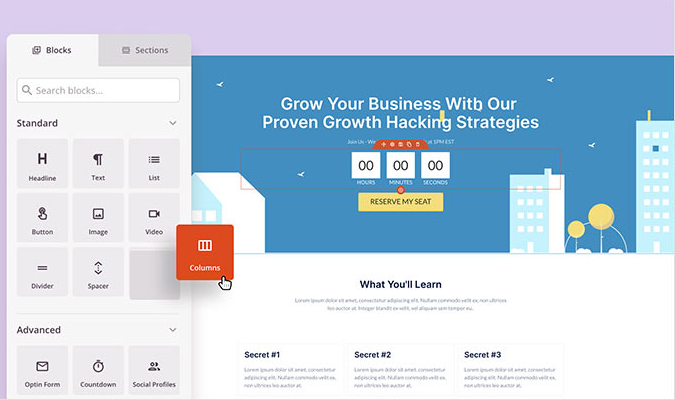
Fast-loading pages by default: Many page builders load large CSS files and multiple scripts that slow down page speed (Elementor is notorious for this). SeedProd keeps its code simple, so pages stay small and quick to load. This helps beginners avoid the sluggish pages and high bounce rates that come with the heavier design tools.

Tools for landing page design: SeedProd focuses on the types of pages marketers build most: lead magnets, registration pages, and simple sales pages. Instead of offering endless widgets, it gives you a tight set of practical blocks that support clear calls to action. This makes it easier for non-designers to create high-converting landing pages.

Built-in theme builder: Users who want more control over their site can build custom headers, edit the footer, or create blog templates without code. The tool keeps these features approachable, so even beginners can replace parts of their theme without worrying about breaking the site.

No theme conflicts: A SeedProd landing page works on its own and does not depend on your current WordPress theme, so you can keep the rest of your site exactly as it is while creating new pages with SeedProd’s builder. This is different from Divi and Elementor, which typically expect you to use their preferred theme for consistent results.
WooCommerce integration: For store owners, SeedProd offers basic ecommerce blocks like product grids and add-to-cart buttons. These tools make it easy to build landing pages for promotions or seasonal offers without editing your main storefront. Bear in mind this is only offered on Elite tier plans.
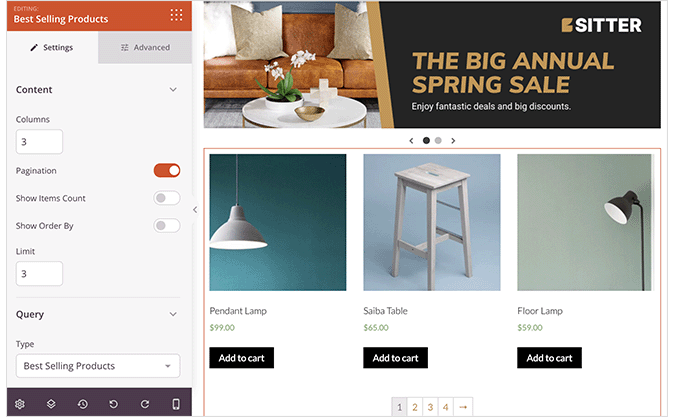
Built-in form builder: SeedProd includes a simple form builder for contact forms, opt-in popups, and registration. You do not need a separate plugin like WPForms or Gravity Forms for basic forms. This reduces complexity and plugins, which keeps your site fast and resilient.
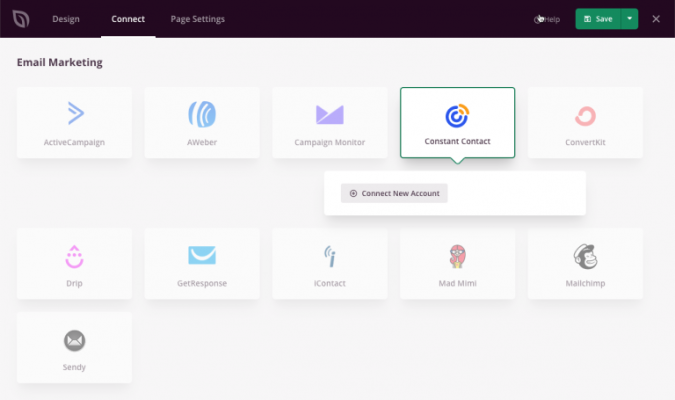
Email marketing integrations: SeedProd integrates natively with major email marketing services such as Mailchimp, ActiveCampaign, ConvertKit, Constant Contact, Drip, and others. Users can connect a form to an email list without writing code or adding extra plugins.
Reusable global blocks: You can create a block once and reuse it across multiple pages. When you update the block, every instance updates automatically. This is useful for global disclaimers, banners, or well-designed CTAs you want to feature on multiple pages.
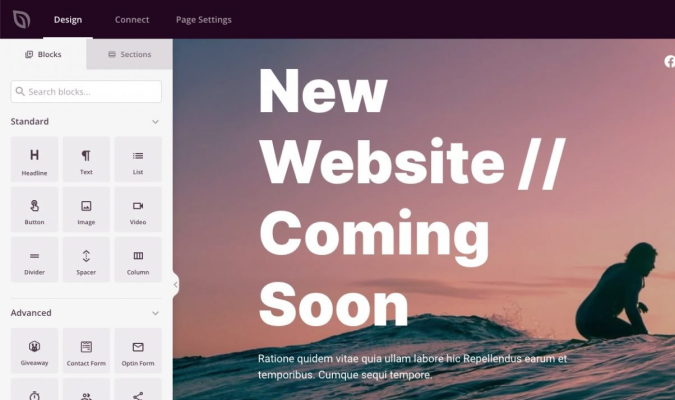
Maintenance and Coming Soon modes: Many users start with SeedProd because they need to hide a site while they build it. The Coming Soon and Maintenance modes are easy to set up and give you a clean placeholder where you can collect emails or share updates. This functionality is where SeedProd got its start, and it is still one of their strongest features.
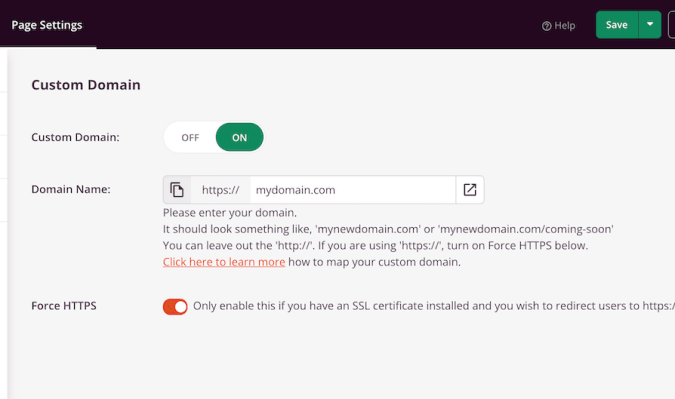
Domain mapping for landing pages: SeedProd lets you assign individual landing pages to separate domains or subdomains. Marketers who run multiple campaigns can publish standalone pages without setting up new sites. It is a useful way to manage promotions when you are not ready to create a full microsite.
Potential SeedProd Drawbacks
Less advanced design options: SeedProd does not offer the deep styling controls and animations that page builders like Elementor and Divi have, or as many options to create unique layouts. You can build clean pages, but this probably isn’t the builder for people who want a showstopping website experience.
Smaller widget and block library: Compared to larger builders with hundreds of widgets, SeedProd has a more limited set. This keeps things simple, but it also means you may need extra plugins for features that other popular builders include by default.
The theme builder is limited: You can customize headers, footers, archives, and single templates, but the controls are not as deep as what you find in premium theme frameworks or full-featured builders. If you want precise control over every structural element, you may need to supplement it with additional tools.
No native funnel analytics: If you are looking at using SeedProd or a landing page builder, just be aware that you are going to have to integrate GA4, Crazy Egg, or another web analytics tool to track your conversion funnel. The same is true of every WordPress page builder, but the standalone landing page builders include funnel analytics that make it easy to track conversions in a clear dashboard.
SeedProd Pricing, Plans, and Add-Ons
At a glance, SeedProd is budget-friendly compared to other WordPress page builders with similar firepower. There is a free forever version, SeedProd Lite, and four paid pricing tiers: Basic, Plus, Pro, and Elite.
SeedProd Lite
The free version, SeedProd Lite, includes their drag-and-drop page builder along with a handful of landing page templates. You can use live previews, version control, and it works with any WordPress theme. You will be able to:
- Enable coming soon and maintenance mode pages
- Create a variety of landing pages, like sales, squeeze, webinar, and thank you pages
- Use blocks like headlines, images, buttons, videos, contact forms, and more
- Create responsive pages that adapt to different screen sizes
SeedProd Lite is enough to get a feel for the page builder without pulling out your credit card, though you won’t get the best templates, features, and integrations.
Premium SeedProd plans
Upgrading your SeedProd account gives you access to premium features. There are four tiers available. For each tier, we have listed the promotional pricing and included the standard pricing in parenthesis.
The Basic plan runs $39.50 per year (normally $79) and works on one site. You get 50+ premium templates and 90+ blocks, which include countdown timers, opt-in forms, hotspots, galleries, price lists, star ratings, and more.
This works if you just need good landing pages and aren’t planning to build custom themes. In other words, if you want to add solid landing pages to an otherwise healthy site, the Basic plan is all you need.
The Plus plan costs $99.50 per year (normally $199) for up to three sites. This includes 100 page templates, access to 2 million optimized stock photos, and integrations with 13 popular email marketing services like Constant Contact, Drip, Mailchimp, ActiveCapaign, and Kit.
You also get the theme builder and over 100 section templates for FAQs, CTAs, heros, headers, and footers. If you’re running a business blog or building a few client sites, the Plus tier makes sense. The section templates and theme builder make it possible to experiment with different layouts.
The Pro plan is $199.50 per year (normally $399) and works for up to five sites. You get 300+ premium templates, dynamic text personalization, and Zapier integration, which allows you to automate and connect lead capture with a much wider range of services.
For freelancers or small agencies managing a handful of sites, this is a good option, which includes priority support.
The Elite plan runs $239.60 per year (normally $599) and supports up to 100 sites. This is the only tier with WooCommerce support, which includes ecommerce specific blocks like product grids, carts, and checkouts. You also get domain mapping, so you can point different domains to specific landing pages.
This is built for agencies cranking out client sites or businesses running tons of campaigns. It’s also the only SeedProd plan that is going to work with WooCommerce, the most popular ecommerce plugin for WordPress.
Is SeedProd Right for You?
SeedProd makes sense if you’ve ever felt paralyzed by too many options in a WordPress page builder. It’s deliberately limited in the right ways if you are focused on generating leads and sales with landing pages. You get templates designed for conversion, an intuitive page builder, and code that loads fast by default.
The people who love it are usually running small businesses or building client sites. They need pages that work, not pages that showcase every possible design technique. They’d rather spend time on their business than learning advanced page builder features they’ll never use.
You should look elsewhere if you’re optimizing for creative control, or want something that tracks leads through an ecommerce funnel out of the box.
For the design-minded who want to stay within WordPress, Elementor and Divi represent two very different ways to build impressive landing pages with jaw-dropping features.
For those looking to build and optimize landing pages that can track multiple funnels, we’d recommend a landing page builder like Leadpages or Unbounce.
You won’t be able to keep everything on WordPress, but standalone landing page builders include everything you need to launch, test, and connect your landing pages to your CRM software. In other words, centralizing your lead and revenue data is no problem.But if speed and simplicity matter more than infinite flexibility, SeedProd is a tool that marketers (and their clients) will adore. And you can always add a tool like Crazy Egg to your SeedProd site to get the web analytics and optimization tools that come with landing page builders.