Wondering why you’d choose managed WordPress hosting over basic shared hosting?
Here’s the short answer.
Managed WordPress hosting is purpose-built for WordPress. Every layer—from server configuration to security policies—is tuned for the CMS you already use.
Yes, resources may still be shared under the hood like traditional shared hosting. The difference is the environment.
Here’s what that means in practice.
When every site on a server runs WordPress, your host can focus its engineering, caching, and security around one platform instead of many. That focus translates into tangible wins for you.
You get a hardened stack, consistent performance, and less maintenance work—usually with automatic core updates, backups, staging tools, and WordPress-specific support.
And because the support teams live and breathe WordPress, they recognize issues fast and know the fixes. Odds are they’ve solved your exact problem before.
If you care about reliability when you’re building your online presence, this kind of certainty is hard to beat.
Performance is also on a different level than most entry-level shared plans.
Sure, shared hosting is cheap. But what are you trading away for that savings?
If you’re launching your very first site, shared hosting can be fine. It’s a budget-friendly starting line.
But once you’re committed to WordPress and want to grow, managed WordPress hosting is the upgrade that removes bottlenecks and busywork.
Below, we’ll dig into the top providers so you can choose the best fit at the right price.
The 6 Best Managed WordPress Hosting Providers in 2026
- WP Engine – Best for most
- Flywheel – Best for running an agency specializing in WordPress
- DreamHost – The best performance under $20/month
- Nexcess – Best for hosting high-traffic sites
- SiteGround – Best for juggling multiple content management systems
- Bluehost – Easiest built-in WordPress site builder
Managed WordPress Hosting Reviews
WP Engine — The Best for Most
WP Engine scales from a single site to full agency workloads, with ecommerce-specific options if your store is the priority.
You get excellent reliability and expert support plus a feature set that feels seamless compared to DIY shared hosting.
It’s as easy to operate as shared hosting—just noticeably faster and sturdier.
- Site speed: 4/5
- Uptime & reliability: 5/5
- Workflow management: 4.5/5
- Customer support: 4/5
- Pricing: 1/5
Site Speed: 4/5 – WP Engine runs on a premium cloud stack with EverCache, CDN integration, and a platform tuned specifically for WordPress. It remains one of the fastest managed WordPress options on the market.
Uptime & Reliability: 5/5 – WP Engine continues to deliver excellent uptime for production sites. Managed updates, daily backups, proactive security, and a hardened platform all help keep sites available when traffic spikes.
Workflow Management: 4.5/5 – Smart Plugin Manager is still available for automated plugin and theme updates with visual checks and rollback protection. Add staging, local development tools, automated migration, and polished account controls, and the day-to-day workflow stays smooth.
Access to the Genesis framework and StudioPress themes is still a nice bonus for WordPress users who want extra design flexibility.
Customer Support: 4/5 – Support is available 24/7, and the WordPress expertise is still one of WP Engine’s strengths. Lower-tier plans lean more heavily on chat, while higher tiers get both chat and phone support.
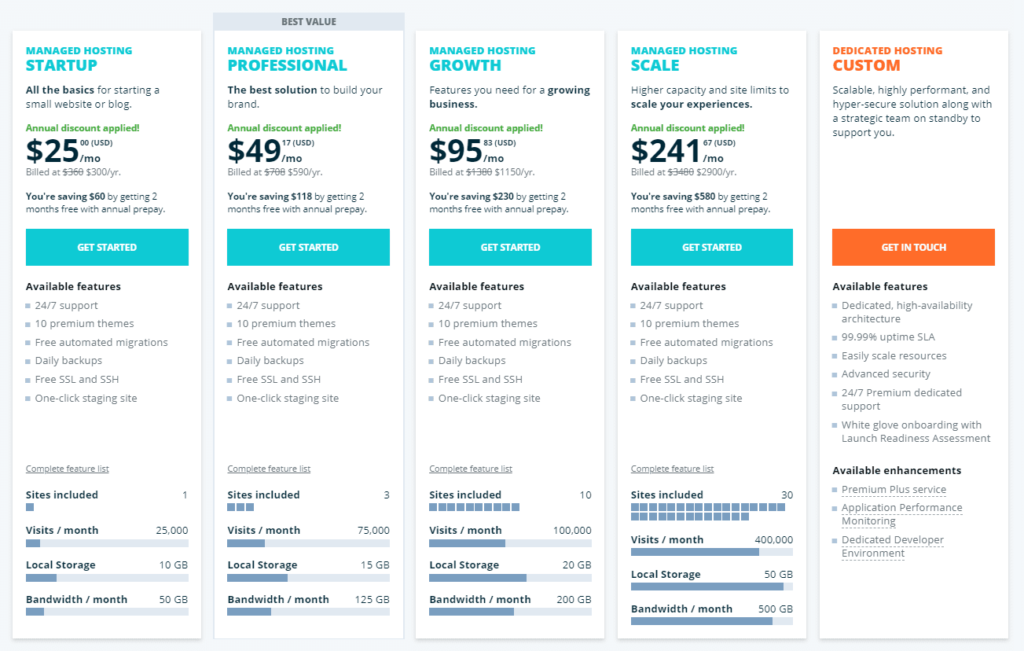
Pricing: 1/5 – Entry plans now start around $30 per month, with premium pricing across the lineup. You’re paying for the platform quality and tooling, not bargain-basement hosting.
For most businesses, the time saved and stack quality justify the spend. If you value robust tooling, security, and near-perfect uptime, WP Engine delivers.
Flywheel — The Best for Running an Agency Specializing in WordPress
Flywheel stands out for collaboration. If you’re wrangling client sites without a clean workflow, Flywheel’s tooling removes the friction without adding complexity.
We’ll unpack the team features shortly. First, the high-level scores.
- Site speed: 3/5
- Uptime & reliability: 5/5
- Workflow management: 4/5
- Customer support: 3/5
- Pricing: 1/5
Site Speed: 3/5 – Powered by Google Cloud and built for WordPress, Flywheel keeps sites fast and stable for most business and client workloads.
Uptime & Reliability: 5/5 – Flywheel continues to post excellent uptime with a managed platform designed to reduce routine maintenance headaches.
Workflow Management: 4/5 – Agency-friendly by design. Billing transfer, collaborators, staging, blueprints, demo sites, and Growth Suite tools make it easy to build and hand off WordPress sites for clients. Managed plugin updates are still available, but they aren’t the core draw here.
Customer Support: 3/5 – Support is available 24/7, primarily through chat and help docs. It’s generally responsive, though it doesn’t feel as full-service as some premium competitors.
Pricing: 1/5 – Plans still start at $25/month, and additional sites or add-ons can push your total higher in a hurry.
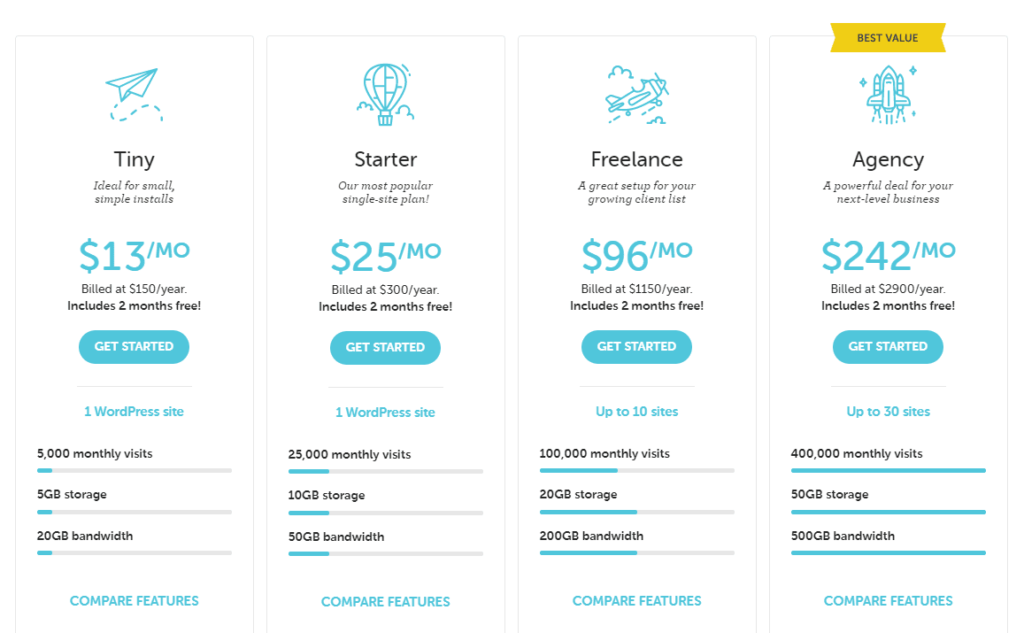
If agency workflows matter most, Flywheel is a strong pick.
DreamHost — The Best Performance Under $20/Month
DreamHost still offers one of the least-expensive on-ramps to managed WordPress, with monthly billing available so you’re not locked into a big upfront payment.
It pairs standout speed and uptime with a simpler toolset than higher-priced competitors, but its managed features are more complete than they used to be thanks to integrated CDN, staging, and backup tools.
Here’s the breakdown:
- Site speed: 5/5
- Uptime & reliability: 5/5
- Workflow management: 2/5
- Customer support: 3/5
- Pricing: 4/5
Site Speed: 5/5 – DreamPress sites continue to perform extremely well for the price thanks to NVMe storage, a tuned WordPress stack, and bundled CDN features.
Uptime & Reliability: 5/5 – Automatic backups, restore options, staging, and a managed environment all help keep sites online and easy to recover.
Workflow Management: 2/5 – You get the essentials—staging, CDN, migrations, and backups—but not the deep agency tooling, white-label controls, or advanced collaboration features you’ll find on pricier platforms.
Customer Support: 3/5 – Support is available around the clock and is generally solid, though advanced WordPress troubleshooting isn’t always as fast or specialized as the top premium hosts.
Pricing: 4/5 – DreamPress 1 starts at $14.99/month on intro pricing and renews at $19.99/month, which keeps it below most other fully managed options while still including a strong set of core features.
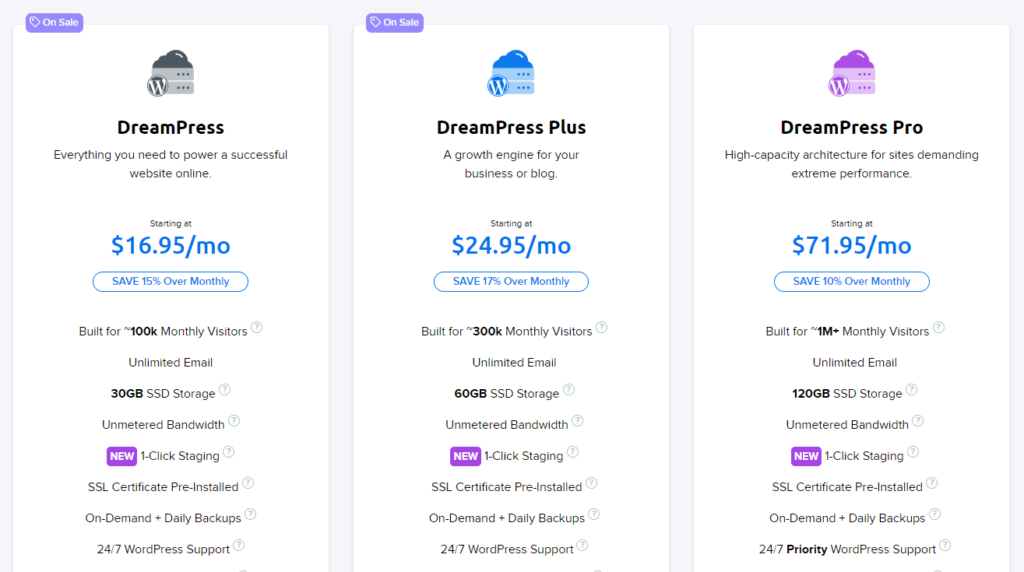
For strong single-site performance on a budget, DreamHost is hard to beat.
Nexcess — The Best for Hosting High-Traffic Websites
Nexcess, under the Liquid Web umbrella, still packs generous resources and workflow-friendly features for serious WordPress sites.
You won’t find Flywheel-style client billing baked into every plan, but the included scaling and maintenance tools remain strong.
Scorecard:
- Site speed: 3/5
- Uptime & reliability: 5/5
- Workflow management: 4/5
- Customer support: 4/5
- Pricing: 4/5
Site Speed: 3/5 – Performance is solid and consistent, especially once its built-in optimization features are in play. It may not always feel as instantly quick as the most performance-obsessed premium hosts, but it’s absolutely capable for busy sites.
Uptime & Reliability: 5/5 – Daily backups, free staging, autoscaling, and a platform designed for demanding WordPress workloads help keep sites online during traffic spikes.
Workflow Management: 4/5 – Automatic plugin updates, visual compare, performance tools, staging, and autoscaling are all part of the appeal here. It’s a smart choice if you want more built-in management than a typical budget host offers.
Customer Support: 4/5 – 24/7 support remains available, and the platform is backed by a team with real managed hosting experience.
Pricing: 4/5 – Nexcess frequently runs aggressive intro pricing, but standard rates land higher than the promo headline suggests. Even so, the included managed features make it competitive for higher-demand WordPress sites.
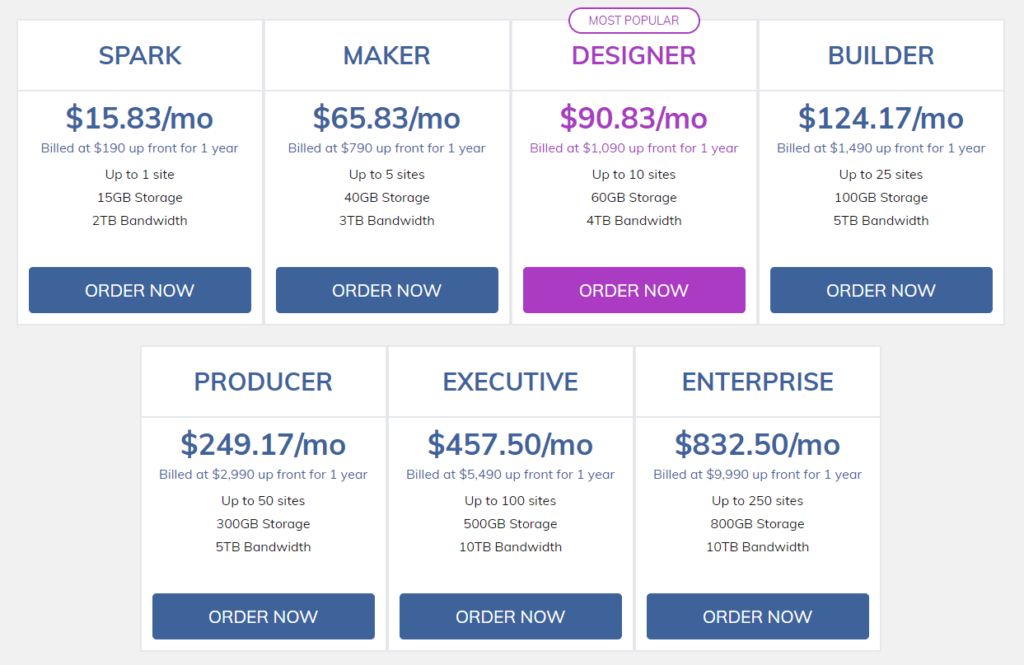
For high-traffic sites without agency billing needs, Nexcess is a strong option.
SiteGround — The Best for Juggling Multiple Content Management Systems
SiteGround makes managed WordPress simple, and it also supports other CMSs from the same broader hosting environment.
If you work across WordPress and other popular website platforms, that flexibility is still a real advantage.
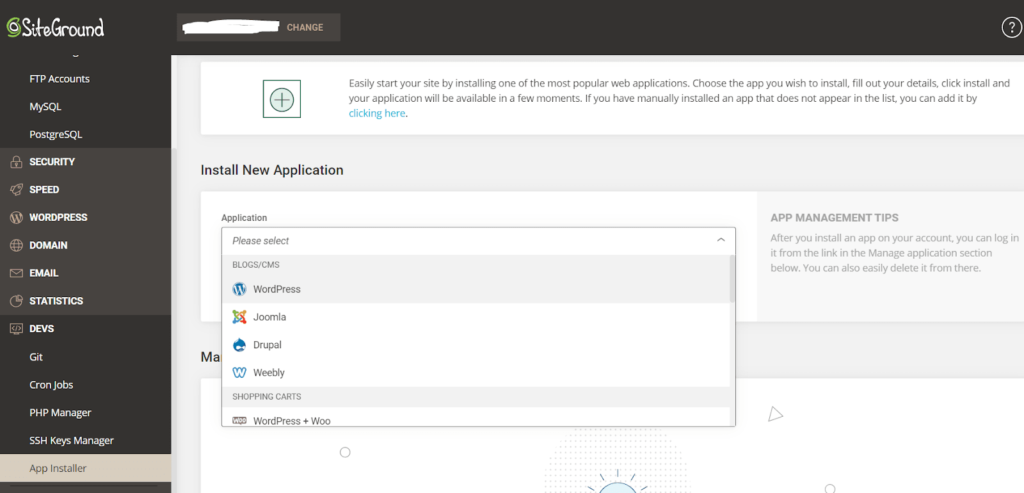
Performance and interface polish are strong; the workflow toolkit is more basic.
Here’s how it scored:
- Site speed: 3/5
- Uptime & reliability: 5/5
- Workflow management: 2/5
- Customer support: 4/5
- Pricing: 2/5
Site Speed: 3/5 – SiteGround’s managed WordPress setup delivers strong real-world performance thanks to its caching layers, CDN options, and in-house WordPress optimization tools.
Uptime & Reliability: 5/5 – 24/7 monitoring, daily backups, and account isolation help keep sites stable.
Workflow Management: 2/5 – The core WordPress features are there—autoupdates, backups, security tools, staging on qualifying plans, plus developer tools like Git on higher tiers—but it’s not as agency-centric as Flywheel or WP Engine.
Customer Support: 4/5 – Support remains fast and knowledgeable once you reach a human.
Pricing: 2/5 – Intro rates look low, but renewals climb sharply depending on the tier you choose. If you need strong WordPress hosting plus flexibility beyond WordPress, the premium can still make sense.
Bluehost — The Easiest Built-In WordPress Site Builder
Think you’re “not a designer”? Bluehost’s integrated WonderSuite/AI tools make it simple to launch a polished WordPress site without hiring out.
Spin up pages in minutes, then refine as you go.
Overall scores:
- Site speed: 4/5
- Uptime & reliability: 4/5
- Workflow management: 2/5
- Customer support: 3/5
- Pricing: 4/5
Site Speed: 4/5 – Bluehost’s current WordPress stack with NVMe storage, caching, and CDN integration is much faster than old-school budget hosting used to be.
Uptime & Reliability: 4/5 – Bluehost advertises strong uptime and backs its WordPress hosting with a more polished platform than it had a few years ago.
Workflow Management: 2/5 – You get automatic WordPress updates, security tooling, staging, and backup options, but not the deep plugin-by-plugin controls or client portals the premium hosts offer.
Customer Support: 3/5 – 24/7 chat and phone remain available, though quality can vary by rep.
Pricing: 4/5 – Entry pricing is still very competitive—especially on longer terms—and includes the beginner-friendly builder experience that makes Bluehost attractive to first-time site owners.
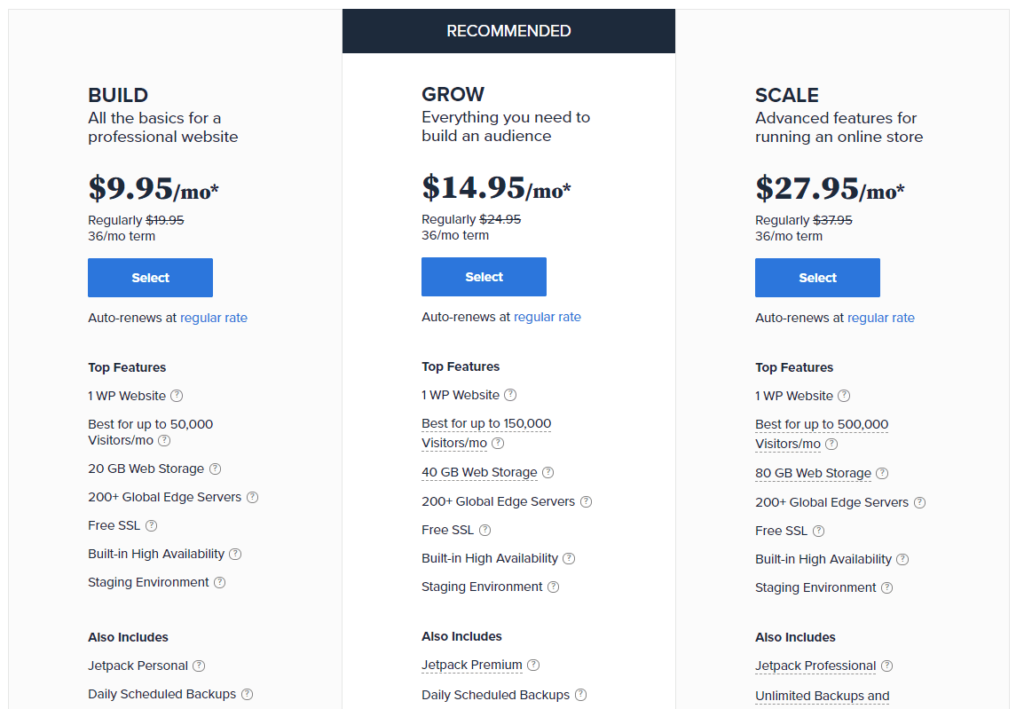
If you want the easiest path to a decent-looking site and strong speed for the price, Bluehost is a straightforward choice.
Methodology for Choosing the Best Managed WordPress Hosting
To save you time, we compared each provider’s onboarding, performance features, support access, and day-to-day management tools. We scored what matters most so you can decide confidently.
Here’s our weighted rubric:
- Site Speed (30%)
- Uptime & Reliability (30%)
- Workflow Management (20%)
- Customer Support (15%)
- Pricing (5%)
Performance carries the most weight because fast, reliable sites win visitors and rankings. Workflow management covers security, plugin updates, client tooling, and developer conveniences. Support and price still matter, just less than speed and uptime at this tier.
Full-Throttle Speed That Search Engines Can’t Ignore (30%)
Managed stacks cut load times by optimizing caching, PHP workers, databases, and CDNs specifically for WordPress.
When comparing hosts, look closely at how much performance tuning is included out of the box and how much manual optimization you’ll still need to handle yourself.
- 5 points for top-tier managed performance
- 4 points for consistently fast performance
- 3 points for solid everyday speed
- 2 points for acceptable but unremarkable speed
- 1 point for clearly lagging behind the pack
Keep speed top-of-mind. It influences everything from bounce rates to revenue.
Unflagging Site Reliability (30%)
Speed is meaningless if your site isn’t reachable. Backups, monitoring, security hardening, and platform stability all matter here.
Scoring is straightforward:
- 5 points for excellent reliability and recovery features
- 4 points for strong reliability with minor tradeoffs
- 3 points for dependable baseline performance
- 2 points for noticeable weak spots
- 1 point for too many compromises
The best managed WordPress hosts remove as much operational risk as possible.
Powerful Tools and Workflow on Autopilot (20%)
We award one point for each of these five feature sets present on a plan:
- Malware detection & removal: Automatic scanning and cleanup to keep your site healthy.
- Advanced performance monitoring: Visibility into load times, requests, and bottlenecks without extra plugins.
- Advanced plugin management: Safe, scheduled updates with rollbacks and visual regression tests.
- Client management features: Invite-only access, billing transfer, white-label portals and reporting.
- Developer & designer tools: Staging, cloning, Git/SSH/SFTP, and smooth site handoffs.
Use this checklist to match plans to your actual workflow needs, not just headline specs.
Don’t Waste Time With Underperforming Support (15%)
Managed hosting reduces the need for support—but when you do need help, speed and quality matter. We scored each provider across:
- Easy access to live help
- Fast initial response times
- Useful troubleshooting from WordPress-aware reps
- 24/7 availability where advertised
- Phone support where it meaningfully improves the experience
No one scored perfectly, but several were consistently fast and accurate.
What Does ‘Managed’ Add to the Price Tag? (5%)
At this tier, most buyers will pay more for stability, speed, and less maintenance. Even so, you should understand intro rates, renewal pricing, and what features are actually included.
Our pricing scale:
- 5 points for standout value in the managed category
- 4 points for strong value
- 3 points for fair pricing
- 2 points for expensive but justifiable pricing
- 1 point for clearly premium pricing
Managed WordPress hosting isn’t cheap—but the better platforms can absolutely earn their keep.
Summary
Managed WordPress hosting comes in many flavors, from budget-friendly performers to full agency platforms. Match the stack to your priorities—performance, tools, collaboration, or price—and you’ll feel the difference fast.
- WP Engine – Best for most
- Flywheel – Best for running an agency specializing in WordPress
- DreamHost – The best performance under $20/month
- Nexcess – Best for hosting high-traffic sites
- SiteGround – Best for juggling multiple content management systems
- Bluehost – Easiest built-in WordPress site builder
Our top pick for most users is WP Engine—a polished, WordPress-first platform with excellent tooling, stability, and support.
Need strong performance for less? DreamHost remains one of the better value plays in managed WordPress hosting, though it’s lighter on advanced management features.
Bookmark this guide and return when you’re ready to pick the plan that fits how you actually build, launch, and grow WordPress sites.