The best AI design tools are rarely the ones with the flashiest demos.
We reviewed 146 AI design tools across 32 real-world graphic and web design tasks to see which ones actually help with the work that follows the first prompt.
These tools are not ranked from best to worst. Each one earns its place for a different kind of work, from mockups and campaign visuals to product UI, brand production, and creative iteration.
The reviews below cover who each tool is for, what it does well, and where it belongs in your design stack.
1. ChatGPT — Best AI Design Copilot for Visual Ideation and Creative Iteration
ChatGPT is the most useful AI design tool when the brief is still taking shape. It can help turn a rough idea into a clearer creative direction, develop prompts, critique reference material, generate or refine imagery, and explain what is working or missing in a design.
That makes it a strong starting point for marketers, founders, designers, and small teams that need a thinking partner before they need a finished production file.
It also fits naturally alongside the bigger design suites.
Use ChatGPT to explore concepts, create visual references, write or tighten creative copy, and generate an initial mockup; then move the selected direction into Canva, Figma, Adobe, or another specialist tool for refinement and delivery.
Its results in our testing support that all-rounder role.
For instance, it produced the strongest product-mockup result in our review, scoring 96/100.

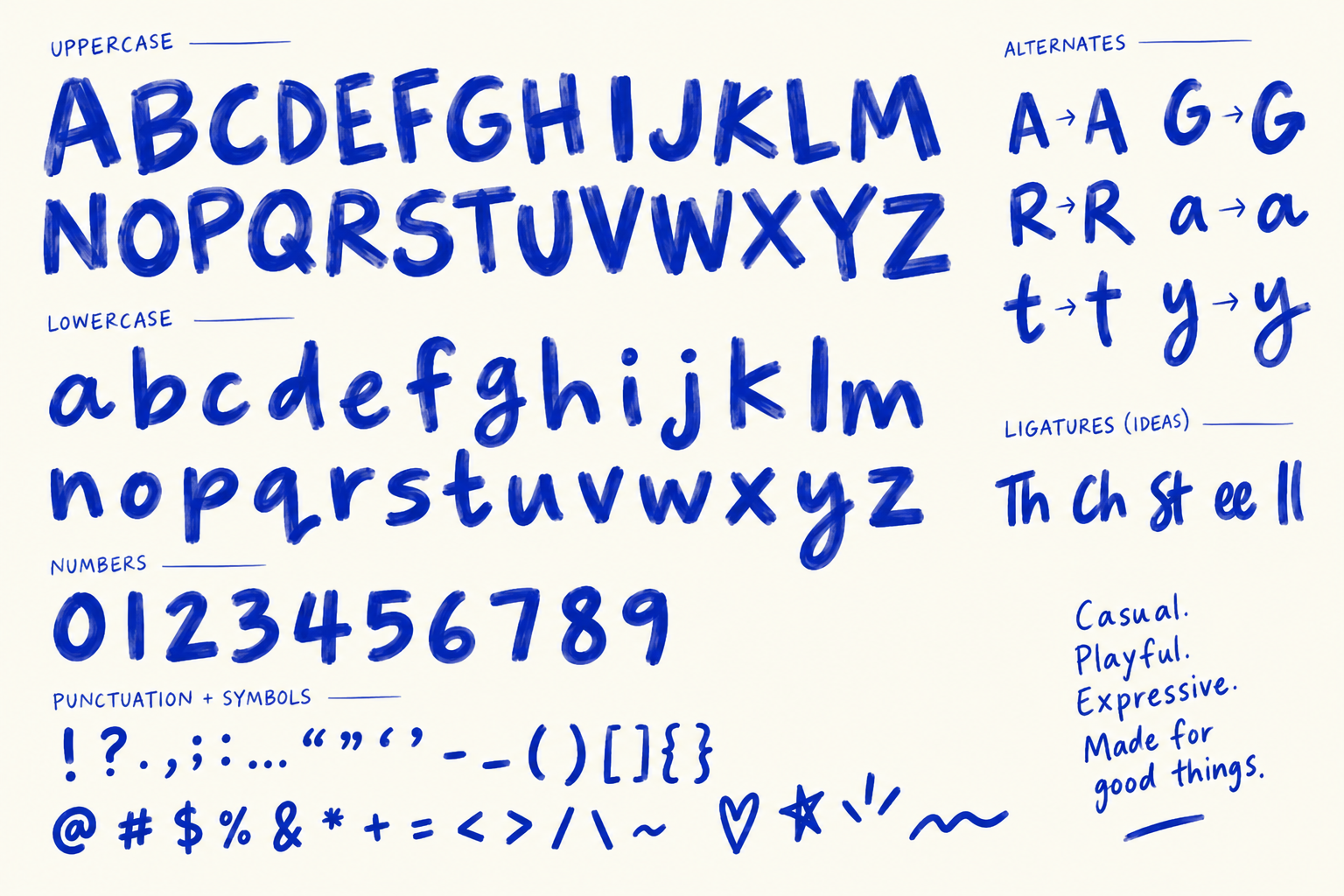
It was also especially strong at structured UI: its landing page, pricing page, ecommerce product page, mobile app screen, and multi-screen user flow each scored 100/100. And, it surprised us with the best generated typeface.
The caveat is that polished outputs can still contain small copy, layout, or specification errors, so it works best with a human reviewing against the original brief.
- Best for: Ideation, creative critique, image generation, mockups, and early visual directions
- Best fit: Marketers, founders, creative teams, and designers working across several formats
- Why it earns a place in your stack: It combines brief development, visual exploration, image generation, critique, and iteration in one conversational workflow. In our review, it was especially strong for structured UI, product mockups, campaign design, and art direction.
- Watch out for: Treat outputs as strong first drafts, not final source files or production-ready design systems. Review copy, layout, specifications, and delivery requirements against the original brief.
2. Claude — Best for Design Systems, Briefs, and Editable Prototypes
Claude is most useful when a design challenge needs structure before it needs polish. With it, you can easily:
- Turn a detailed brief into a clear visual system
- Outline a user flow
- Shape a presentation
- Organise a content-heavy document
- Build an interactive concept that a team can refine
That makes it a practical option for people who need to move from idea to an organized first draft without starting from a blank canvas.
A useful difference in this test was that Claude’s design outputs were created as editable artboards made up of individual elements, rather than static images.
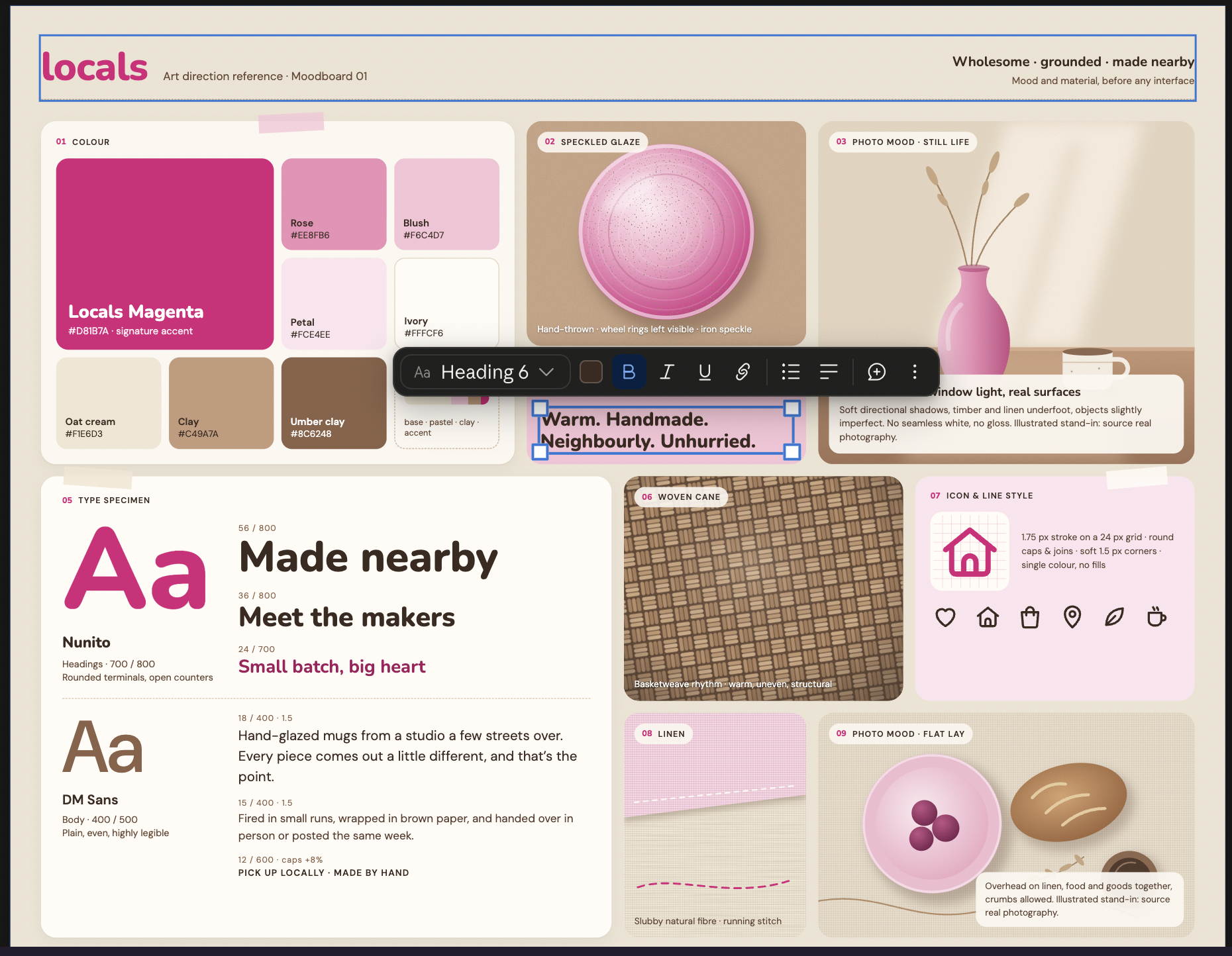
That gives non-designers more room to adjust copy, spacing, colour, and layout after generation. Its specialist tools, including Claude Design System and Claude Slides, also make it more than a general chat assistant.
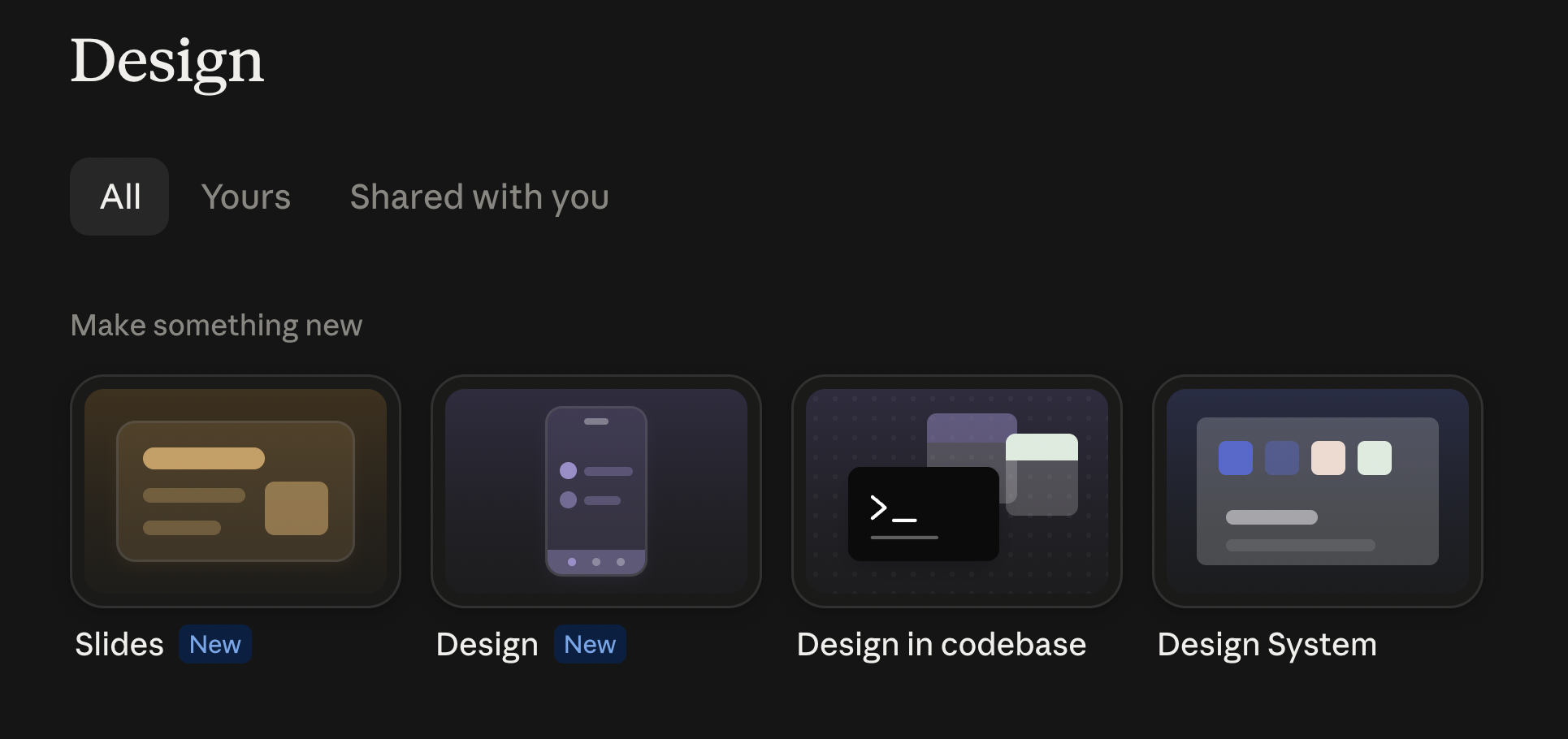
Claude was at its best when the brief called for a structured system. In our review, its visual identity, style guide, dashboard, and vector-icon outputs each scored 100/100.
It was less convincing when the work depended on rich photography or expressive campaign visuals. For example, its slide deck design had strong structure and narrative flow, but its simplified fish illustrations felt basic compared to ChatGPT’s more image-led interpretation.
Claude slide deck:
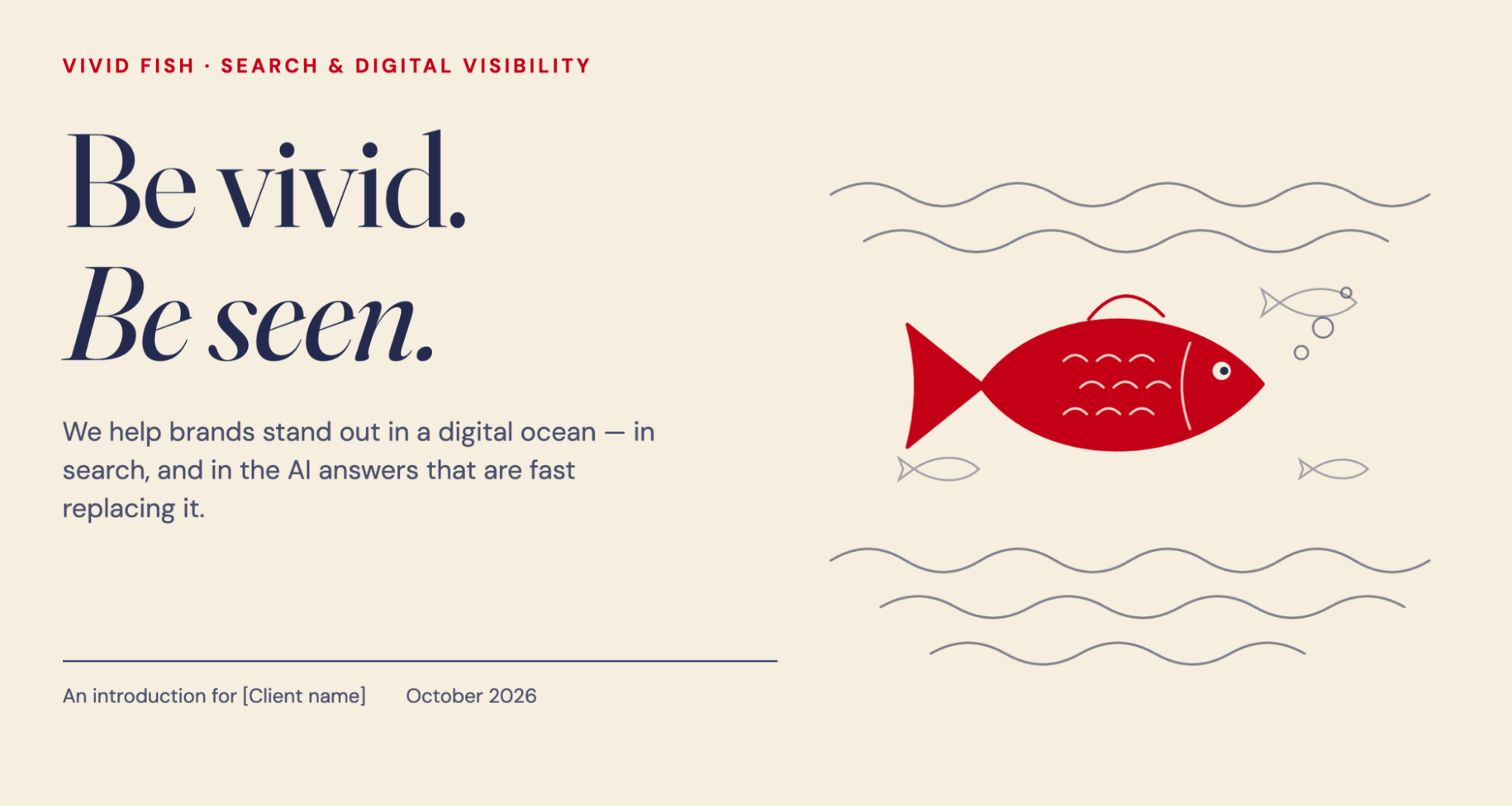
ChatGPT slide deck:
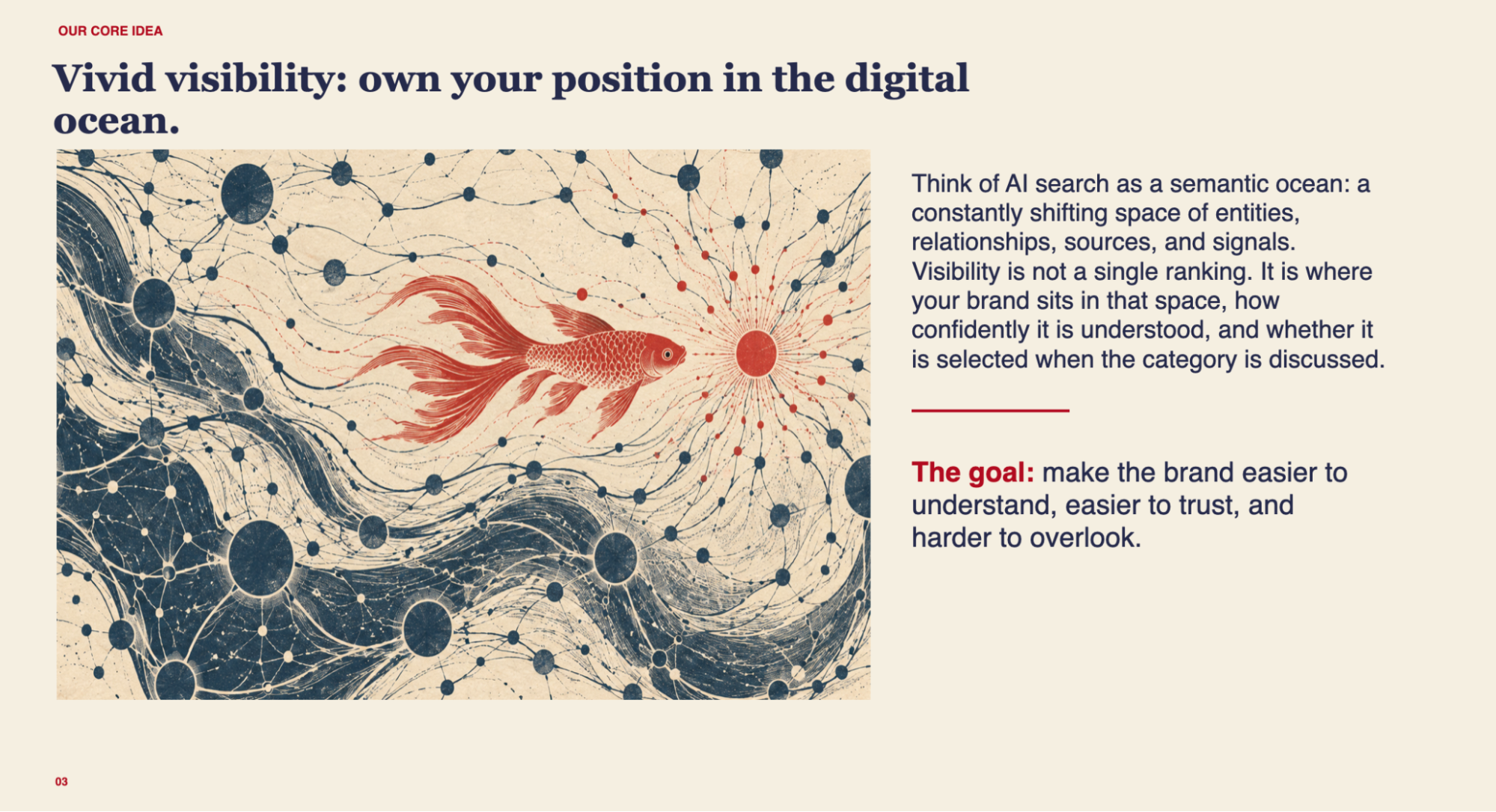
We recommend using Claude to develop the framework, then add photography or more expressive visuals in ChatGPT, Adobe, Canva, or a specialist image tool.
- Best for: Design briefs, brand systems, dashboards, content-heavy documents, slide decks, and editable prototype concepts
- Best fit: Product, brand, strategy, and operations teams that need to turn complex requirements into structured visual work
- Why it earns a place in your stack: It combines long-context reasoning with editable visual artifacts, helping non-designers create and refine coherent systems rather than just one-off images
- Watch out for: It is less suited to photorealistic imagery and expressive campaign graphics. Review every required screen, state, and deliverable before export, as polished layouts can still miss structural details
3. Canva — Best for Marketing Teams and Everyday Brand Production
Canva is the practical production hub for marketers and content teams that need to turn an approved brand direction into a steady stream of usable assets. It is built for everyday work, such as:
- Social posts
- Campaign graphics
- Presentations
- Event materials
- Documents
- Lightweight video
- Quick variations for different channels
Its AI features can speed up the first draft, but Canva’s bigger advantage is that the work stays approachable and editable for non-professional designers. A marketer can start with a template, apply an existing brand style, adjust copy or imagery, and create a version for a new placement without rebuilding the design from scratch.
That makes Canva a natural middle layer in an AI design stack.
ChatGPT or Claude can help develop the message and creative direction; Canva can turn that direction into a practical set of branded content assets; Adobe can take over when precise finishing or production files are needed.
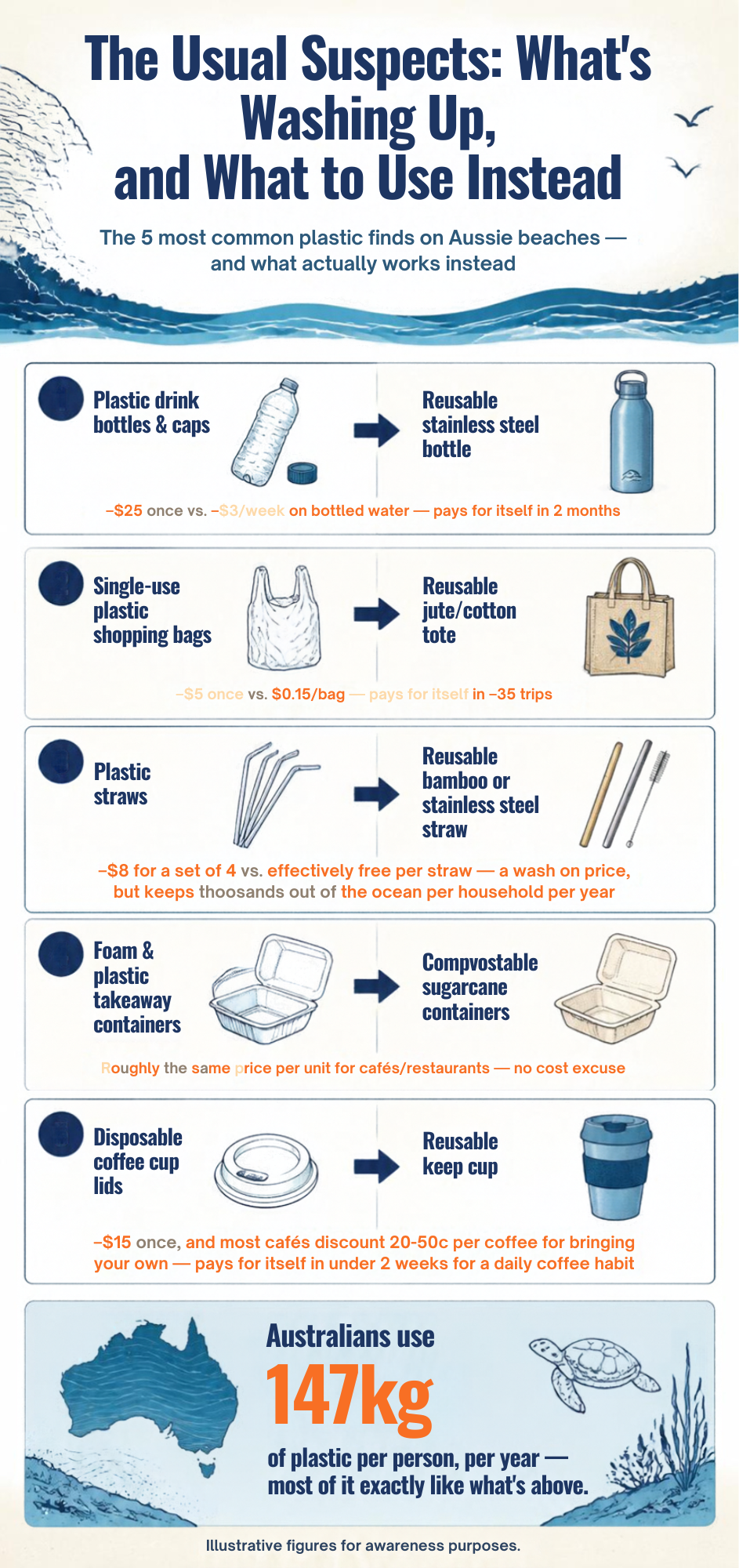
Its results in our review reflect that strength. Canva produced a polished visual identity system, and its event poster and hero image outputs each scored 96/100.
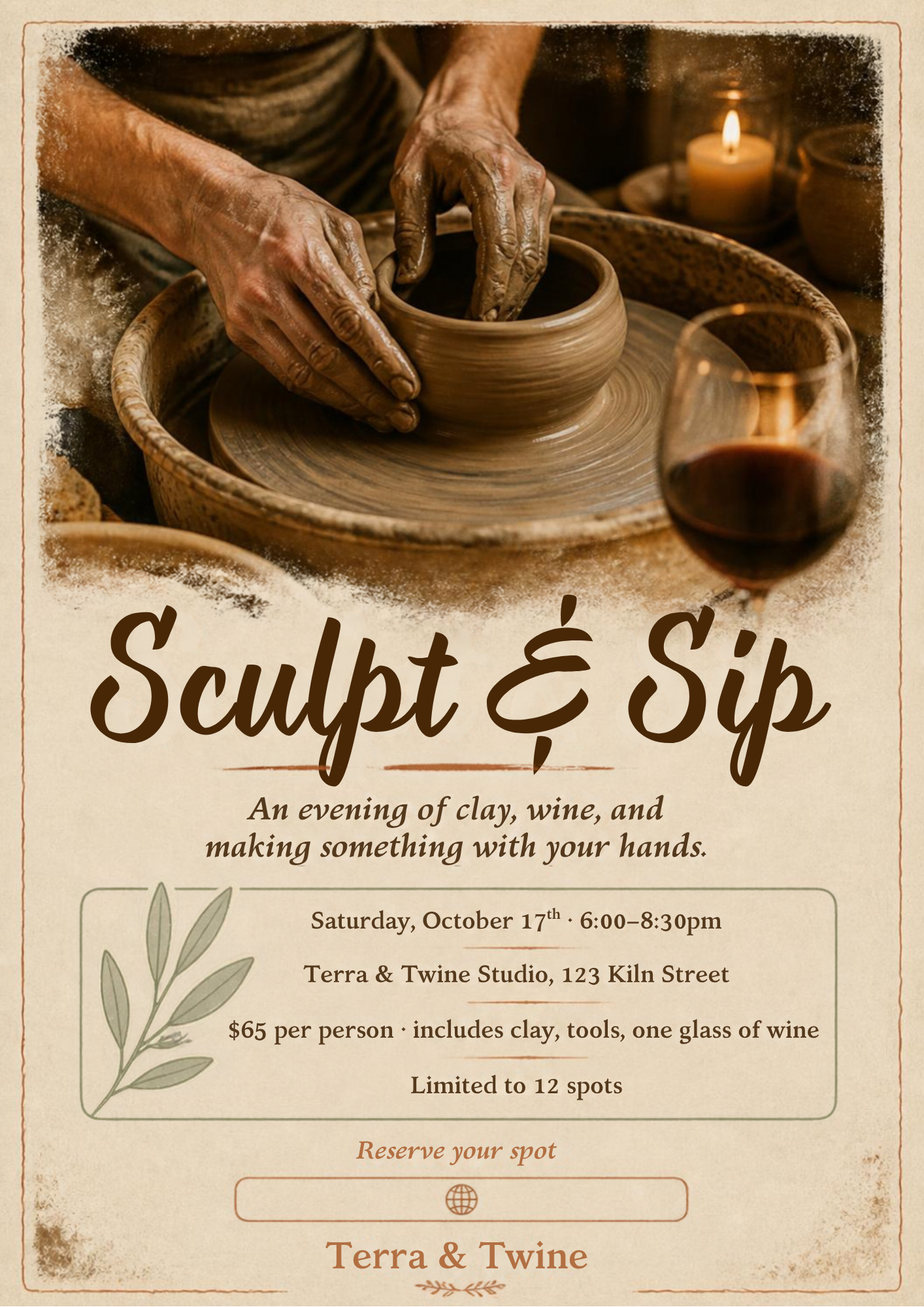
However, the less successful outputs show why final QA still matters: a campaign set missed required delivery sizes, while an otherwise polished infographic introduced errors in the cost data and text.
- Best for: Social content, campaign assets, presentations, branded templates, and everyday marketing production
- Best fit: Marketers, content teams, small businesses, and non-designers who need to create on-brand work at speed
- Why it earns a place in your stack: It turns brand direction into editable, repeatable assets that more people across a business can create and adapt
- Watch out for: Check exact formats, copy, data, and channel requirements before publishing. Brand-management features such as Brand Kit may also require a paid plan.
4. Figma — Best AI Design Tool for Product Teams
Figma earns its place in an AI design stack because product design is rarely a one-person task. It is where product managers, designers, researchers, and engineers can work from the same screens, leave feedback in context, share decisions, and hand approved work into development.
Its AI tools are most useful when they speed up the work around that collaboration. You can use them to:
- Generate an early interface direction
- Create or revise copy
- Explore layouts
- Turn an idea into a clickable prototype
- Make small changes without rebuilding an entire screen
Tools such as Figma Make also give non-designers a faster way to turn a rough product idea into something a team can react to.
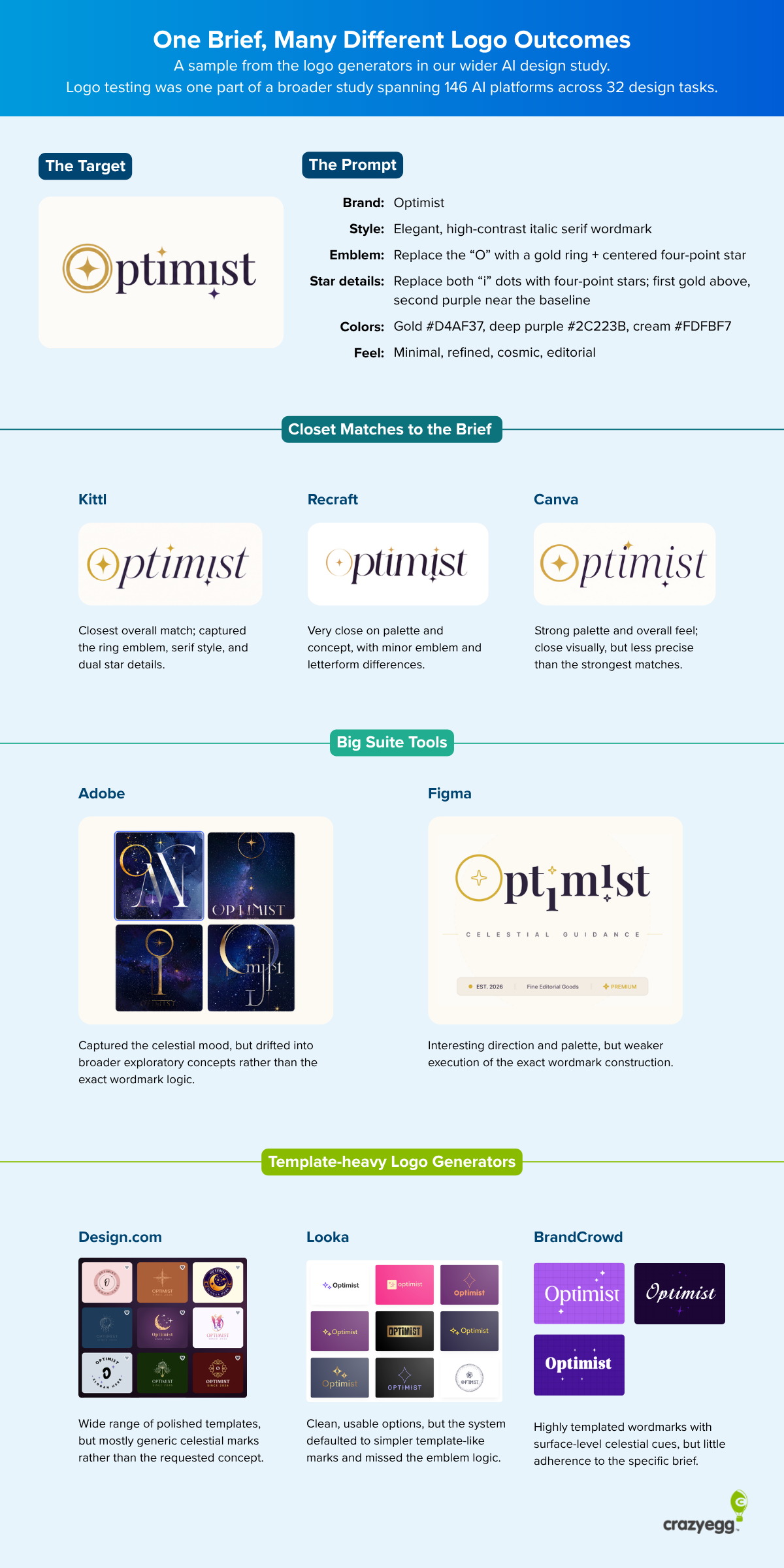
Surprisingly, Figma also produced two credible logo explorations, each scoring 76/100. Both captured the gold ring-and-sparkle emblem, deep-purple serif wordmark, and restrained celestial direction in the brief, although the exports worked better as presentation sheets than as clean final logo assets.
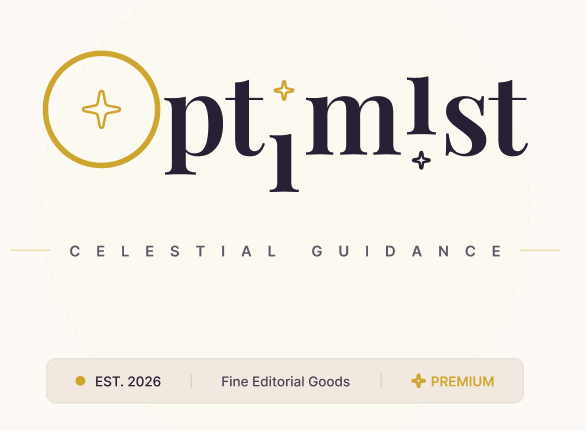
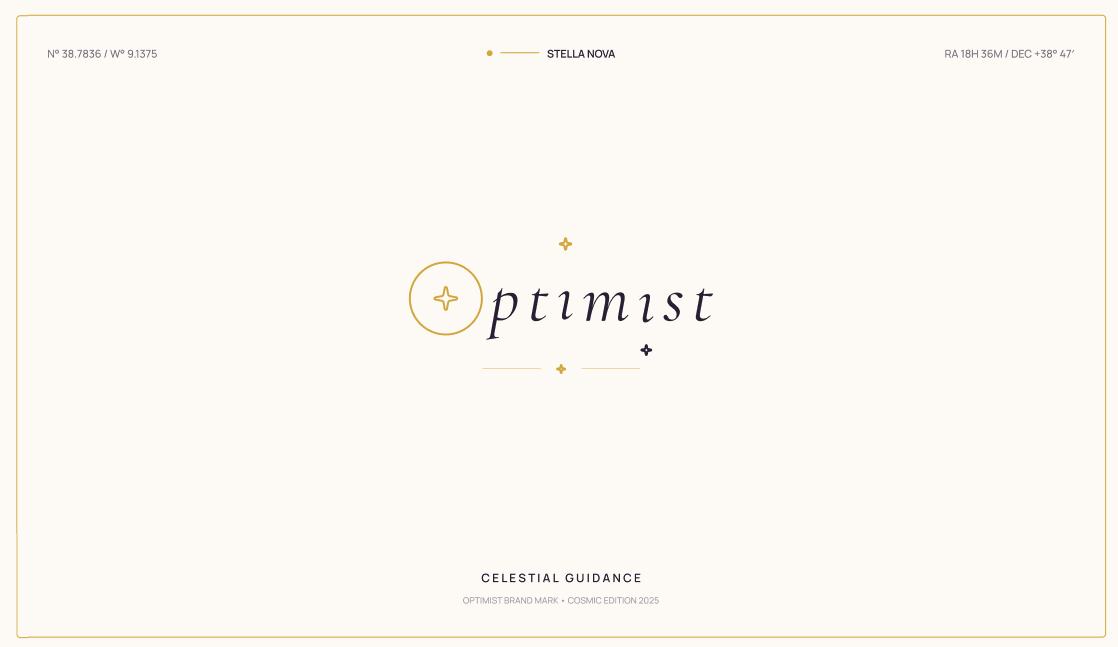
Figma is not the best choice for every creative task. It is less natural than Canva for high-volume marketing content and less specialised than Adobe for advanced image editing or print production.
But if the work is a website, app, dashboard, service flow, or other digital product, it gives the team a shared place to move from AI-generated concept to a design that can be reviewed, refined, and handed over.
- Best for: Product UI, website and app concepts, collaborative feedback, prototypes, and developer handoff
- Best fit: Product designers, product managers, founders, researchers, and engineering teams
- Why it earns a place in your stack: It gives teams a shared, editable workspace for turning AI-assisted ideas into product decisions, prototypes, and development-ready designs
- Watch out for: AI-generated screens are not proof of good UX. Validate flows, content, accessibility, responsive behaviour, and technical feasibility before building
5. Adobe — Best for Pixel-Perfect Brand and Creative Production
Adobe earns its place in an AI design stack because it is where brand work often needs to become final work. Canva is built to help more people create everyday content, while Adobe is better suited to the teams responsible for the brand system itself:
- Refining visual details
- Preparing files
- Controlling typography and color
- Producing assets that need a higher level of creative control
Adobe Firefly brings AI generation and editing into that wider ecosystem. It can help brand designers and creative teams create a visual direction, generate image variations, expand or edit an approved image, and move the result towards the Adobe tools they already use for finishing.
That makes Adobe especially useful when AI needs to support an existing creative workflow rather than replace it.
The Firefly image outputs we assessed were promising. Its pottery-studio hero image scored 88/100, with effective copy space and a strong handmade mood.

However, it didn’t do so well with anything requiring text, suce as the logo concept:
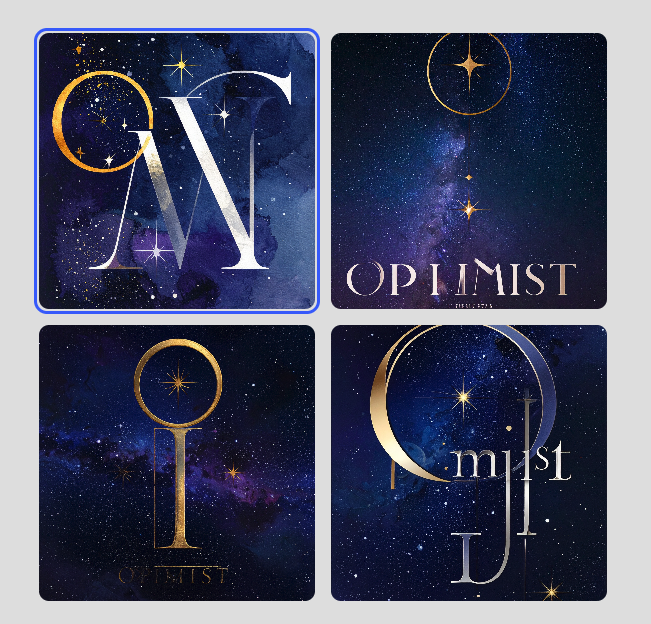
Even our second test in Adobe’s creative studio did not pass muster. Although the text was significantly more legible, it did not meet the brief requirements included in our prompt. Instead, it was similar to many of the templatized AI generated logo designs we saw from many other tools in our test.

- Best for: Brand-led image generation, controlled image editing, professional creative production, and final asset refinement
- Best fit: Brand designers, in-house creative teams, agencies, and organisations already working in Adobe tools
- Why it earns a place in your stack: It connects AI-assisted image generation and editing to the professional creative ecosystem many design teams already use
- Watch out for: AI-generated visuals still need careful checking for product accuracy, label copy, perspective, resolution, and final production requirements
6. Kittl — Best for Branded Merchandise and Small-Business Products
Kittl is a strong fit for creators and small businesses that want more control than a template tool without needing to master a full professional creative suite.
It brings typography, logo design, illustration, mockups, templates, and AI assistance into one browser-based workspace, making it useful for the branded work that often sits between an early idea and a finished marketing asset.
Its outputs were among the strongest we reviewed for typography-led graphic design. For example, it produced one of the best logo outputs:
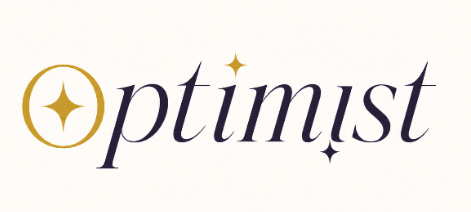
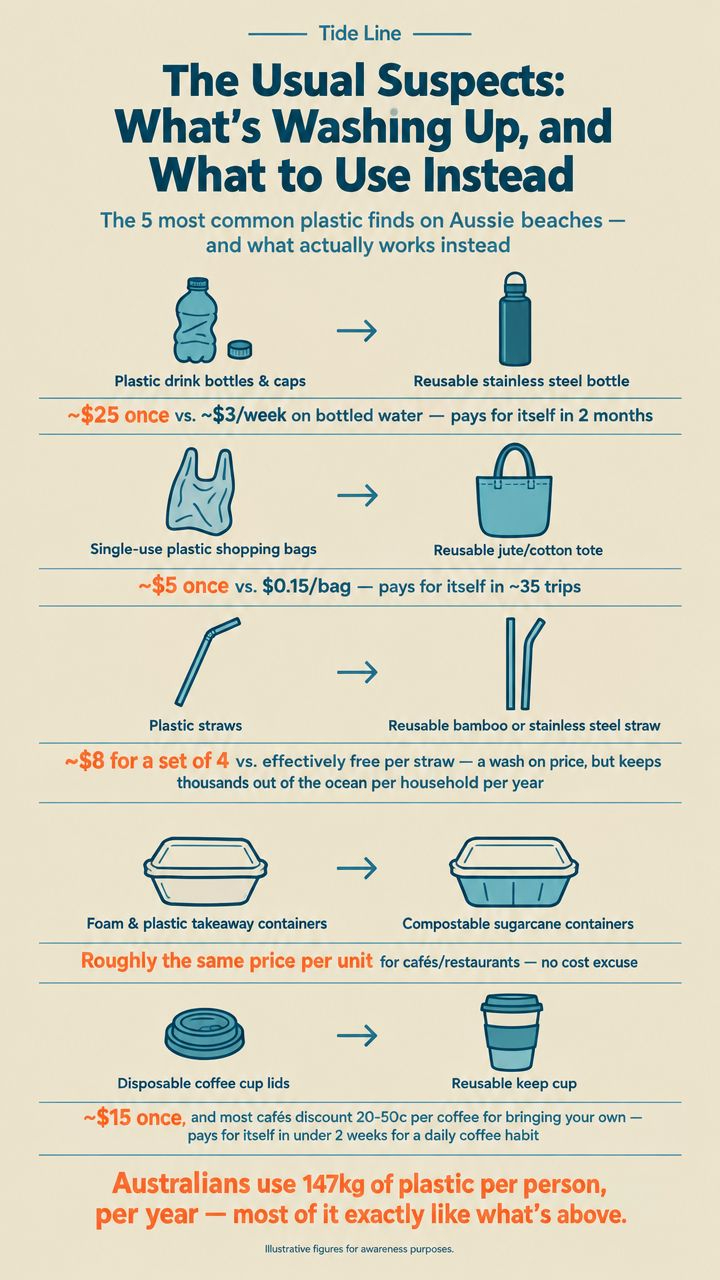
While the infographic scored 96/100:
And the event poster scored 92/100 with clean, accurate text and visuals generated:
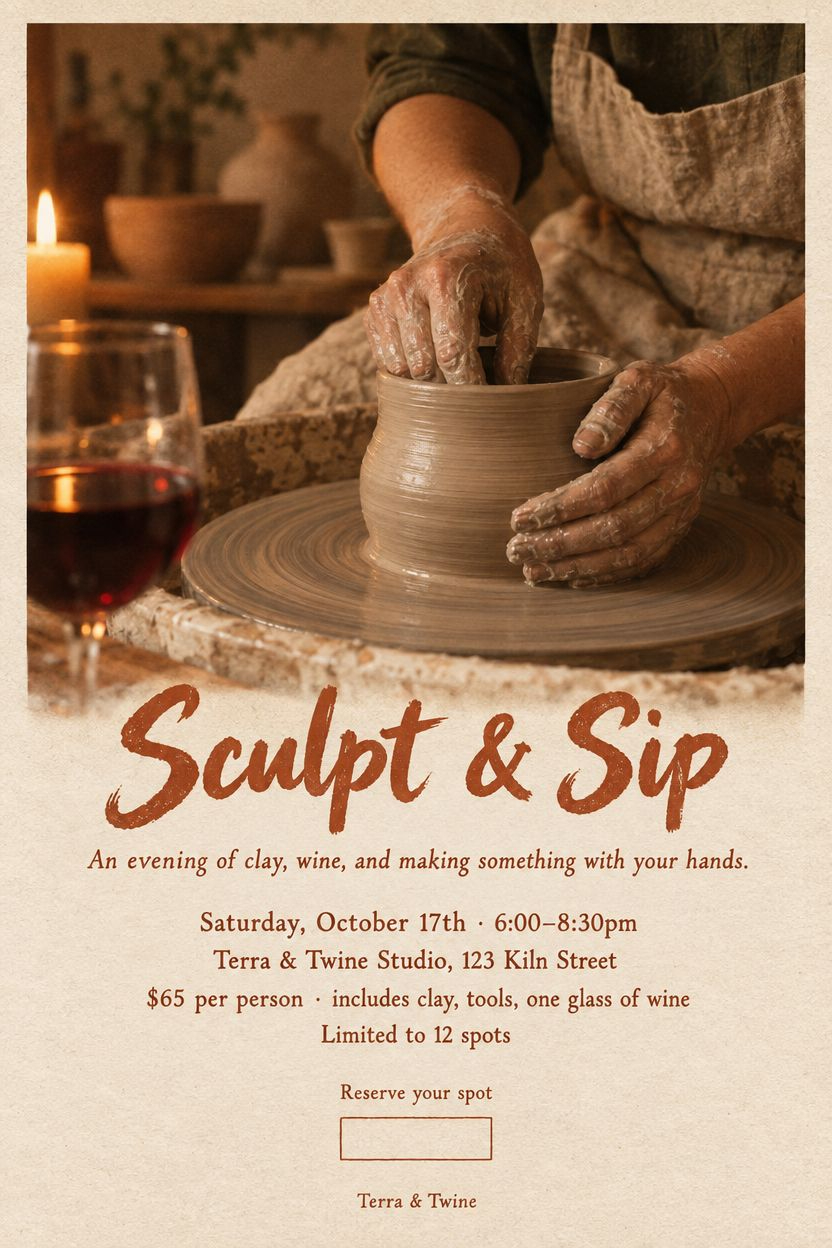
Across our tests, we found Kittl handled type hierarchy, palette, structured information, and brand personality particularly well.
- Best for: Logos, typography-led graphics, posters, merchandise, packaging concepts, and small-business brand assets
- Best fit: Creators, independent businesses, ecommerce sellers, and marketers who want more distinctive branded visuals
- Why it earns a place in your stack: It gives non-specialists a practical way to turn an approved visual direction into expressive, type-led branded work
- Watch out for: Check originality, licensing, spacing, print resolution, and final export requirements before publishing or producing physical assets
7. Ideogram — Best for Targeted AI Image Editing
Ideogram is a better fit when you need images generated or edited for a specific use, such as a social ad, product scene, hero image, or poster. It can generate campaign visuals, add short copy within the composition, and make targeted changes to an existing image without requiring a full redesign from scratch.
Ideogram’s Generate Image screen is prompt-first: add reference images and describe the result you want.
For more controlled edits, open an image in Studio to change the full image, extend or reframe it, or—on paid plans—paint over a selected area and prompt a replacement.
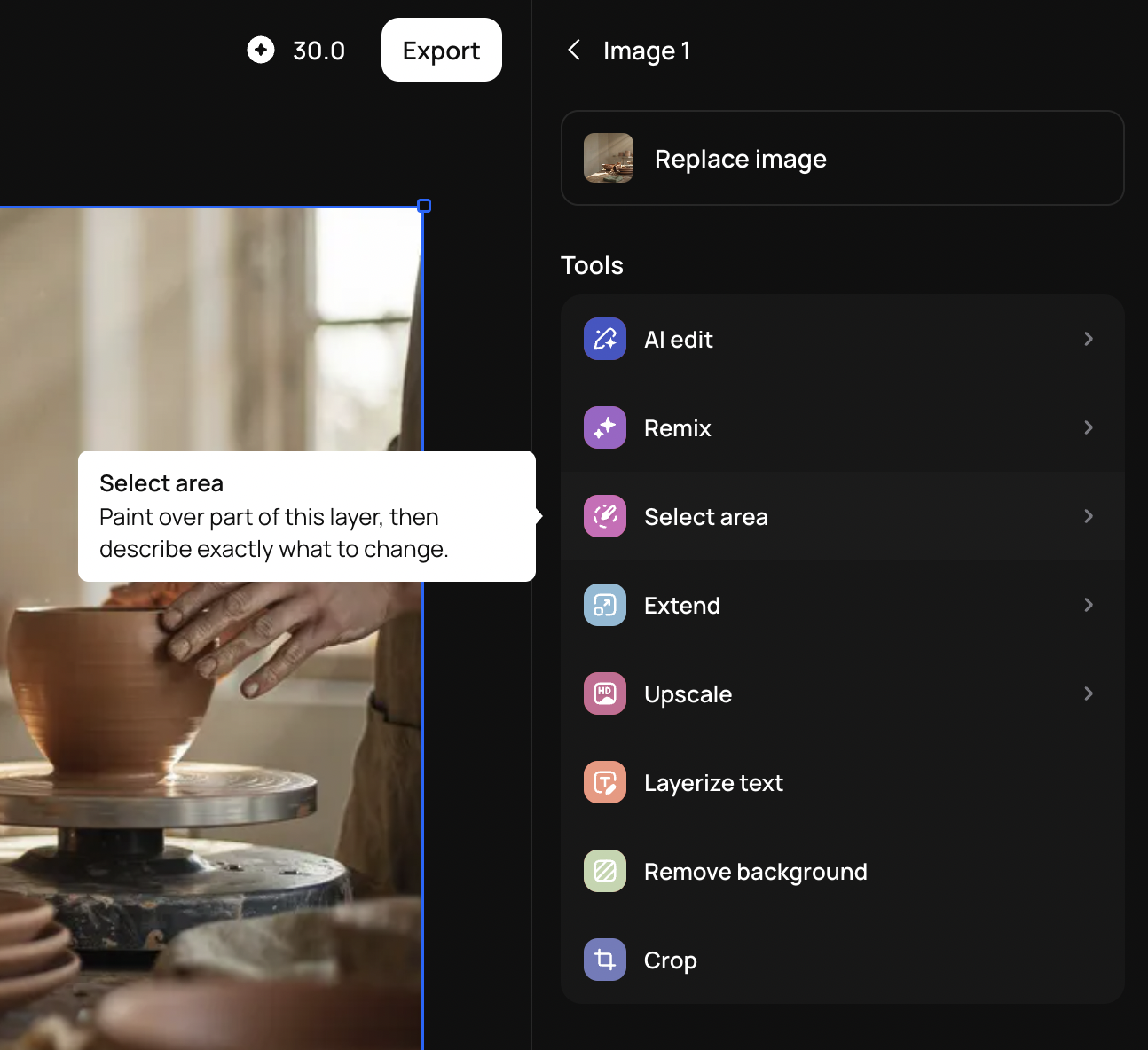
Studio also lets you combine generated, uploaded, and library images in a layered composition.
That makes it a useful complement to Claude. Claude is stronger when the brief needs to become an editable design system, presentation, document, or interactive concept. Ideogram is the better choice when the job is to create or change the visual asset itself, like to:
- Generate a social image
- Reframe a hero for a new channel
- Replace a background
- Adjust a product scene
- Produce a headline-led campaign direction
In our review, Ideogram’s social ad variants averaged 93/100 with elegant fonts, gold foil detailing and clean, minimal visuals:

That said, not all variants in each of our test groups met our quality standards.
For instance, these floating hands make this output unusable even though the rest of the image was better than the hero mock up produced by some other tools.

The strongest results combined polished image generation with short, readable copy and an appropriately branded visual direction.
Think of Ideogram as a strong tool for creating and iterating visual directions, rather than a substitute for final product retouching or exact production artwork.
- Best for: Campaign imagery, social ads, reframing or extending images, and targeted AI edits
- Best fit: Marketers, creative teams, ecommerce brands, and designers who need to create or adapt image assets quickly
- Why it earns a place in your stack: It combines original image generation, short in-image text, and more controlled region-based editing than a one-shot image generator
- Watch out for: Targeted edits are still generative, not pixel-perfect. Review product details, dense copy, typography, and any image area that must remain exact
8. Flair AI — Best for E-commerce Product Scenes and Ad Variations
Flair AI is built for ecommerce teams that already have a product to sell and need more ways to present it.
Rather than starting with a blank prompt, it lets users bring in approved product imagery, then place it into different scenes, backgrounds, layouts, and ad concepts. That makes it more useful for testing creative directions around an existing product than for inventing a new brand identity from scratch.
Because of this, Flair’s test was not a like-for-like comparison with the other image generators in our test.
Rather than asking it to generate a product mockup from the same text prompt, we supplied the existing ChatGPT-generated bottle image and used Flair to place that product into a lifestyle scene.

That makes this a better demonstration of Flair’s intended workflow than a a generation using our test prompt. It is useful for exploring product-in-use imagery and campaign variations, but the final output still needs to be checked against the approved source material for product shape, labels, reflections, angles, and small copy.
- Best for: Ecommerce product scenes, lifestyle concepts, paid-social creative, and ad variations
- Best fit: Ecommerce marketers, small product brands, performance creative teams, and agencies
- Why it earns a place in your stack: It helps teams turn approved product imagery into a wider set of campaign directions without producing a fresh studio shoot for every idea
- Watch out for: Bring approved product images and copy, then carefully check product accuracy, labels, proportions, reflections, and fine detail before publishing
9. Flowstep — Best for Fast AI UI Concepts
Flowstep is useful when a product team needs to turn an idea into a screen they can react to quickly. It can help founders, product managers, and designers explore a dashboard, pricing page, workflow, or app concept before investing in a full design process.
Its value is speed rather than finality.
Use it to create a visual starting point for a familiar product pattern, such as a SaaS dashboard, checkout flow, pricing page, or settings screen. That early concept can then be taken into Figma for user testing, system design, collaboration, and developer handoff.
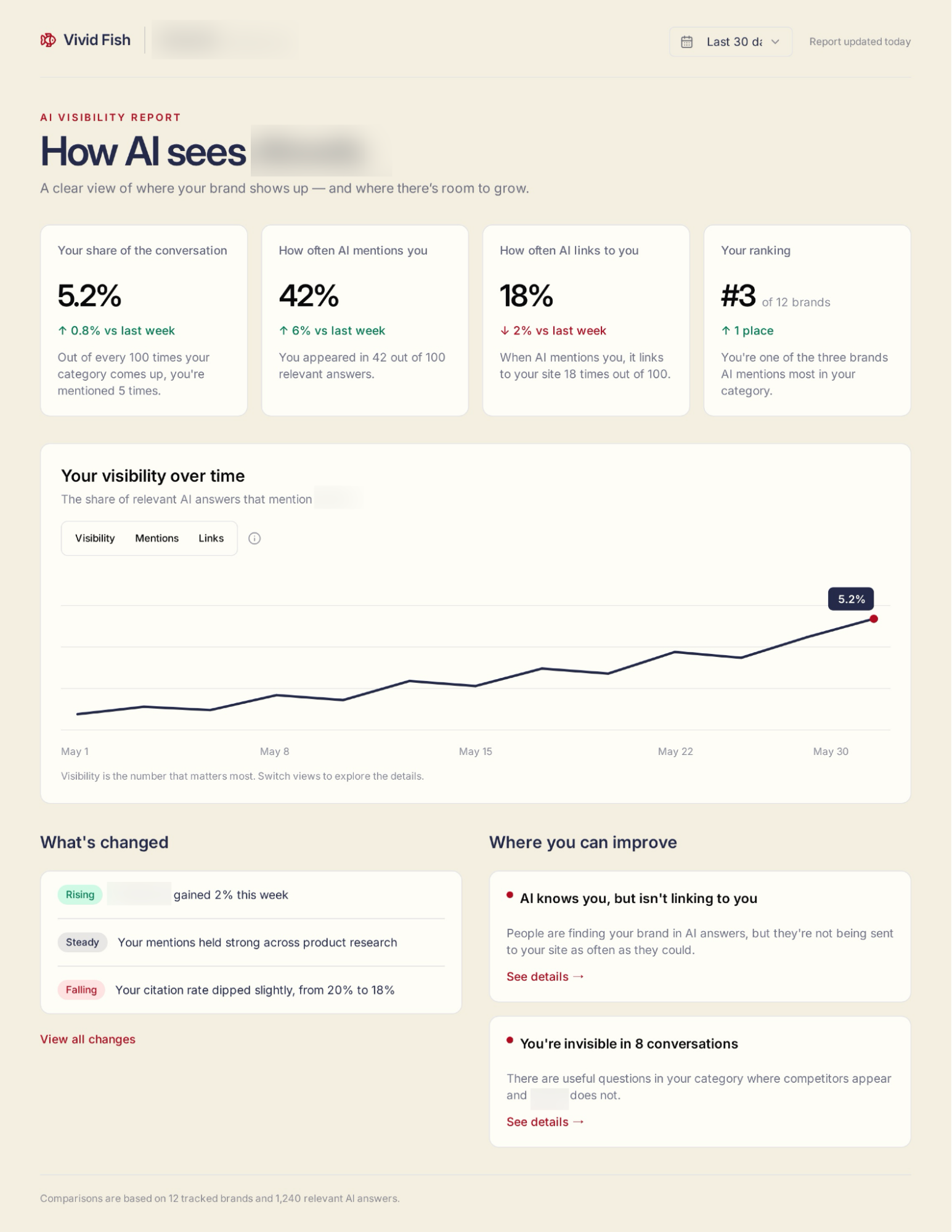
The results in our review suggest that Flowstep works best when the brief has a clear, established interface structure. Its dashboard scored 96/100:
Its pricing page and multi-screen user flow both scored 92/100
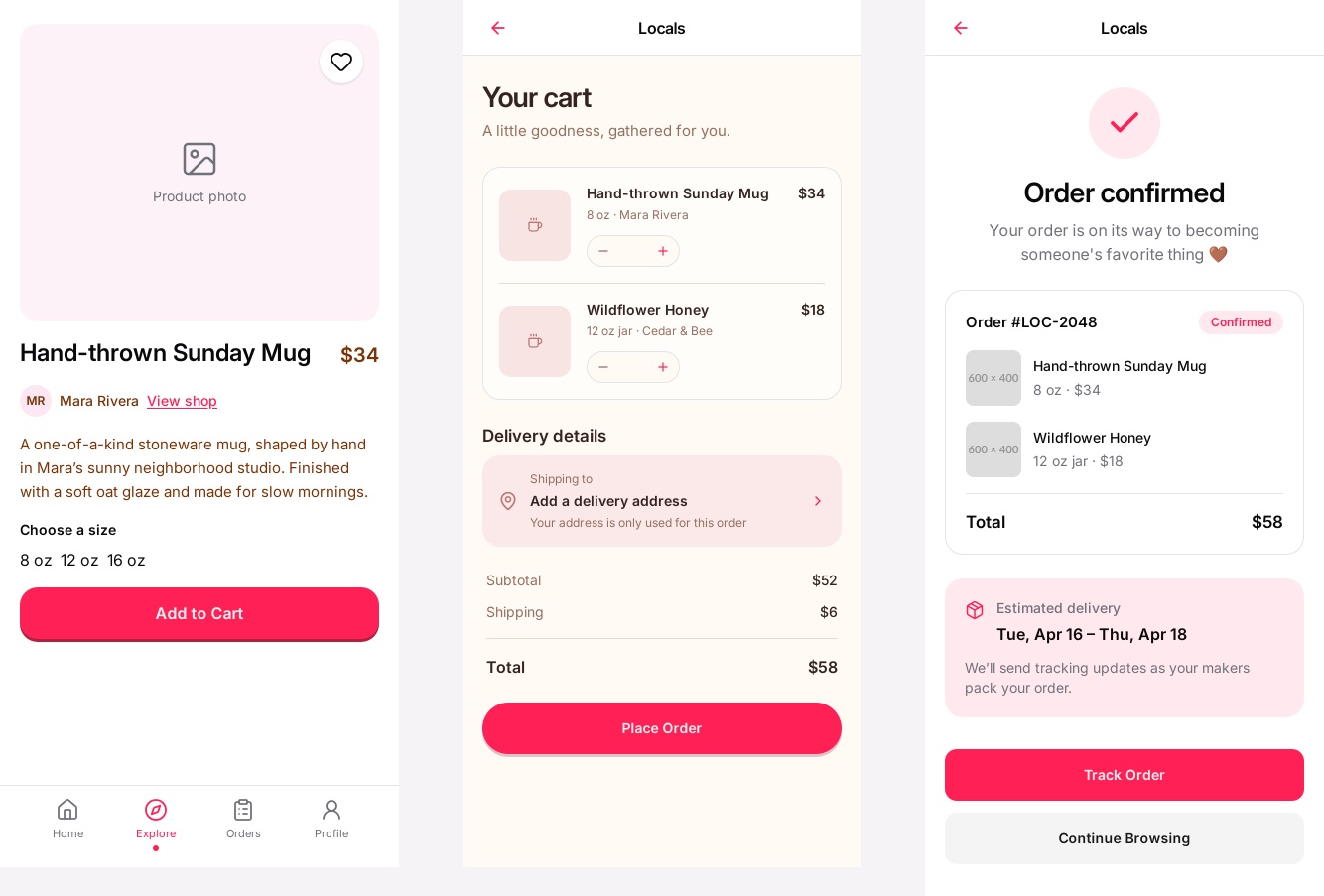
Those outputs had strong hierarchy, recognisable interface conventions, and clear content grouping.
It was less convincing on broader website concepts: its landing-page and homepage outputs each scored quite low after missing required structural elements.
We’d suggest using Flowstep for contained product screens and flows, rather than expecting it to solve an entire website or product experience in one prompt.
- Best for: Dashboards, pricing pages, product flows, and early app-screen concepts
- Best fit: Founders, product managers, UX designers, and teams exploring a digital product idea quickly
- Why it earns a place in your stack: It gives teams a fast visual starting point for familiar interface patterns before the work moves into Figma or a production workflow
- Watch out for: Treat generated screens as concepts, not validated UX. Check structure, content, states, responsiveness, accessibility, and technical feasibility before building
Other AI Design Tools Worth Knowing
The tools above cover the broadest and most practical roles in an AI design stack, but a few other tools are worth considering for more specialised jobs.
- Magnific is useful for moodboards, expressive campaign visuals, and art-directed poster concepts. It performed well in those visual tasks, but its infographic result showed the same weakness many AI tools have with dense factual copy.
- Pitch is worth considering for collaborative sales and marketing presentations.
- Leonardo AI is a useful alternative for image-led concept exploration and visual-asset generation.
- Astria is the more technical option for teams that want to train or fine-tune image models around a specific ecommerce workflow.
- For supporting tasks, Clipdrop can help with cleanup, background removal, relighting, resizing, and upscaling.
- Cosmos is useful for visual research and reference gathering.
- Napkin AI can turn written ideas into editable explanatory visuals, although generated diagrams still need factual checking.
- Bannerbear and Abyssale are worth investigating when a team needs template-based creative automation at scale.
How We Assessed 146 AI Design Tools
We reviewed 146 AI design tools across 32 real-world graphic and web design tasks, including logos, brand systems, social ads, brochures, websites, product mockups, dashboards, user flows, decks, reports, and specialist design work.
The best performing tasks across the board were:
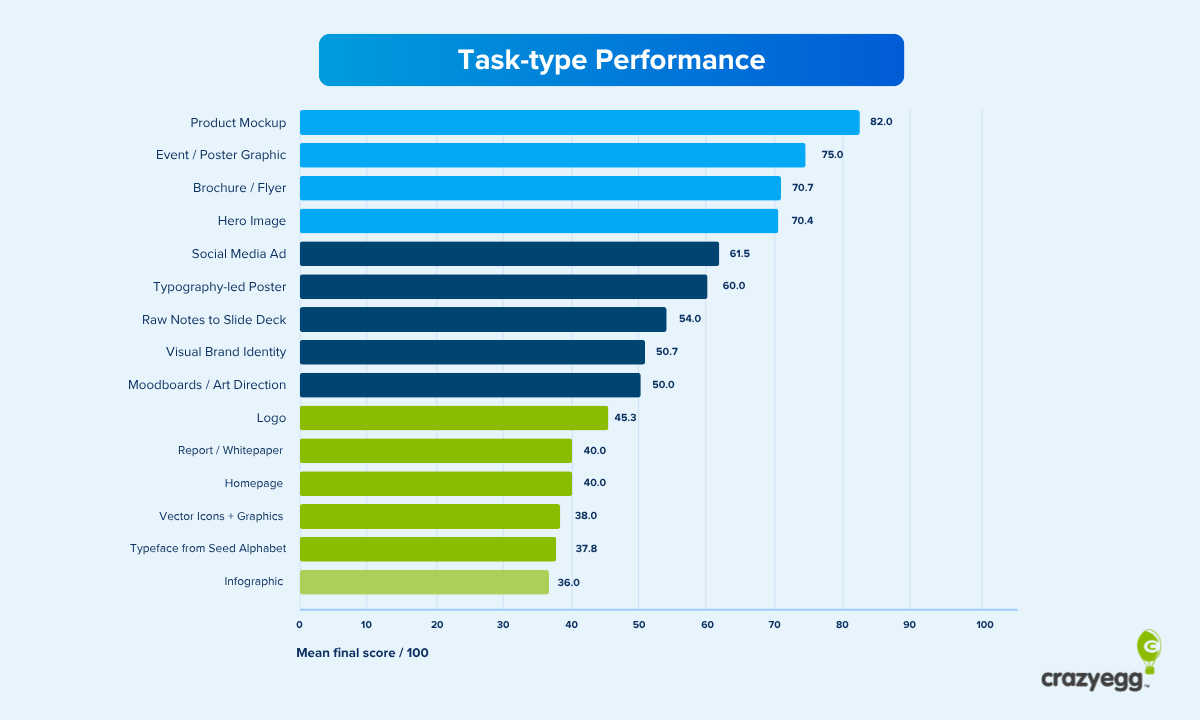
Not every platform was tested on every task.
Some tools are broad creative environments, while others are built for a narrow workflow such as ecommerce product scenes, image editing, or AI UI concepts. That is why this is not a simple ranking from one to nine.
Each recommendation reflects a combination of its intended use, practical role in a wider workflow, current product capabilities, and, where relevant, the hands-on results from our testing.
The scored outputs were assessed against five equally weighted criteria:
- Brief fidelity: Did the output follow the instructions?
- Brand coherence: Did the visual choices work together and stay on-brand?
- Craft and technical execution: Was the output clean, accurate, and free from obvious artifacts?
- Functional fitness: Would the design work for its intended purpose?
- Aesthetic judgment: Did it look like something a professional designer might reasonably ship?
A strong score does not guarantee that every output from a tool will be ready to use. It shows that the submitted result performed well against a specific brief. Equally, a tool with limited or uneven testing can still earn a place in the stack when it fills an important role for the teams that already use it.
Build the Stack Around the Work You Already Do
The best AI design stack is not the largest one. It is the combination of tools that helps your team move from idea to approved output with less friction.
Creators and small businesses might start with ChatGPT for ideas, Canva for everyday content, and Kittl for logos, merchandise, packaging concepts, and more distinctive brand assets.
Marketing and ecommerce teams may get the most value from ChatGPT, Canva, Ideogram, and Flair AI. Together, they can help develop a concept, create editable campaign assets, generate visual directions, and turn approved product imagery into lifestyle scenes or paid-social variations.
Product teams should keep Figma as their shared design system and source of truth. Claude can help shape briefs, workflows, decks, and structured design artifacts; Flowstep can accelerate early screen concepts; and Framer can carry a polished web direction closer to a live experience.
For brand and creative teams, Adobe remains the layer for controlled image editing, detailed finishing, production files, and the tools many organisations already use to maintain visual quality.
The most useful question is, “Which tool helps the next person in our workflow do better work?”