More than 40% of the websites on the internet run on WordPress. If you have one of them, why not have a web hosting package to match?
WordPress hosting comes in two main forms. You’ll see many providers offer a flavor of their shared hosting plan that is focused on WordPress.
This usually means you’re using the same servers as you would if you’re on traditional shared hosting, but you get WordPress-related features included on your provider’s plan. Some web hosts also offer a more fine-tuned environment that’s optimized specifically for WordPress sites, which can naturally deliver better performance.
The other, often more attractive, form is managed WordPress hosting. When you see “managed” to describe a web hosting plan, it means the provider will shoulder some (or all) of the responsibility of site and server maintenance.
That usually entails automatic updates to your WordPress core and, in some cases, plugins, plus automated security monitoring and regular backups. Sometimes, it means your managed hosting provider’s team will work behind the scenes to make sure everything on your site and server is optimized for top-quality performance.
If you’re building a new site from scratch, shared WordPress hosting is the most cost-effective option. Approach it the same way as you would any other shared hosting—know that it will get the job done for simpler sites, but you may end up outgrowing it in the future.
It’s a good place to start, and you can usually scale up to the big leagues with ease when your site starts getting popular.
Managed hosting offers stronger support and usually more hands-off maintenance, plus you’re likely to get enhanced, more consistent performance in terms of site speed and uptime when a provider takes care of server and site optimization for you.
You’ll have to pay a bit more to reap the benefits of managed hosting, but it’s a smarter choice for some specific types of sites and site owners. Managed WordPress hosting is great for web stores or any site owners that want to sleep easy, knowing their site is secure and performing well without having to do the administration themselves.
Just be mindful that some WordPress hosts offer managed hosting that doesn’t deliver on all fronts. You’ll see a few that provide automated updates and not much else, but still call their hosting plans “managed.” Others, though, really do a lot of the work for you and deliver enhanced performance and security without you having to lift a finger.
If managed WordPress hosting appeals to you more than its shared hosting equivalent, just make sure to dig into what “managed” entails for the providers you’re considering.
Fortunately, we’ve done a lot of the work for you. You can read our full post on the best managed WordPress hosting or continue through this post where we’ve thoroughly assessed all of our top picks and spotlighted any managed features you can tap into.
Based on our experiences and testing, Bluehost provides the best WordPress hosting for most people. It offers affordable plans with tons of WordPress-oriented features, all while making it easy for beginners to launch a new WordPress site from scratch. They even give you a free domain for one year to sweeten the deal. Plus, you’ll get automatic WordPress installation and automatic WordPress updates to help keep your site secure and current. Bluehost is also officially recommended on WordPress.org’s hosting page.
There are many other great WordPress hosting services to consider though depending on your specific needs. Read on to learn about our top picks for WordPress hosting to find the best choice for you in minutes.
The Best WordPress Hosting Services in 2026
- Bluehost – Best for most businesses
- HostGator – Best for new WooCommerce sites
- Hostinger – Best if you need a lot of storage
- DreamHost – Best for scaling up your WordPress hosting
- SiteGround – Best customer support for WordPress
- Flywheel – Best WordPress hosting for client websites
- WP Engine – Best WordPress hosting for serious ecommerce
- Nexcess – Best value for managed WordPress hosting
- Kinsta – Most secure WordPress hosting
In-Depth Reviews of the Best WordPress Hosting Services
Bluehost — Best for Most Businesses
Bluehost includes a WordPress site builder with their hosting offerings that delivers a surprising combination of ease of use and customization.
This is perfect for most businesses—as Bluehost eliminates the complexities and technical aspects that people often feel overwhelmed by when building a website for the first time. It’s a great place to start and will help you overcome the seemingly daunting WordPress learning curve.
That’s because Bluehost has made the limitless customization of WordPress more accessible to all by creating a more beginner-friendly WordPress site builder. It removes some of the intimidation of the WordPress interface while delivering the drag-and-drop site editing you may have seen before with other website builders.

Plus, there are tons of starter templates you can use to jumpstart the design of your new site without having to start from scratch.
Bluehost’s WordPress hosting is essentially beginner-friendly hosting with WordPress-specific onboarding, automatic installation, updates, and an AI site builder layered in. You’re not going to find the deepest managed hosting extras here, but that’s part of the appeal.
It keeps pricing reasonable. Bluehost’s WordPress plans currently start at $3.99 per month on introductory pricing.
And you’re going to be able to get up and running fast. Bluehost automatically installs WordPress once you’ve completed the initial account setup, which just involves a few quick questions about what you’re trying to do with your WordPress site. Plus, it will automatically keep your instance of WordPress updated so you’re not left running outdated software.
From there, you can pick a theme and make your customizations. It’s easy to change text, imagery, colors, and more in Bluehost’s site builder. You can also add plugins to extend WordPress’ functionality on your site, whether you want website features that help you find business prospects, tools to help you optimize and market your site content, or nearly anything else.
You can go from nothing to a fully realized website in minutes. And that’s also true if you’re building an online store. Bluehost offers ecommerce-friendly WordPress options that make it easy to get a store up and running without a ton of technical work.
All Bluehost WordPress plans come with a free domain for the first year, SSL, 24/7 support, and built-in setup tools that make life easier for first-timers.
The performance is solid, and you’re getting a great deal on WordPress hosting that also makes it as easy as pie to build a new site—even if you have no experience at all.
Overall, we feel confident recommending Bluehost as your top choice for most businesses. Get started today.
HostGator — Best for New WooCommerce Sites
WordPress makes it easy for entrepreneurs and businesses to sell products online. All you need to do is install WooCommerce, and your WordPress site instantly gets ecommerce functionality.
But online stores have different hosting requirements than blogs and other websites. Fortunately, HostGator has you covered.
HostGator’s managed WordPress hosting is built to help you get up and running fast, with WordPress pre-installed, daily backups, added security features, and migration help if you’re moving from another provider.

As a managed WordPress provider, HostGator provides some extra perks and support that you’ll enjoy. You can set up daily backups and take advantage of migration support to keep your site protected and reduce the hassle of moving over.
Plus, HostGator emphasizes performance and an easier control experience for WordPress users. That matters if you’re launching a new store and don’t want to wrestle with a bunch of backend complexity on day one.
Other benefits include:
- Built-in site security
- 24/7/365 support
- WordPress pre-installed
- Free SSL certificate
- Migration assistance available
HostGator frequently runs promotional pricing on its WordPress hosting, and plans are backed by a 30-day money-back guarantee.
Hostinger — Best If You Need a Lot of Storage
Hostinger delivers shared hosting on WordPress-optimized servers, making it the ideal environment for new site owners to start their WordPress site on the right foot. Want to see the difference that servers optimized for WP makes? Just look at the results for our test site’s speed during our month of testing.
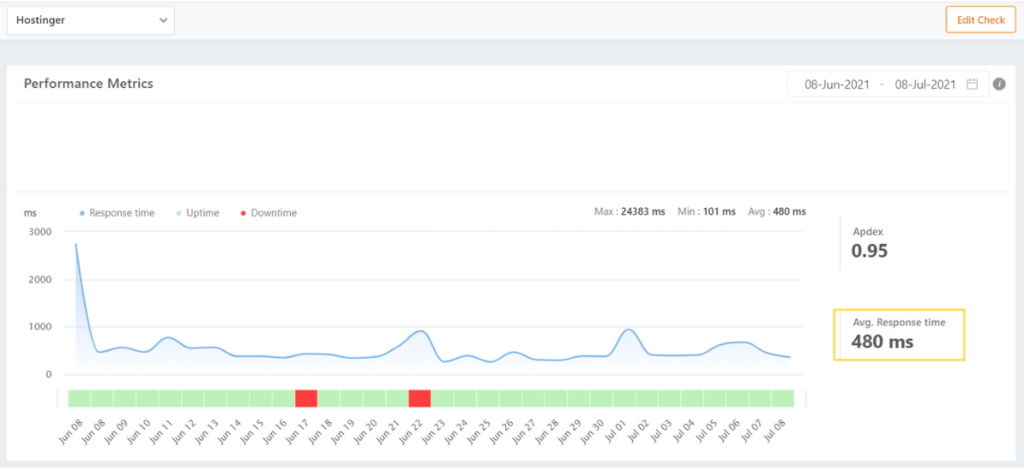
Outside of a rocky first day, Hostinger kept loading times well below one second and averaged just under half-a-second load times across the month of testing.
The best part? That’s without using any optimization techniques. We didn’t install a caching plugin, compress scripts, or enable a separate content delivery network (CDN). The data above is a testament to Hostinger’s pure performance without any enhancements.
So, there’s even more room for improvement if you take the time to optimize your site further.
On top of that, Hostinger also sports some of the cheapest long-term pricing you’ll find for WordPress hosting.
Their Business WordPress plan lets you host up to 50 websites and delivers the following WordPress-specific features:
- Automatic WordPress maintenance
- WordPress staging tool
- Daily and on-demand backups
- Free CDN
- 50 GB NVMe storage
- Free migration
You can also move up to Hostinger’s Cloud Startup plan if you need even more room, which bumps storage to 100 GB NVMe and adds more power for heavier WordPress sites.
Most of you will find better value in the mid-tier Business plan from Hostinger. It currently starts at $2.99 per month on a long-term introductory deal, renews at $16.99 per month, and includes the features that growing WordPress sites actually need.
If you’re building a brand-new WordPress site on Hostinger, you’ll also benefit from its growing library of AI tools and site-building aids. If you’re in a rush to set something up or just need some inspiration to serve as a springboard for your site design, those extras can speed things up considerably.

Overall, Hostinger is the top option for those who want a lot of storage because it delivers a lot of space, strong value, and excellent speed for the money. Set yourself (and your website) up for success by signing up for Hostinger’s WordPress hosting.
DreamHost — The Best for Scaling Up Your WordPress Hosting
DreamHost gives your WordPress site the most room to grow. That’s due to the range of WordPress-friendly options it offers, from affordable shared hosting to DreamPress managed hosting and VPS upgrades.
What that gives you is the ability to start simply (and affordably) while having the confidence that you can unlock better hosting for your WordPress site as it grows, all without leaving DreamHost.
If you’re not coming to DreamHost with an established, complex WordPress site, you can start on one of the provider’s simpler hosting plans for WordPress. Those remain affordable and easy for beginners to work with.

Choose an annual or multi-year term and DreamHost includes a free domain for the first year. DreamPress plans also include unlimited mailboxes, automatic backups, and professional migrations.
But that’s just the starting point. DreamPress is DreamHost’s name for their managed WordPress hosting. And it’s not another case of a provider just slapping the term “managed” onto their shared hosting plans, either.
DreamPress gives you a more performance-focused WordPress environment, meaning you gain the benefit of isolated resources and more specialized WordPress support. You also get the managed features you’d expect, like backups, updates, staging, and migration help.
DreamPress currently starts at $14.99 per month for the first year, supports one website on the entry tier, and includes 15 GB NVMe storage, 40,000 monthly visits, one professional migration, unmetered bandwidth, unlimited mailboxes, and a free domain for one year.
No matter which flavor you choose, you’re going to get reliable performance from DreamHost. During our month-long testing period, they were one of the most reliable WordPress hosting providers in terms of uptime.
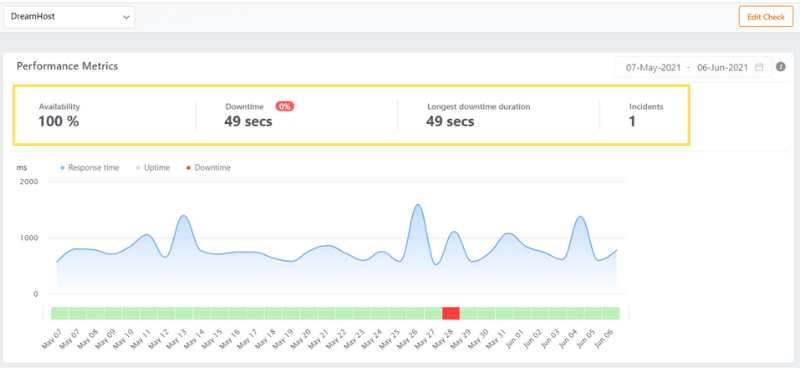
We only saw a total of 49 seconds of downtime, and that all happened during a single incident.
Many providers will claim 99% uptime or better and fall short with their actual performance. But DreamHost truly delivered in this regard.
And that’s just when your site is using DreamHost’s simpler infrastructure. You can tap into DreamPress or VPS hosting when you need a serious upgrade in resources and performance.
Get the longest runway for growing your WordPress site by starting on one of DreamHost’s plans today.
SiteGround — The Best Support for WordPress Hosting
Whether you’re seeking cheap unmanaged hosting for your WordPress site or the extra assistance that comes with managed hosting, having the support of a team that really knows WordPress is extremely valuable.
SiteGround offers stellar WordPress-focused web hosting, with plans that deliver a bevy of benefits no matter what you’re trying to achieve with your websites.
There are a lot of features to cover here, so let’s get into it.
Every SiteGround plan, including the entry-level StartUp tier that starts at just $2.99 per month, comes with a blend of managed and DIY WordPress-related features, including:
- Quick and easy WordPress installation
- Free site migration
- Automatic WordPress updates
- Automated site backups
- Server-level security monitoring
- 24/7 human support
While that doesn’t include everything you’d find in a fully managed WordPress hosting plan, the automated updates, backups, and proactive security take a lot of the admin work off your plate.

And, for most site owners, that’s enough in terms of managed features. With SiteGround, you get an easy, quick path to spinning up a WordPress site or transferring one to their servers. After that, you get the reassurance that their team is keeping a watchful eye on updates and security and can help troubleshoot issues when they arise.
A unique benefit is SiteGround’s mindfulness of agency work. Every one of their WordPress hosting plans allows you to ship sites to clients and invite collaborators into Site Tools.
SiteGround’s high-end GoGeek plan also unlocks white-label access, private DNS, staging + Git, on-demand backups, and more storage and resources for bigger sites.
That’s just covering the feature sets you get access to. SiteGround provides some exceptional value for what basically equates to semi-managed WordPress hosting.
But that value becomes irreplaceable when you consider that SiteGround’s customer support is actually helpful.
That’s rarer than you might realize in the world of web hosting. A lot of providers relegate you to chat bots or self-service help articles, especially on entry-level plans.
Meanwhile, SiteGround offers 24/7 support through phone, live chat, and tickets.
It’s honestly the best, most genuinely helpful support we’ve seen among web hosting providers. We were connected with a representative every time we reached out and we got prompt assistance each time, as well. There was no waiting around for a real human to enter the chat or long pauses in our interaction when we asked questions or needed clarification.
For example, when we picked their brains about improving site security, we got a bunch of great information in just four minutes.
The rep was helpful, fast, and straightforward, advising us to turn on automatic core WordPress updates and automatic plugin updates, with instructions on where to find these settings.
It felt like they paid attention to what we were asking and knew exactly what to do. You might be surprised how often that isn’t the case when trying to get support from a hosting provider.
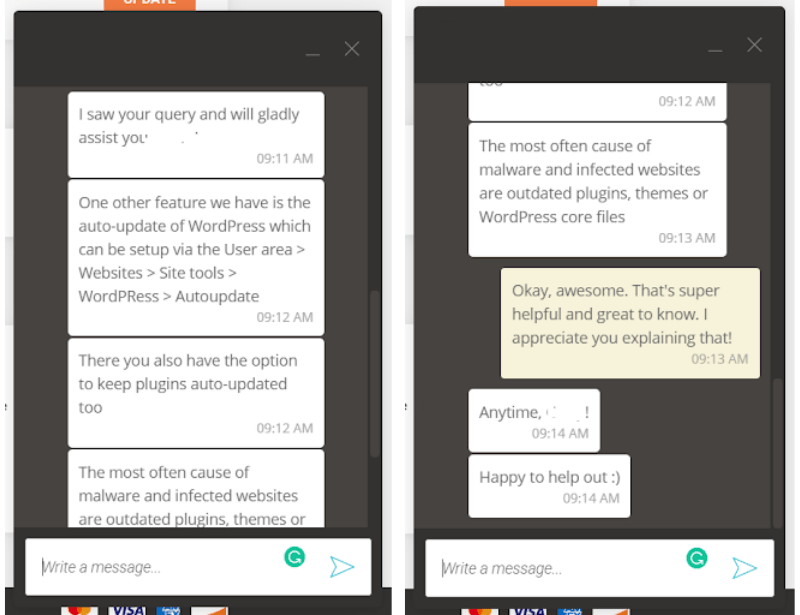
Overall, the service was excellent. SiteGround’s reps didn’t try to upsell us on anything during any of our three chats and none of them made us feel like we were wasting their time.
Pairing that with SiteGround’s great pricing and WordPress-related features, we think a lot of first-time and experienced site owners alike will appreciate the value of their WordPress hosting plans. Get started with SiteGround today.
Flywheel — The Best WordPress Hosting for Client Websites
If you’re a freelancer, designer, or a member of an agency, Flywheel comes with tons of developer tools and client management features, plus easy billing and account setup for your clients.
Other options on our list have some of these tools, but Flywheel’s focus is in these areas. As such, we consider Flywheel to be the best specialized solution for client-oriented web hosting, whether you’re simply building websites for others or offering clients hosting along with your other services.
Client management is made so much easier within Flywheel’s hosting environment. Send bills to your clients in a few clicks or set it up so they’re automatically sent every month or year. Use tags and advanced filtering to organize the sites you build for others and easily find them when you need them. See what’s happening within your team through real-time activity feeds.
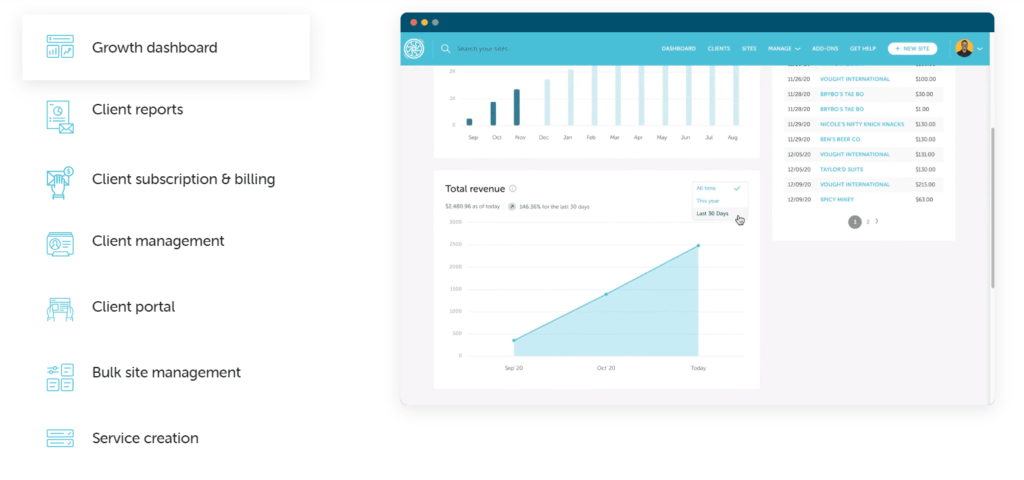
Flywheel also offers blueprints, which let you build a standard package of themes and plugins as a starter kit for future projects.
But that’s just the stuff you can do yourself. Another positive of choosing Flywheel is how much they’ll handle for you on their end.
If your site is ever attacked for any reason, Flywheel will help you fix everything, remove malware, clean things up, and provide advice on how to prevent it from happening again. They also offer dozens of security features at the server level, meaning you don’t need to worry about setting up plugins or addressing vulnerabilities on your own.
One security feature many of Flywheel’s customers like is two-factor authentication (2FA) to keep your sites, dashboard, and client portal secure. If you need more stringent, proactive security, you can utilize the built-in intelligent IP blocker that identifies potential intruders and blocks their access to your sites.
That’s in addition to the managed features you’d expect, like automatic WordPress core updates, premium site migrations, and the option to add managed plugin updates for $8 per month per site.
On top of all these benefits for agency and freelance work, you don’t have to worry about the fluctuations of shared hosting servers giving your clients a bad impression. Flywheel’s platform runs on Google Cloud infrastructure and gives each site its own resources rather than lumping everyone together the way many basic shared hosts do.
With servers powered by Google Cloud, free Fastly-powered CDN on cloud plans, FlyCache, staging on every plan, and auto-healing technology, you get a managed WordPress platform that’s clearly built with client work in mind.
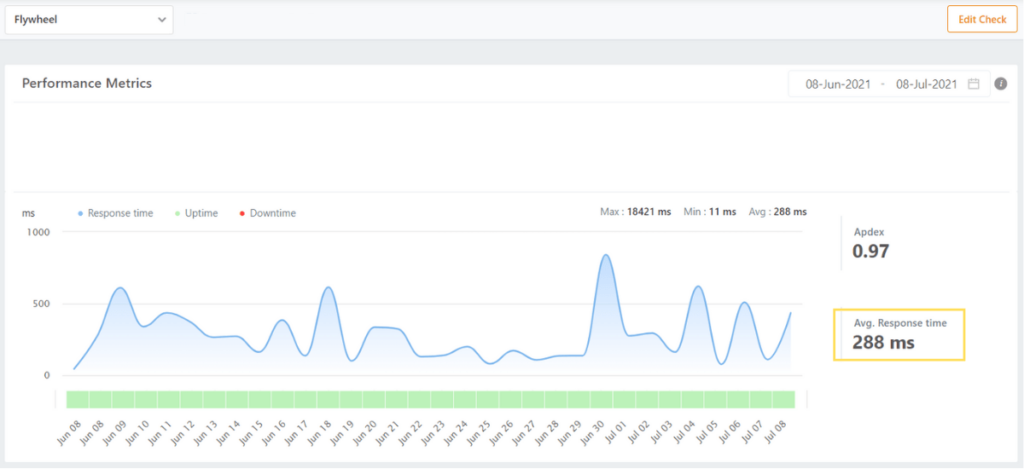
Just look at the results. Our test site averaged load times of just under one-third of a second and didn’t experience a single second of downtime all month long.
With all that considered, there’s no better choice for anyone building and hosting sites for clients than Flywheel.
WP Engine — The Best WordPress Hosting for Serious Ecommerce
A lot of the providers who offer WordPress hosting also provide WooCommerce-friendly packages or features. But, if you have ambitious ecommerce goals from day one, don’t settle for something you’ll outgrow in months.
WP Engine delivers managed WordPress hosting for online store owners who intend to dominate their industry or niche.
It starts with the excellent server infrastructure WP Engine offers its customers. They were one of the providers on this list to deliver flawless uptime during our month of testing, with no downtime incidents whatsoever. On top of that, we saw good page loading speeds that averaged well under half of a second for the month.
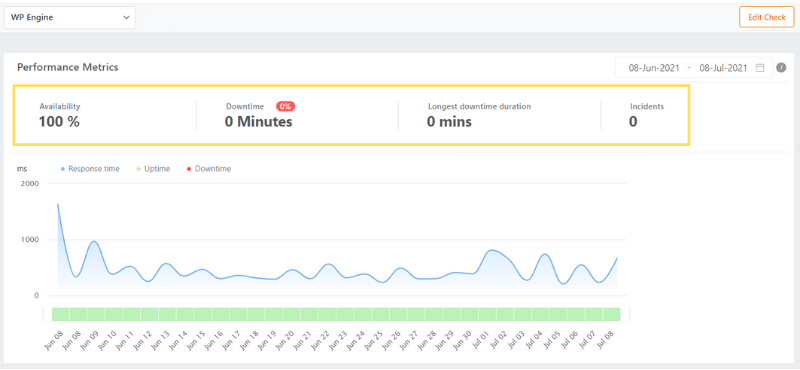
Those are both huge benefits for a WooCommerce site, as no online store wants to have to grapple with potential lost sales and customers that result from downtime or slow load times.
But WP Engine’s value goes beyond simple hosting performance.
Its current WordPress hosting plans include things like daily backups, one-click staging, automatic WordPress and PHP updates, SSL, SSH access, and WordPress-specific support. For ecommerce sites, WP Engine now positions store-focused features through add-ons and ecommerce solutions layered on top of its managed WordPress platform rather than through a separate old-school WooCommerce plan lineup.
The Startup plan currently starts at $30 per month and supports one site, with higher tiers available as your traffic and site count grow.
WP Engine might be a bit pricier than some comparable providers, but the platform’s speed, support, backups, staging, and ecommerce-ready stack are hard for many hosts to beat. As such, the slightly higher investment in your hosting can be a smart one, as it can unlock better site performance and visitor experiences, in turn creating more revenue for your online store.
Get serious about your WordPress-based ecommerce site by signing up with WP Engine today.
Nexcess — The Best Value for Managed WordPress Hosting
Nexcess remains one of the better paths to unlocking the peace of mind of managed WordPress hosting.
You’ll enjoy a clutter-free interface that lets you easily find things in the hosting backend when you need to. But so much is handled for you without you lifting a finger.
Every managed WordPress plan comes with the essentials, including automatic plugin updates, staging, performance tools, and autoscaling features that help absorb traffic spikes.

Nexcess goes further than a lot of hosts in day-to-day convenience, though, thanks to features like visual compare, free staging, automatic plugin updates, and cloud acceleration.
Current managed WordPress offers from Nexcess start at $4 per month on introductory pricing. As you scale up, you can unlock higher tiers that support more sites and more resources, while keeping the same managed approach.
Those plans also give you:
- 24/7/365 support
- Free staging
- Autoscaling during traffic surges
- Cloud acceleration
- Managed migrations
Those performance and scaling features imply that you can unlock serious speed on Nexcess. And, based on our testing, that assumption would be correct—we saw consistently good load times during the month we hosted our test site on Nexcess, and it delivered excellent uptime.
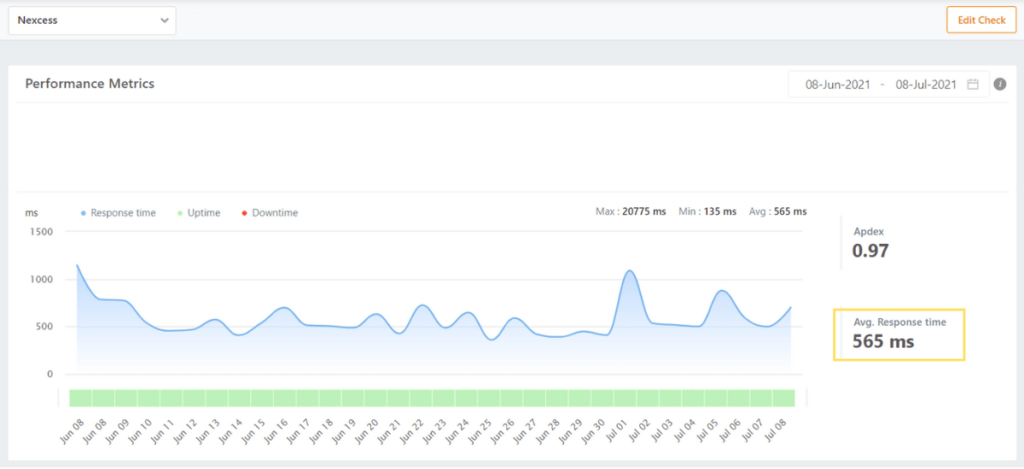
If the entry plan is too limiting for your WordPress site, Nexcess still offers a wide array of upgrades. All of them can deliver the stress-free, hands-off hosting experience you crave.
Kinsta — The Most Secure WordPress Hosting
Kinsta comes with more built-in security features than most other options on this list. If keeping bad actors, malware, and other threats away from your site data (and that of your visitors) is what you prioritize, Kinsta is one of the strongest options you can choose.
First off, Kinsta includes free malware removal and a strong Cloudflare integration that adds an enterprise-level firewall, DDoS protection, automatic SSL, and edge caching.
You also get automated backups that happen every day, with the option of initiating manual backups prior to making big changes to your site.
You’re getting much more than just malware cleanup and backups taken care of for you, though.
Kinsta also includes its own APM tool, which lets you track slow processes, database queries, external requests, and plugin-related bottlenecks so you can spot performance issues before they spiral.
A wonderful benefit of choosing Kinsta is that Cloudflare integration is included across managed WordPress plans, providing serious protection from attacks while also giving you edge caching and performance benefits without extra setup.
Getting this level of security and performance enhancement is a huge difference-maker.
On top of being packed with security features, Kinsta also offers a plethora of other benefits for your WordPress site.
One of the highlights is the advanced uptime and performance monitoring. Kinsta’s APM tool lets you track and analyze slow processes and transactions, database queries, external requests, and WordPress plugins.
For instance, you will be able to pinpoint a slow web page instantly and find out what’s causing it to lag.
We recommend that you only activate this feature when you need to check or troubleshoot something, though. Running it constantly in the background can negatively affect page performance.
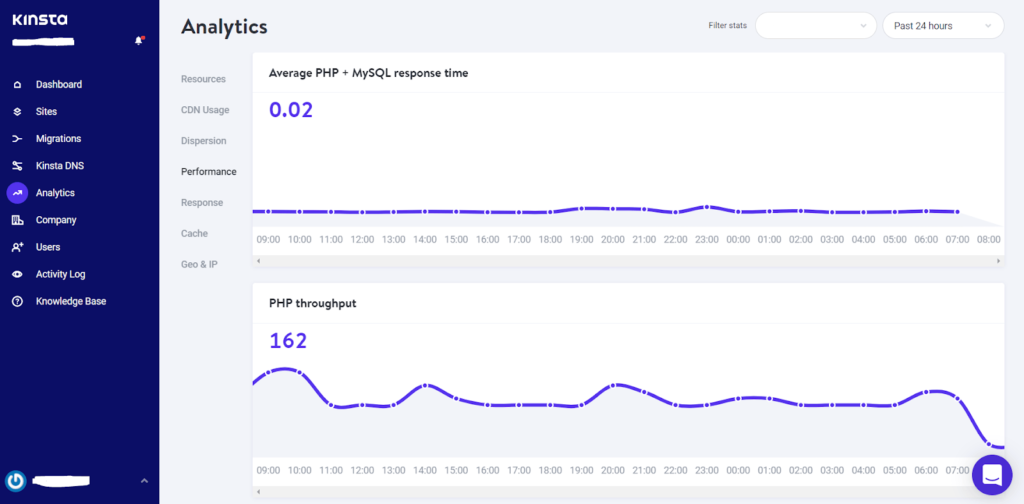
Beyond that, an analytics dashboard covers all sorts of site metrics for you at a glance.
Usually, you’d need to use a third party to get this kind of data. But Kinsta makes this available on every plan.
This is some serious visibility and control that Kinsta offers its users. But not everyone is going to know just what the fix is when they spot an issue or area for improvement.
That’s where Kinsta’s stellar customer support comes in.
Every interaction we had with Kinsta’s support team was excellent. We reached out to them three separate times, and each time the Kinsta representative was knowledgeable and gave us fantastic, detailed instructions on what to do.
For instance, we picked the support team’s brain about how to ensure our WordPress site stayed speedy on their servers. The rep we connected with ran a test on their end and was incredibly thorough in explaining the results of the test and what we can do to improve it even further.
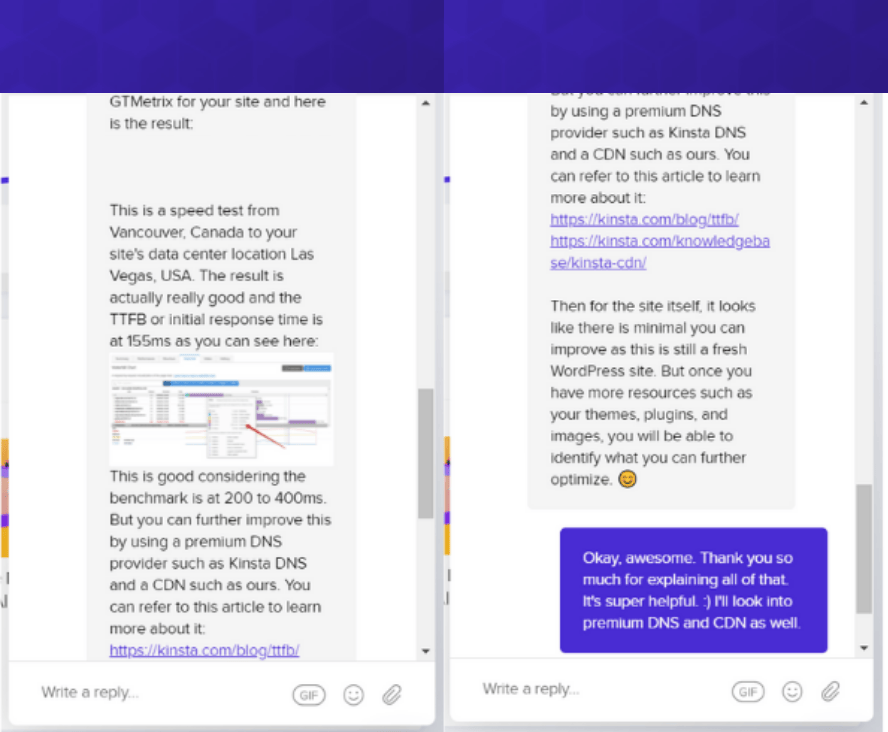
We appreciated that they offered specific advice for our site and not just a blanket statement that applies to everyone.
All of this comes at a steeper price than many others on this list. Kinsta’s managed WordPress plans start at $30 per month on annual billing and $35 month-to-month, then scale up from there if you need support for multiple WordPress installations or more resources and bandwidth.
While that price point starts steep (and gets much steeper for higher-end tiers), the included benefits in terms of security and backend support really justify those rates in our eyes.
Get rock-solid security and managed WordPress features by choosing Kinsta for your WordPress hosting service.
Methodology for Choosing the Best WordPress Hosting Service
Our team spent weeks collecting all the data that informed our recommendations.
We went deep on the research because we don’t want you caught on the wrong side of a decision when you pick your WordPress web host.
For every host that we tested, we went through an exhaustive procedure:
- We opened a brand-new account with a WordPress hosting plan
- Bought a separate domain name for each host and went through the signup process
- Created a fresh site with no images, pages, plugins—just a blank WordPress install
- We used the exact same WordPress theme and settings for every site
- Then we monitored site speed and uptime for an entire month
- And finished by submitting three tickets to gauge customer support
Using what we found during that process, we spotlighted the WordPress hosting providers that really rose to the occasion for any or all of these testing measures.
A lot of the differentiators between providers came down to pricing, managed hosting features, the level of customer support they offered, and unique benefits they included on their plans. We’ll cover a few of those in more detail below, as they’re the key elements to consider in your own purchasing journey.
Shared Hosting Versus Managed Features
You might be wondering if I’m looking for WordPress hosting why should I care about shared hosting?
The answer is that most entry-level WordPress hosting uses shared infrastructure. Some providers just use the same servers that you’d end up on with a traditional shared hosting plan. Others have shared environments they optimize for WordPress sites.
Either way, that usually means you can secure WordPress hosting for about the same price as many hosts’ shared hosting plans. In other words, it will likely be quite cheap—often less than $10 per month on introductory pricing.
Managed WordPress hosting isn’t necessarily on a different set of servers. You’ll find some WordPress plans called “managed” that just add a few extra features to a typical shared plan setup. Sometimes, though, you’ll find serious managed WordPress hosting providers that run on cloud-based or VPS-style configurations.
That means there’s a wide spectrum of managed WordPress hosting plans, from ones that just take care of simple backend stuff for you to others that deliver peak performance while also keeping your site secure and optimized in the background.
So, what’s the right flavor for you?
It comes down to how willing you are to take care of site administration and monitoring on your own. And, also, how worried you may be about the negative effects of sub-optimal site performance or security issues.
A lot of WordPress sites—especially new ones—don’t really have to worry about that too much. Basic security and reasonable performance are often enough when you’re just getting started. And, unless you’re building a very complex WordPress site, load times and uptime should stay within a good range for quality visitor experiences.
If that’s your case, you can just focus on getting the best deal on WordPress hosting with the features you need.
However, more robust sites, websites that capture a lot of data, and online stores will benefit greatly from the peace of mind that comes with managed hosting features.
What features should you expect from managed WordPress hosting?
On the most basic level, look for proactive security monitoring, backups, automatic updates, and easy recovery tools. Better managed hosts also handle more of the performance work behind the scenes and give you staging, migrations, CDN integration, and better support.
Another thing to look for is automated site backups. You don’t want to be stuck back at square one if, for any reason, your site breaks or becomes unusable. Good hosting providers give you daily backups and, ideally, on-demand backups or one-click restoration.
Beyond that, good managed hosting should also work behind-the-scenes to make sure your site is running as best as it can. That can entail the provider handling server management, caching, resource scaling, and optimization tools that would otherwise take extra plugins or a lot more manual effort.
There are even more benefits to gain from managed WordPress hosting, like free site migrations, advanced performance metrics and reporting, access to a premium content delivery network (CDN), site staging, and even client management tools for agencies.
Keep the wide variety of managed features in mind if you know you need more than just vanilla shared hosting for your WordPress site, or if you have ambitious plans for near-term growth.
Getting the Right Price for the Right Plan
Even though cheaper hosting isn’t always better, we understand that the price of hosting is a big hurdle for a lot of people.
Whether you’re just getting started, moving to a new host, or have years of experience, there’s no need to pay more than you need to.
The previous section started to outline how to think about pricing in terms of WordPress hosting. If you just need the basics, you’re going to find plenty of options with low price points comparable to traditional shared plans. If you need more—especially in terms of managed features or guaranteed better performance—you’ll likely see rates between about $10 and $30 per month for entry-level managed plans.
So, you can expect to see monthly rates ranging from around $3 to $30 or more within this hosting category. And, keep in mind that, like every other flavor of hosting, you’re going to see different rates depending on whether you opt for true monthly billing or commit to a year or more at checkout.
While that covers the long and short of it, there are other things to consider here as well.
For one, traffic or resource overages can create headaches if your plan is too small. Some lower-cost plans are less forgiving than others, while more premium managed providers make it easier to absorb spikes or scale up quickly.
When you need to accommodate more traffic and more resource consumption because of your growing website, be aware of how your host handles scaling and overages. Plenty of hosts make it easy to move up when you need to. Some even offer a wide range of WordPress hosting plans to make the next step painless.
Customer Support That Understands WordPress
Whether you’re experienced or not, you need a WordPress pro in your corner if anything goes awry.
But just how helpful are customer support teams on WordPress hosting providers?
We tested each host’s representatives out through three different live chat interactions, and put our judgement of how helpful they were in our reviews above.
To test them out, we asked one of three different questions when we connected with someone:
- What security features/measures do you offer to keep my site secure?
- Can you walk me through how to set up an email account for my domain?
- How do I make my site load as fast as possible?
We then documented the entire process, screenshots, and all. We noted how each interaction felt, and graded each provider on whether their assistance will actually benefit you whenever you need help or guidance.
The key to us was whether they demonstrated real expertise about WordPress and what a novice would need to know to get the most out of it.
There is a wide range of quality in terms of hosting provider support. We’ve made sure to call out the ones who were actually helpful and went above and beyond in their service. For us, a quality support team never tries to upsell us, doesn’t just rely on referring us to knowledge base articles or other external links, and doesn’t make us feel rushed during the conversation.
It’s not surprising that managed WordPress hosting tends to deliver better quality support overall, but you’ll notice in our reviews above that a couple of hosts also provide quality help on their traditional WordPress hosting plans.
Summary
If you’re using WordPress to create and manage your websites, Bluehost offers some of the best hosting plans for your needs. The features, affordability, and performance Bluehost delivers make them a well-rounded choice that’s going to work well for most people.
However, you can always refer to this guide when going through the process of choosing the best WordPress hosting service for your specific needs.
- Bluehost – Best for most businesses
- HostGator – Best for new WooCommerce sites
- Hostinger – Best if you need a lot of storage
- DreamHost – Best for scaling up your WordPress hosting
- SiteGround – Best customer support for WordPress
- Flywheel – Best WordPress hosting for client websites
- WP Engine – Best WordPress hosting for serious ecommerce
- Nexcess – Best value for managed WordPress hosting
- Kinsta – Most secure WordPress hosting