Not sure which tool to pick between PostHog and Mixpanel? PostHog is best for teams that need tight control over their data and don’t mind getting their hands dirty with technical work, while Mixpanel is ideal for SaaS teams that want an open-and-go solution.
Let’s dive into the features PostHog and Mixpanel offer and how the two compare.
PostHog vs. Mixpanel: A Quick Snapshot
TL;DR? Here’s a quick overview of the two behavior and website analytics tools.
| Feature | PostHog | Mixpanel |
|---|---|---|
| Event-Based Tracking | ✅ Highly developer-oriented event model (SDKs + API) ✅ Optional broad autocapture (clicks, errors, web vitals) ⚠️ More configuration if you want precision control | ✅ Event-driven analytics across web, mobile & server ✅ Clean SDK implementations ⚠️ Autocapture is more limited by default |
| Funnel Analysis | ✅ Build custom multi-step event funnels ✅ Create cohorts from user drop-offs ⚠️ Interface is more utilitarian than polished | ✅ Time-specific conversion windows ✅ Modern, color-coded funnel visualization ✅ Detailed drop-off reporting ⚠️ Less customization at the infrastructure level |
| Cohorts & Segmentation | ✅ Behavioral + property-based cohorts ✅ Filter by event frequency and custom properties ✅ Dynamic, automatic updates ✅ Cohorts reusable across funnels, flags, experiments | ✅ Event- and property-based cohorts ✅ Date & multi-condition filtering ✅ Strong intra-report segmentation |
| Integrations | ✅ SDKs, API, Zapier, and CDP destinations ✅ Direct integrations (Mailchimp, Jira, GitHub, etc.) ⚠️ Requires manual setup (API keys, mapping, filters), ideal for technical teams | ✅ Broad partner ecosystem (HubSpot, Slack, Mailchimp, etc.) ✅ UI-based authentication setup for a plug-and-play experience ⚠️ Less control in the backend |
| Dashboards & Reporting | ✅ Dashboards built from saved “Insights” ✅ Query-first reporting model ⚠️ More functional than modern and has an exploratory feel | ✅ Boards built from saved reports (Insights, Funnels, Retention, Flows) ✅ Clean, modern interface ✅Comparable reporting depth |
Feature Breakdown: PostHog vs. Mixpanel
1. Event-Based Tracking
PostHog
PostHog is a product analytics platform that lets teams capture custom events—aka, individual user actions—across their websites and mobile apps.
PostHog is very developer-friendly, and you can send events to PostHog via software development kits (SDKs) or API. These events can then be sliced and diced into funnels, segmentation, and trend charts to analyze what users are doing on your platform.
Compared with Mixpanel, PostHog can automatically capture a wider range of user interactions, like clicks, web vitals, and errors. You don’t have to turn autocapture on, but if you do, there’s less manual setup to do.
(Psst—see these PostHog alternatives for more excellent tools to consider.)
Mixpanel
Mixpanel’s autocapture is a little more basic. It focuses more on high-level interactions like pageviews and form submissions. If you want deeper interaction data—the likes of which PostHog automatically gives you—you’ll have to manually define which events you want Mixpanel to track.
Like PostHog, though, Mixpanel is fundamentally based on event tracking, not pageviews like some other web and user analytics tools.
With SDKs for web, mobile, and server-side tracking, Mixpanel tracks the actions users take inside a product, like using a feature, making a purchase, or changing something in an account. As with PostHog, these events then get fed into Mixpanel’s funnels, retention analysis charts, and reporting tools.
One big difference between Mixpanel and PostHog is that PostHog gives you the choice to self-host or run the program on the cloud. If you need tight control over your data, you can self-host. If you want the convenience of the cloud, you can have that too.
Mixpanel is a cloud-hosted service only, which means less control but more simplicity. See our full Mixpanel review for even more information on this popular tool.
2. Funnel Analysis
PostHog
With PostHog, you can define a specific sequence of user events to track. For instance, you can create a funnel comprised of “viewed pricing page” + “signed up for free trial” + “used feature for the first time.”
From there, PostHog will measure how many users make it through each step of the funnel. It’ll show you where users drop off, give you conversion rates, and segment the funnels by properties or cohorts that you define.
PostHog’s funnel results are a little bit cluttered—to my eye, at least—and less visually pleasing than Mixpanel’s. But PostHog’s audience of developers probably appreciates that the focus is more on presenting data than on making that data look pretty.
Or maybe—and actually, this is probably it—they’re super dedicated to the 1990s vibe.
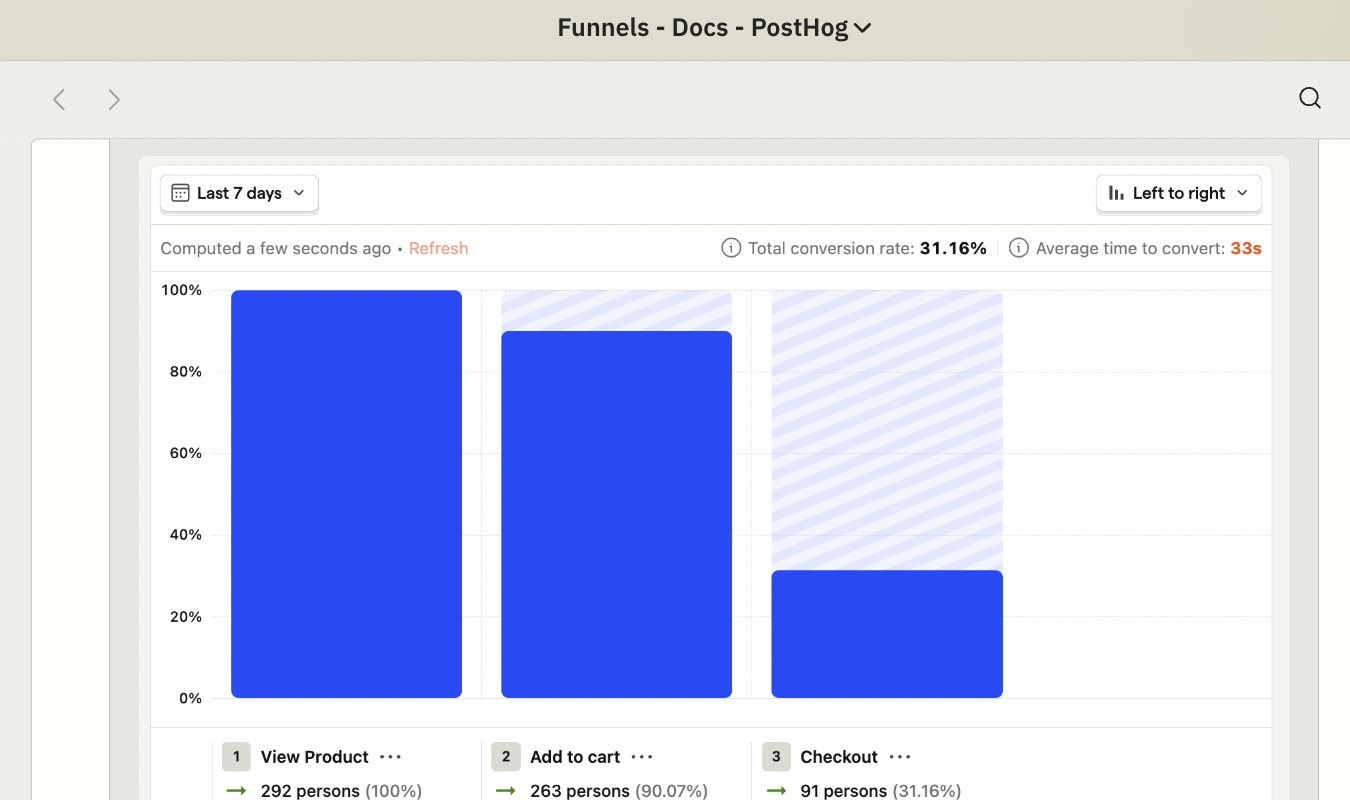
If people don’t convert—and there will be plenty who don’t, because that’s just how the game goes—PostHog lets you create cohorts out of these users so you can study their behavior and try to win them back.
Mixpanel
Mixpanel’s reports are also built on event sequences. They measure how users go from one event to another within a set timeframe. (This conversion window feature isn’t available at the same level on PostHog.)
In Mixpanel, you can also see how many users complete each step of a journey and highlight where drop-offs happen.
It then calculates the conversion rates between each step of a funnel, and, like PostHog, lets you segment users by specific attributes, conversions (or lack thereof), and ranges of time.
Plus—in my humble, non-developer-brained opinion—Mixpanel’s funnels are just prettier. They present more data than PostHog, surprisingly, but with color-coding, the data is easy to absorb and study.
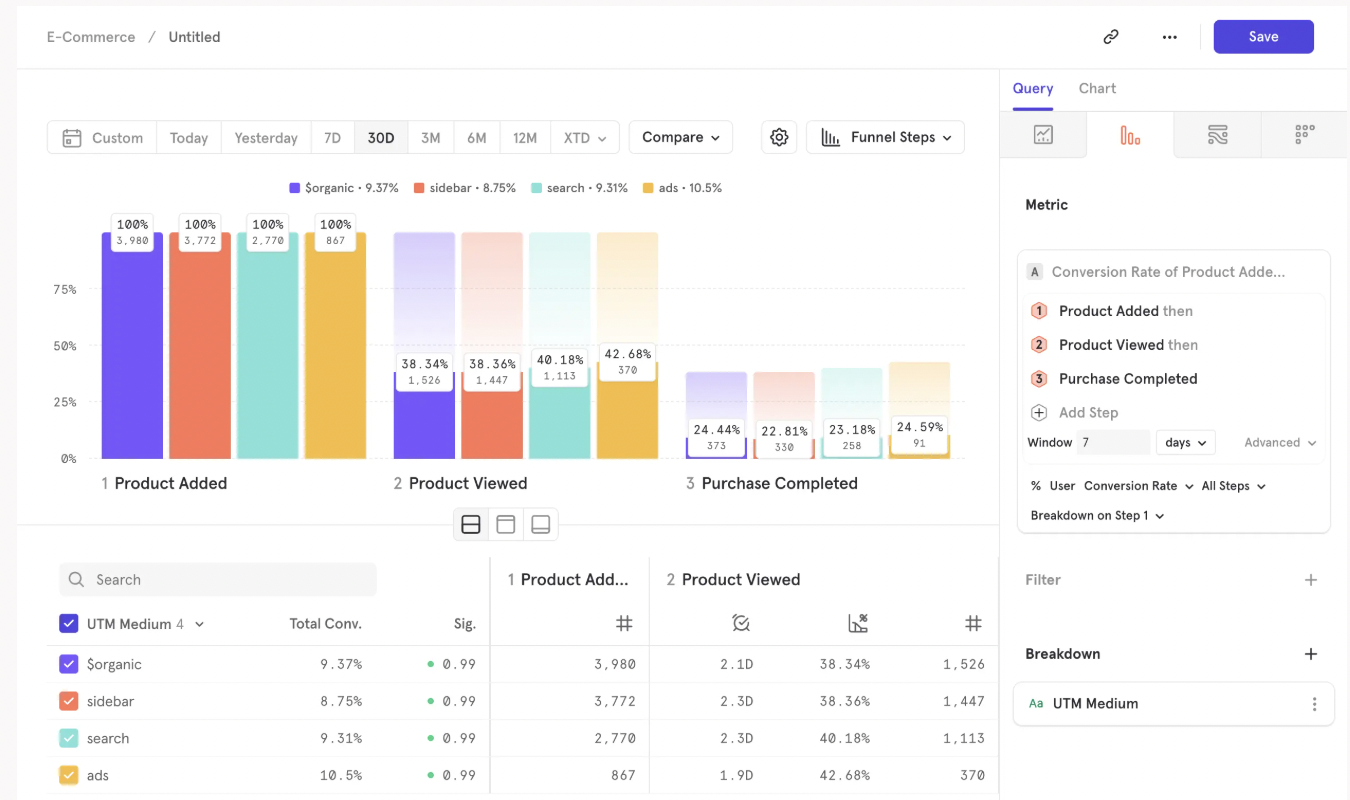
See what I mean?
3. Cohorts and User Segmentation
PostHog
PostHog lets your team create user cohorts based on behavior or other properties that you define. It’s fairly easy to set up cohorts. First, you’ll identify specific events you want to track, like “Completed Signup” or “Used Feature A.”
Next, you’ll identify the event frequency you want to track, if any. To see how often someone uses an important feature, you can define a cohort as any user who “Used Feature A more than 3 times,” for instance.
After you’ve defined the events and frequencies you want to track, you can further filter the cohort by user properties and behavioral traits, including:
- Geographic location
- Plan type
- Type of device (web, iOS, Android)
- Operating system or web browser
- Traffic source
- Account creation date
- Any custom user attributes your team wants to define and track
Cohorts in PostHog update automatically as users meet the criteria, and drop them if they no longer meet it. You don’t have to do any of that automatically. Once the cohorts are set up, you can use them for funnels, trend charts, feature flags, retention reports, A/B tests, and surveys.
Mixpanel
Like PostHog, Mixpanel supports behavioral, event-based cohorts. You can create them according to:
- Completion of an event
- Frequency of an event
- User profile properties
- Time- and date-based conditions
You can also track users and cohorts according to multiple conditions with Mixpanel. For instance, you can create a cohort that’s a mix of “Users who signed up” + “Users who have used Feature A at least two times” + “Users who are on the Pro plan.”
I like how deeply you can filter cohorts on both Mixpanel and PostHog. This type of precision helps you optimize each area of your website or app for every type of user who touches your platforms.
4. Integrations
PostHog
PostHog supports a variety of integrations and connections that funnel data into and out of its analytics platform. These include:
- SDKs (JavaScript, Python, React Native, and the like) and an API to send events, interact with data, and integrate PostHog into various website and mobile products.
- Third-party connectors, including Zapier, which connects PostHog to thousands of tools without pushing you to use any code.
- Direct integrations with tools like Jira, Linear, GitHub, Mailchimp, ClickUp, and other popular platforms.
Keep in mind, though, that the direct integrations are not as easy to use as the native integrations Mixpanel offers. You have to configure the entire integration yourself by managing API keys and audience IDs. It is not plug-and-play.
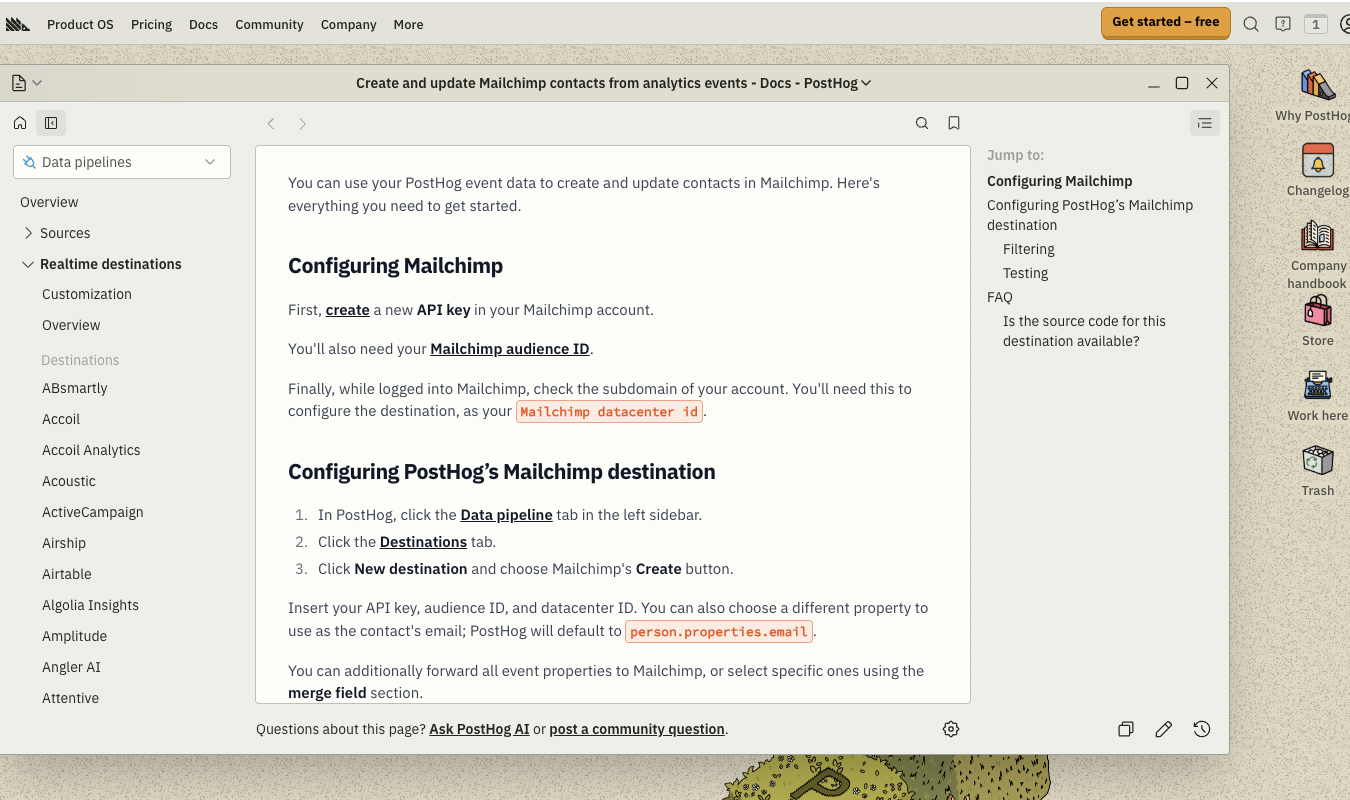
Considering that PostHog’s primary audience is teams with technical know-how, this isn’t necessarily a bad thing, unless you want plug-and-play integrations.
For that, you’ll want Mixpanel instead of PostHog.
Mixpanel
While PostHog comes in both self-hosted and cloud-hosted options, Mixpanel only offers a cloud-hosted product. This means its integrations are geared more toward ease of use rather than offering users full control over every little detail.
Mixpanel offers partner integrations with a bevy of tools, from Hubspot and Slack to ABTasty and—yep—Mailchimp!
All you have to do to set these integrations up is go to the Integrations section in Mixanel, choose which tool you want to integrate with, authenticate the app, and configure what data to sync.
Unlike with PostHog, you won’t be doing nearly as much manual API key management or all the other technical things the more hands-on tool requires you to do.
Of course, I’m not saying PostHog is bad at integrations. Far from it. The difference is more in the philosophy of how data flows between systems. With PostHog, you get deeper control but more upfront work to do. With Mixpanel, you have less control but also less work.
5. Dashboards and Reporting
PostHog
With PostHog, your team can build a custom dashboard with everything you want to see: trends, funnels, retention reports, and the like. Just as a note: reports are first built as “Insights,” as PostHog calls them.
These are just single, analytics queries, like a specific chart or report, that PostHog builds using your event data. Once you create an Insight, you can add it to a dashboard or just save it to compare future Insights with later.
All in all, dashboards and reports are query-first with PostHog. Insights are the building blocks for the specific dashboard configurations your team curates.
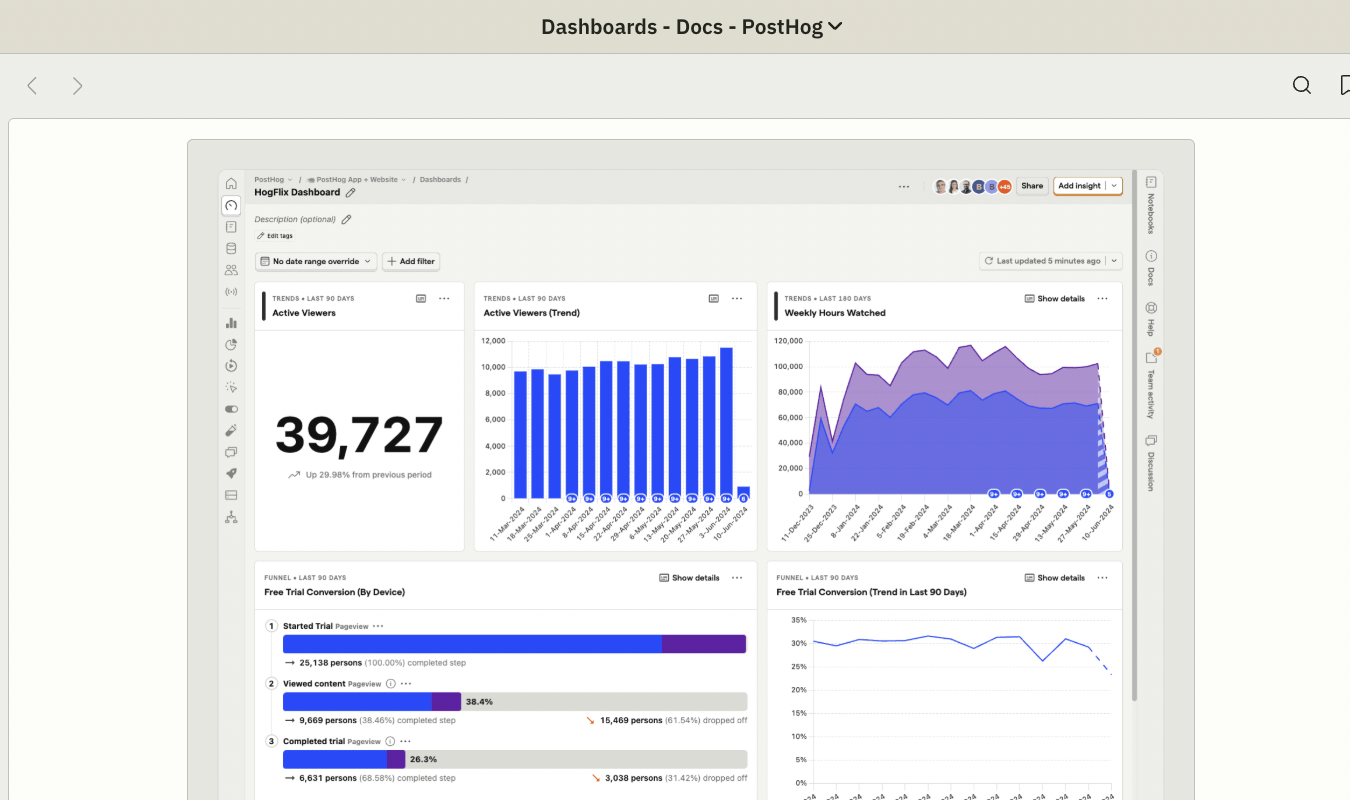
As with every PostHog feature, the dashboards’ visual appeal and clarity is a little lost in 1990s-era websitecore, if you will, but it’s still tidy and readable.
Mixpanel
Mixpanel also allows you to create fully customizable dashboards, and as with PostHog, you build these dashboards using saved reports.
In Mixpanel, they aren’t all called one thing, though—the building blocks here include Insights (aka trend reports), Funnels, Retention, or Flows. These each represent a different type of Mixpanel-powered analysis.
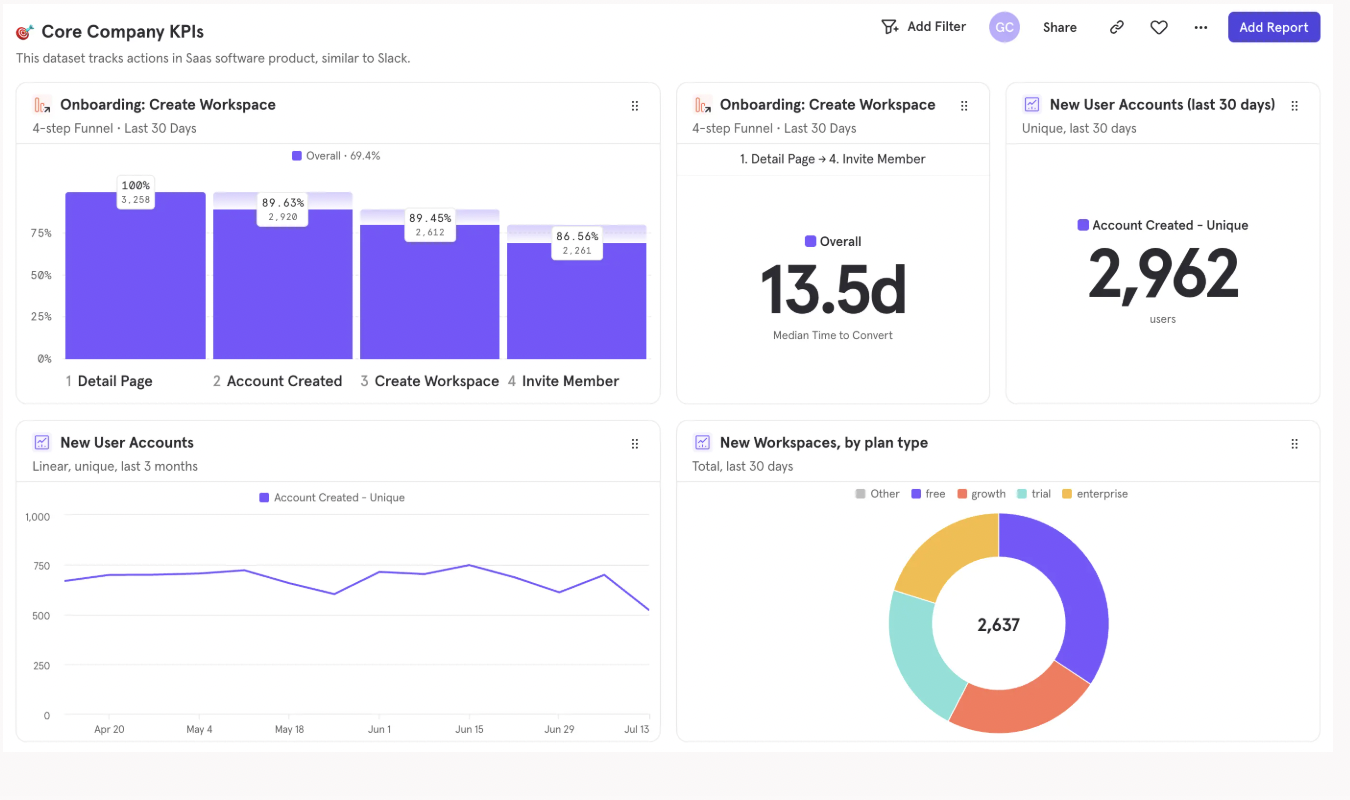
Once you save a report, you can add it to a Board—Mixpanel’s term for a dashboard.
You rearrange the dashboard, apply date and time filters, and share the results with your teammates. The dashboards here are more modern, and therefore a little less cluttered, than what you get with PostHog.
But functionally, the two are equals when it comes to dashboards and reporting capabilities.
Pricing Breakdown: Which Has the Best Value?
How do PostHog and Mixpanel compare, pricing-wise? Let’s take a look.
| PostHog | Mixpanel |
|---|---|
| Free plan available with generous monthly event limits and core product analytics features. Can self-host for more control. | Free plan available with event limits and access to core reports (Insights, Funnels, Retention). Cloud only. |
| Paid plans scale based on events used, plus add-ons (like session replay, feature flags, surveys). Costs grow as usage does. | Paid plans scale based on events tracked and features used. Pricing tiers get you more advanced analytics and higher limits. |
| Good fit for teams that want control over hosting and don’t mind managing their usage carefully. | Good fit for teams that want straightforward SaaS pricing and minimal infrastructure decisions. |
| Best value for: technical teams who want lots of control and the option to self-host. | Best value for: product and growth teams who want polished analytics without a complicated setup. |
Final Verdict: Is PostHog or Mixpanel Right for You?
After studying both tools, here’s my takeaway:
Choose PostHog if you want lots of control over your product, love the nerdy, retro, and yet somehow also sophisticated feel of the platform, and don’t mind setting up and configuring things yourself to get exactly the level of precision you want.
Choose Mixpanel if you want a modern, cloud-based web and product analytics platform that’s easier to set up and manage without needing engineering know-how.
And if what you really want is a behavior analytics tool for your website that also includes tools like heatmaps, session recordings, surveys, and A/B tests, try Crazy Egg.
With clear, upfront pricing (and free-forever tools that include web analytics, instant heatmaps, conversion analytics, and surveys) Crazy Egg has everything you need at one predictable monthly price. Learn more about how Crazy Egg’s web analytics work to give you the insights you need.