All Heatmaps in Crazy Egg can be exported in a format specifically designed for AI. You can upload your Heatmap data to any AI tool, and have it analyze your visitors’ behavior patterns for you.
AI Exports for Heatmaps now include data from your Conversions. You can ask your AI tool to go beyond surface-level activity like clicks, scrolls, or hovers, and find what actually drives conversions.
It can now help you actually find Conversion Rate Optimization (CRO) opportunities on the page:
- Which conversions happen most from visitors to this page?
- What do converters do differently from non-converters?
- Which page content drives the most conversions? Which gets attention, but doesn’t drive action?
- Where is friction stopping visitors from converting?
- What optimizations are most likely to improve my conversion rate?
This means you can not only use your AI tools to understand what visitors are doing on your site, but to identify new CRO ideas — which you can then try out in A/B Testing.
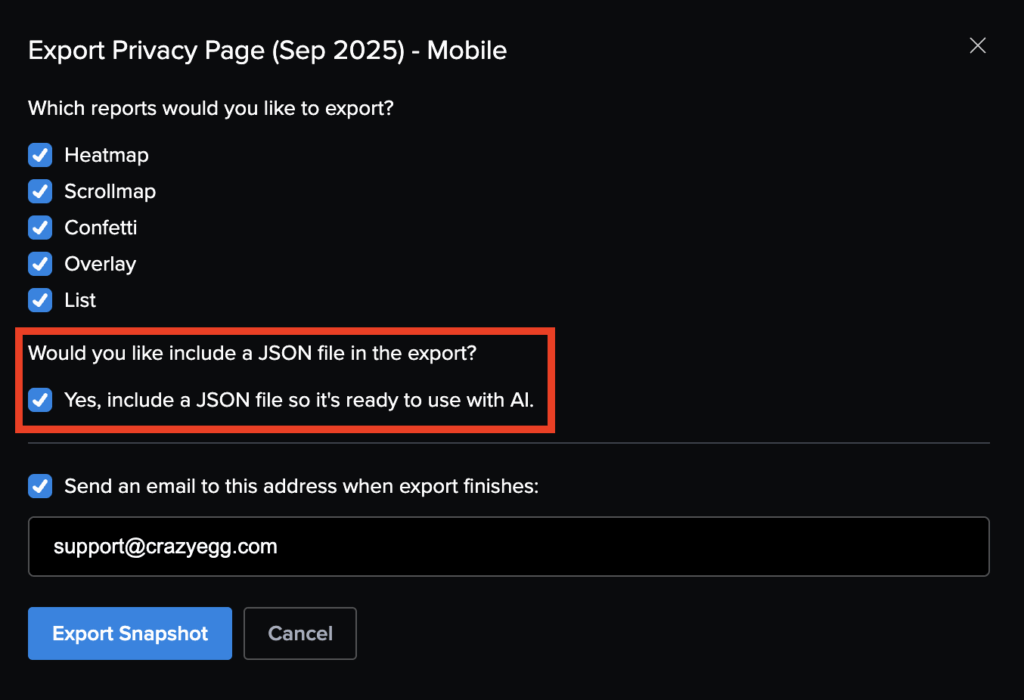
To access AI Exports for Heatmaps: first go to any Heatmap report. Click the three dots in the top-right, click “Export”, and make sure “Yes, include a JSON file so it’s ready to use with AI” is selected (pictured). Then upload the file to your AI tool. The AI Export will include data from any events you’re tracking in Conversions.
AI Exports for Heatmaps are available for all Crazy Egg customers on Pro and Enterprise plans.