Looking for a UXtweak alternative that’ll knock your socks off? We’ve got four alternatives to suit a range of needs: Crazy Egg, Mixpanel, Smartlook, and Mouseflow.
My Personal Top 3 Alternatives to UXtweak
If you need a quick overview, I’ve outlined my top three choices in this handy table.
| Best for SMBs that want a tool that offers easy-to-use session replay, 5 heatmap types, native A/B testing, and surveys. | Best for product-based teams that need deep, event-based analytics, funnels, and AI tools to help generate reports. | Best for teams that want a “UXtweak lite” experience with all the key features for mobile and web—but affordable. |
|---|---|---|
 |  |  |
| Crazy Egg Pricing: $29+/month, free tier available What I like: Easy to install, focused session replays, 5 heatmap types, native A/B testing, on-site surveys, helpful AI summaries, and a robust free plan. Read more | Mixpanel Pricing: Paid plans scale with event volume; free tier available. What I like: In-depth event-based tracking, funnel building and analysis, retention-tracking and segmentation tools, and AI insights. Read more | Smartlook Pricing: $69+/month, free trial available What I like: Session replay with integrated heatmaps, event and funnel tracking, and support for both web and mobile, just like UXtweak. Read more |
How I Chose These UXtweak Alternatives
UXtweak is a UX research and usability testing platform. Its goal is to help teams understand how their users interact with websites and apps. To that end, UXtweak offers session recordings, heatmaps, usability tests, and feedback tools.
For some, UXtweak offers a little too much in the testing department and not enough elsewhere. We’ve got alternatives for that.
Here are the criteria I looked at while choosing these four UXtweak alternatives:
- Session replay without enterprise excess. UXtweak offers powerful session replay and testing tools, but it can feel like too much for teams that want quick user experience insights instead of structured research studies. For these teams, I prioritized tools that offer simple but streamlined session replay. My main goal here was to find products that are easy to set up and easy to manage.
- Heatmaps that quickly offer you clear, actionable patterns. UXtweak does include heatmaps, but they can be cumbersome and confusing to interpret, mostly because of the sheer breadth of data points they track. I looked for tools with plug-and-play heatmaps that are easy to interpret, organize, and segment.
- Native A/B testing and survey features. I firmly believe that numbers only tell one side of the story. They show what users did, but not why. A/B testing helps validate whether a change actually improves outcomes. Surveys add something priceless: real context from your users that can show you their confusion, opinions, or intent that raw behavioral data can’t explain by itself. UXtweak supports surveys and testing, but often within the context of formal research workflows. I prioritized tools that make A/B testing and feedback collection fast and easy.
- Lower and more predictable pricing. UXtweak’s pricing scales with usage, and the free plan is fairly limited in what it offers. I prioritized tools with generous free or low-priced plans as alternatives.
- Usable by non-techy teams. UXtweak is often a great tool for engineering-led and tech-savvy teams. It’s really not ideal for small businesses or entrepreneurs. Yet, those of us on the more SMB side of things still need a way to analyze our web and app visitors. I looked for tools that fit this need without requiring the hire of an IT department.
Without further ado, here are the four UXtweak alternatives that met most or all of these qualifications.
1. Crazy Egg
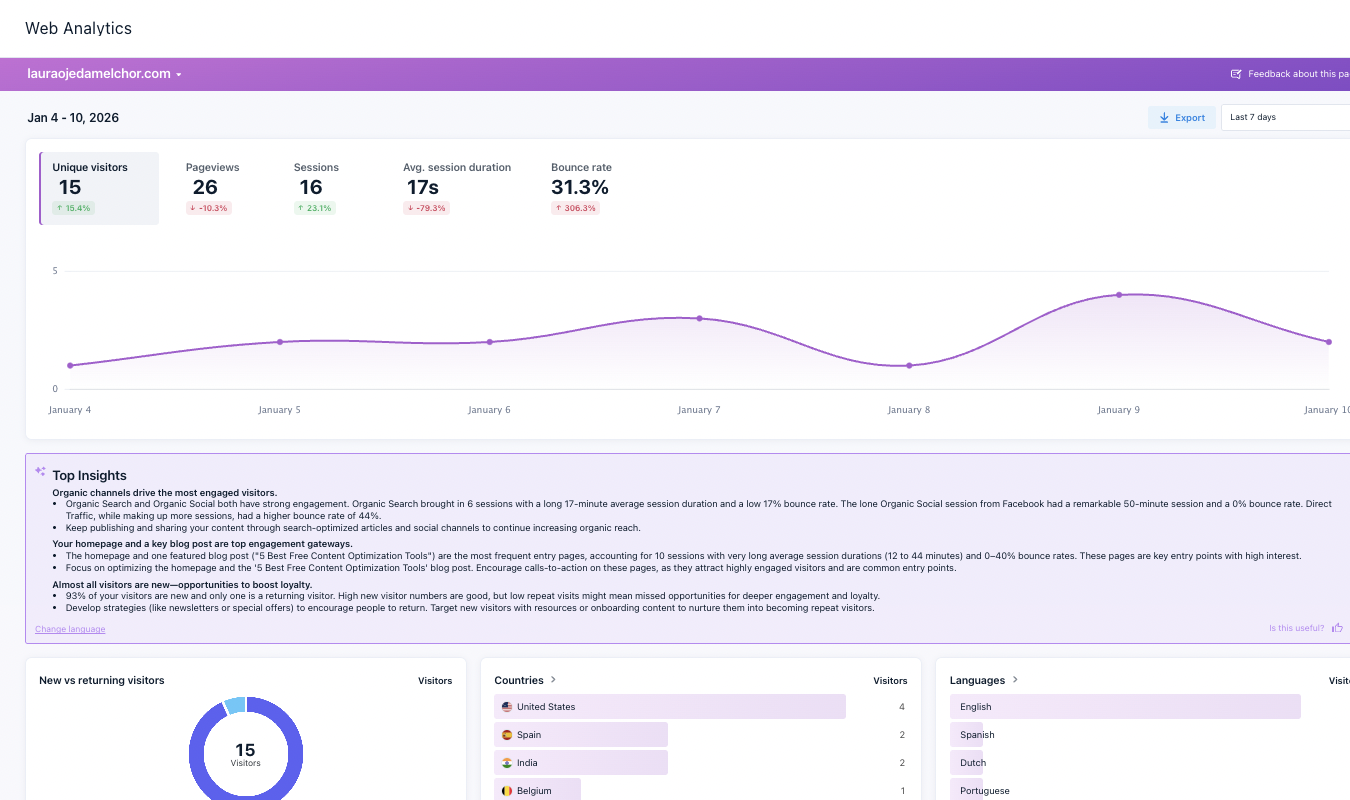
Crazy Egg is a behavior analytics platform for businesses that primarily want to track website-based data. (I have just begun using it for my own website—more on this in a moment!)
What I like:
- Visual behavioral insights: Crazy Egg turns raw interactions into visuals that are easy to interpret. You don’t have to comb through overwhelming data dumps and try to glean insights from those numbers. Instead, as you can see in the screenshot above from my own Crazy Egg dashboard, the data is organized. Main stats are color-coded to reflect improvement or decline in performance. A line graph represents web visitors. The summary, generated from your data with the help of AI, provides not just an overview but also key next steps for growth. (And yes, I will be taking Crazy Egg’s advice here as I work to increase web traffic to my author/freelancer website.)
- Easy setup. All it takes to set up Crazy Egg is installing a simple tracking script on your site. I’m not the most deep-tech-savvy person on the planet. I was a little afraid I would break my Squarespace site when I inserted the tracking script into the header page code of my website. I didn’t, of course, because I followed Crazy Egg’s detailed yet concise instructions to the letter. It took just a day or so for data to begin to populate my dashboard. I love going from not knowing what my web visitors look like or who they are to actionable insights within a day.
- Streamlined session replays. Crazy Egg’s recordings are simpler and more focused than UXtweak’s. Instead of pushing you to capture every interaction across various apps and internal tools, Crazy Egg keeps your replays page-focused. You get to watch how users interact with a specific page (like your signup or checkout page) instead of following them across every interface related to your brand. UXtweak, for instance, focuses on showing you long, end-to-end sessions across multiple screens and tools. It answers the more general question of “What did this user do on every interface my company owns?” Crazy Egg helps you answer a more focused question: “What’s tripping people up on this particular page?”
- Easy experimentation is built into the workflow. UXtweak offers complex and comprehensive testing features. I wanted something simpler. With this UXtweak alternative, you can quickly and easily build split tests to find out which variation of a button, page, or CTA performs better with your web visitors. No extra steps or tools to deal with.
- Qualitative feedback via surveys. In my opinion, the ability to gather surveys from web visitors is a core feature for any behavior analytics tool. In Crazy Egg, surveys are a core feature, which means you have a way to gather NPS scores and written feedback from your site. Crazy Egg’s pre-built templates and survey builder give you a range of survey types to pick from. And with AI summaries, the most important insights within the surveys are quick and easy to glean.
What could use improving:
- Website-only focus. Unlike a few of the other tools on this list, Crazy Egg focuses only on website analytics. It does not support apps. For some—like me—this isn’t a dealbreaker because we don’t have apps and would rather not pay for a pricier tool that includes app analytics in every package. But for those that do have apps, it could be an issue.
Who should use it:
- Teams that want quick, easy-to-understand insights into how users interact with their website. Paid plans begin at $29 a month, and Crazy Egg also offers a robust free plan that includes web analytics, instant heatmaps, and surveys.
2. Mixpanel
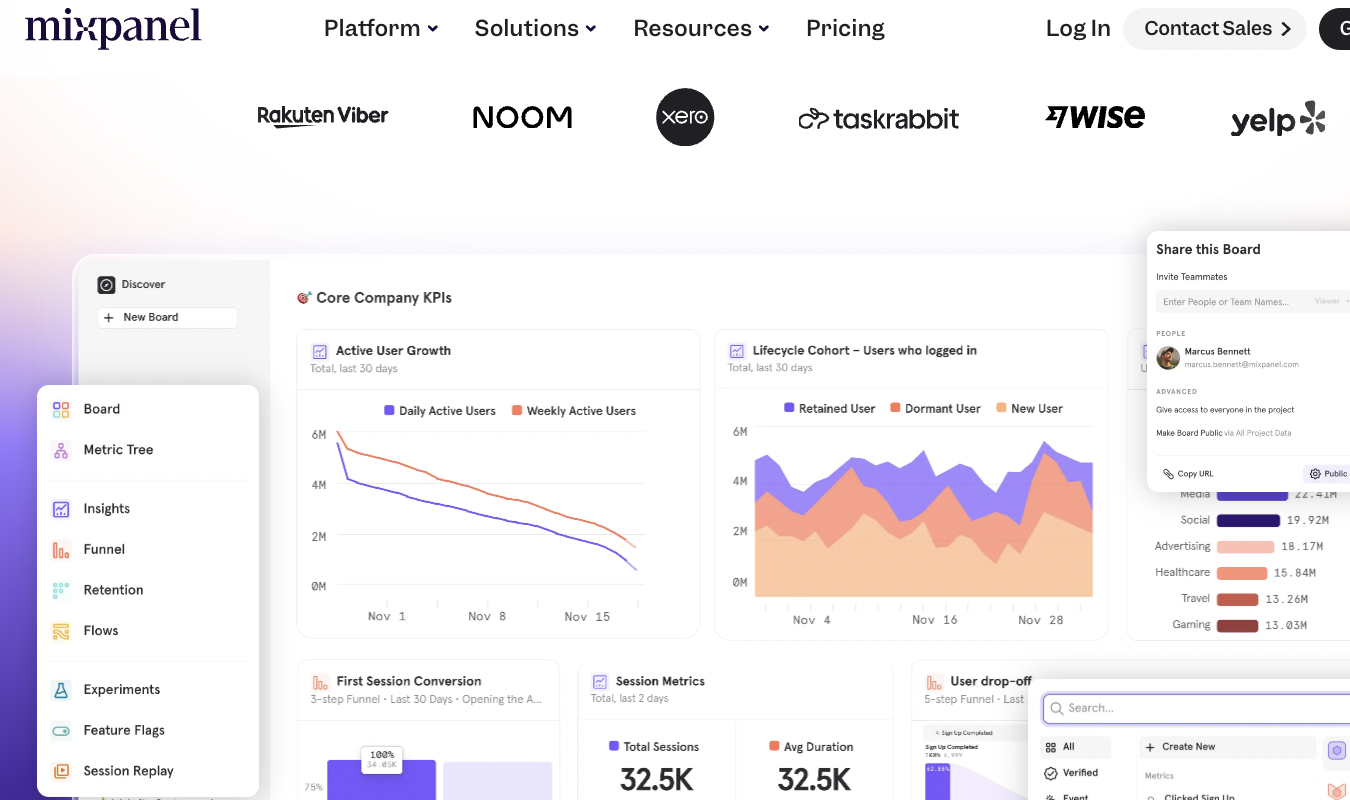
Mixpanel is a product analytics tool built to show how users move through your website or app over time with a birdseye focus on events, funnels, and retention. While Mixpanel isn’t a traditional UX research tool like UXtweak, it’s a solid alternative for teams that care more about behavioral outcomes than moderated testing.
What I like:
- Event-based tracking that goes deeper than pageviews. Mixpanel is built around tracking user interactions—events—on your site or app. So instead of mainly showing which pages users visit and how they interact with them, you get a more granular view of the specific actions users take. If specific buttons, flows, or features carry a huge importance for your brand, Mixpanel lets you see how often they’re used, where users drop off, and which behaviors lead to conversion or retention over time.
- Powerful funnels and retention mapping. This UXtweak alternative is heavy on funnels, and for good reason. Mixpanel makes it easy to map multi-step user flows, see exactly where users drop off, and track whether people return over time. This helps your team see which actions across your website and app keep users engaged with your brand.
- Strong user segmentation features. With Mixpanel, you can group users in a variety of ways, including by behaviors (like those that have completed onboarding), cohorts (like users that signed up in the same week), and properties (like plan tier, location, or device). This makes it easy to compare how different groups behave over time—and what makes them stick around. And with that information, you can tailor features to click with each segment.
- Experimentation and reporting support. Like Crazy Egg, Mixpanel offers an AB testing feature, and it provides detailed reporting that ties the results from your experiments directly to user behavior. This allows you to see how different variants impact metrics like engagement, conversion, and retention over a span of time.
- AI-assisted insights and summaries. Mixpanel’s AI tools can do a few nifty things, including generating insights from your data and highlighting trends, anomalies, and next steps (like Crazy Egg does). And with its Spark AI feature, you can also ask questions in plain language and get detailed reports without having to assemble them yourself.
What could use improving:
- Steeper learning curve, especially for those who need simpler analytics. Because it’s event-based, Mixpanel is more complex than other UXtweak alternatives, like Crazy Egg. It takes teams more upfront planning and data literacy skills to set up events. For example, you have to decide in advance which user actions you want to track and how they should be named. Before you do this, the data isn’t very useful.
- No surveys. Unlike Crazy Egg and UXtweak, Mixpanel doesn’t offer a native way for you to gather insights for your team. It’s all about the numbers, numbers, numbers, which, to me, is a sacrifice. Sure, you can use an integration, but then you have to pay for an additional tool and go through the process of linking it up to your Mixpanel dashboard. A built-in survey tool would be a step up for this UXtweak alternative.
Who should use it:
- Product and growth teams that need to know how specific user actions and features drive conversion and retention. Mixpanel offers a free tier, with paid plans that scale based on event volume and usage—check out the Mixpanel pricing calculator for more information. Want a deeper dive? Our Mixpanel review tells it all—the good and the bad.
3. Smartlook
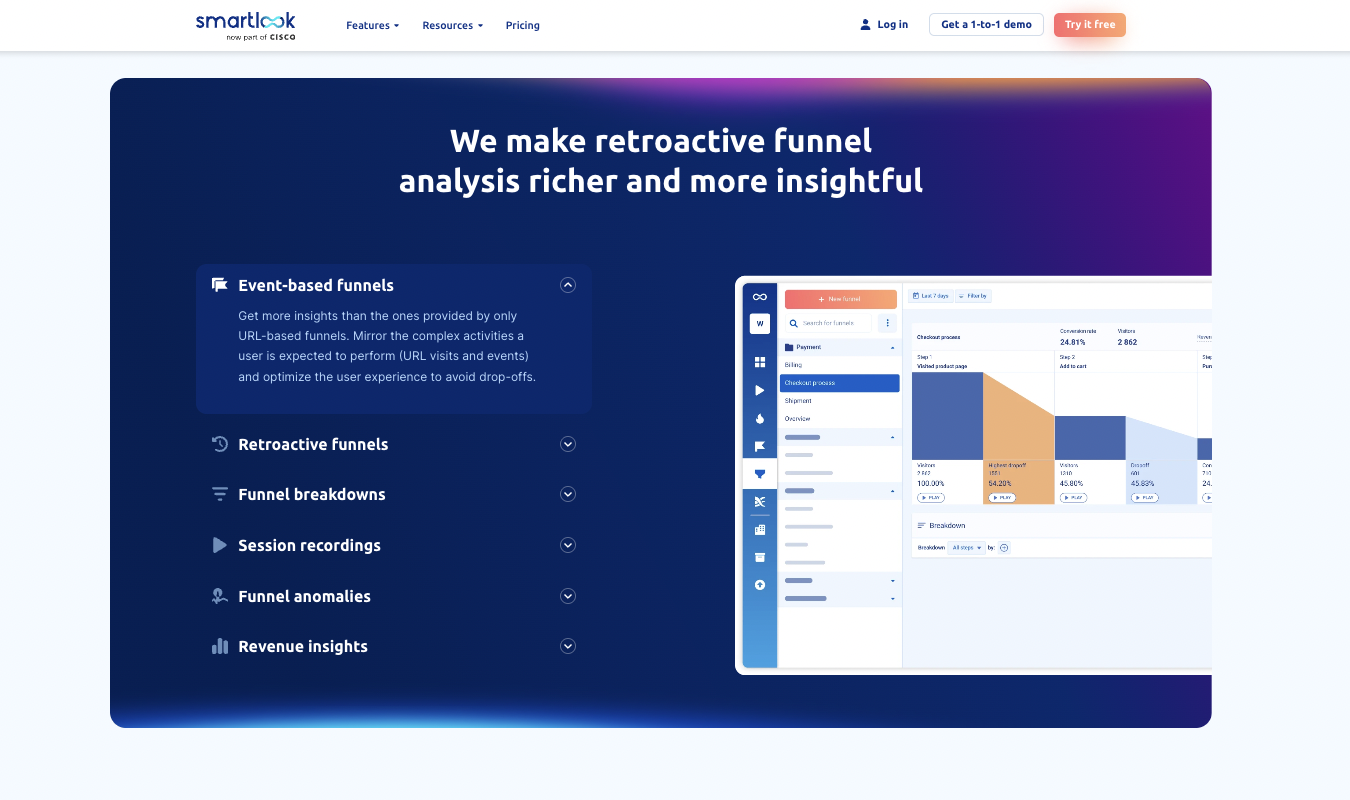
Smartlook is a user behavior analytics platform that lets you analyze sessions, funnels, heatmaps, and events across both apps and websites.
What I like:
- Always-on session recordings. Like UXtweak, Smartlook automatically captures all sessions and user interactions. No click, scroll, or input goes untracked, which means your team gets detailed session replay data across your website and mobile apps.
- Integrated heatmaps. With Smartlook, you can make heatmaps using session data that you already have. For instance, you can generate a click or scroll map to see the user patterns (or snags) that emerge in a visually pleasing way.
- Event tracking and funnels. Smartlook also pairs its session replays with tools like event tracking, and funnel building and analysis. These features help you spot drop-off points and actually see the user behavior that takes place around these trouble areas.
- Web and mobile support. This UXtweak alternative—like UXtweak itself—works on both apps and websites. For websites, you’ll install a tracking script (just like I did with Crazy Egg) to record web sessions, clicks, scrolls, and navigation. For mobile apps, Smartlook provides native software kits (SDKs) that plug right into iOS, Android, and other common application frameworks.
- Flexible filters and segmentation capabilities. You can filter session recordings by a variety of characteristics, including URL, device, country, session duration, or even specific events (like users who added an item to a cart but didn’t complete the purchase).
What could use improving:
- No native survey or AB testing tools. UXtweak offers robust testing and survey tools. It would be nice if Smartlook followed this path too.
- Can be pricier than other UXtweak alternatives. Smartlook’s paid plans cost a bit more than tools like Crazy Egg and Mixpanel, even for the lowest paid tier, and the costs rise exponentially as usage scales.
Who should use it:
- Teams that want UXtweak-style session replays and UX behavior insights, but with integrated heatmaps, funnels, and event tracking in a simpler, all-in-one platform. After Smartlook’s generous free tier, paid plans begin at $55 a month. For other, similar options, see our roundup of Smartlook alternatives.
4. Mouseflow
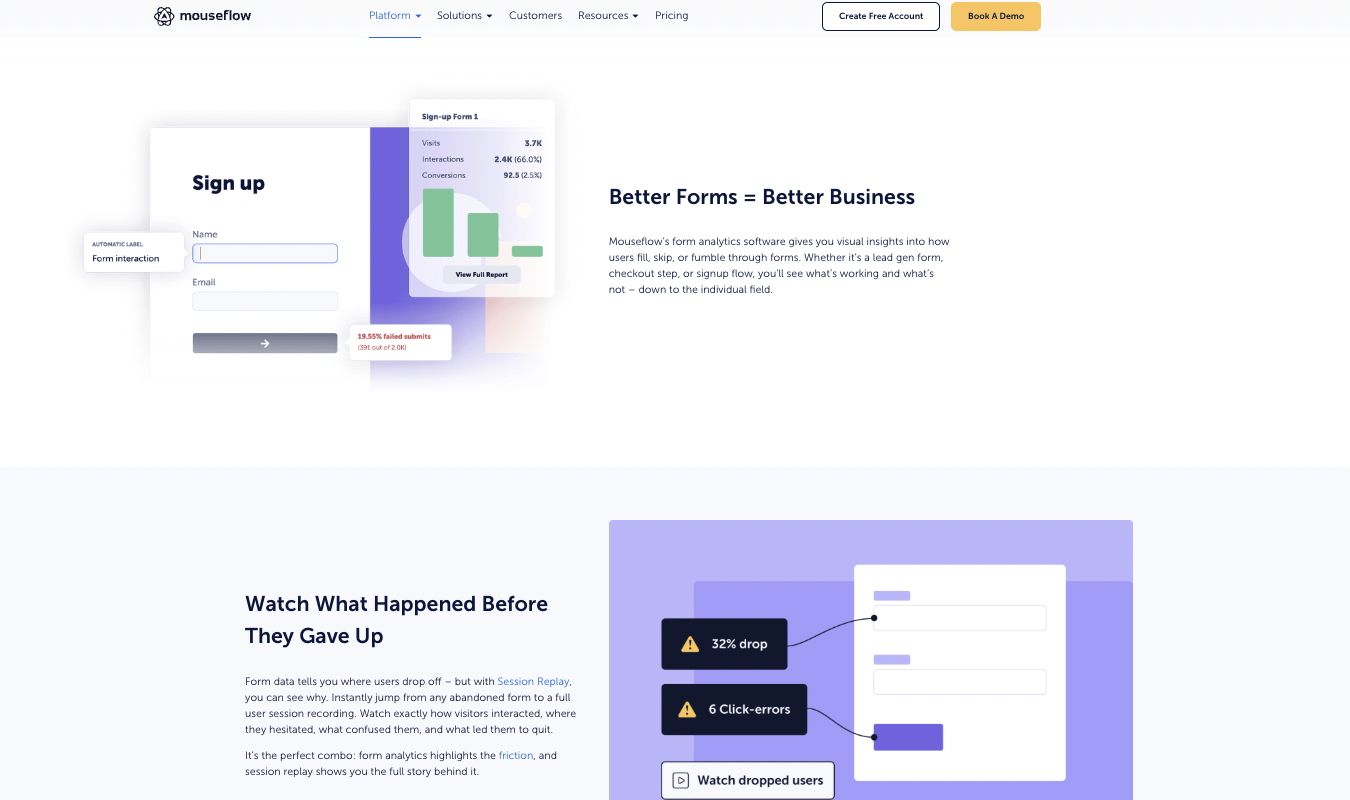
Mouseflow offers all sorts of analytics, including form analytics, session replay, and heatmaps, so teams can get a clear view of how users interact with their website.
What I like:
- Session replay that’s easy to work through. Like UXtweak (and other alternatives on my list), Mouseflow records user sessions so you can watch how visitors navigate through your site. Mouseflow adds timeline markers, playback controls, and filters so you can quickly jump to specific moments instead of being forced to watch all the in-between stuff if you don’t want to.
- Heatmaps—lots of them! Mouseflow offers a full seven heatmap types, including click, scroll, movement, attention, geographic, live, and friction maps. These are all generated automatically for any webpages that get traffic. Together, this menu of heatmaps makes it easy to see what users focus on, what they ignore completely, and how far they really make it down a webpage.
- Detailed form analytics. One of my favorite Mouseflow tools is its form analytics feature, which shows where users abandon fields, hesitate, or run into technical issues inside forms. If you frequently rely on forms for newsletter signups, coupons, and checkout processes, Mouseflow can be an excellent choice for this feature alone.
- Funnels are tied to actual user behavior. Mouseflow’s funnels show you where users drop off in multi-step flows. You can go straight from a funnel step into the session recordings that show you the contextual actions around that step. This makes spotting and solving common UI and UX problems easier.
- Easy setup. Like a few of the other UXtweak alternatives on our list, Mouseflow offers a plug-and-play setup. Just install a tracking script and Mouseflow will start collecting data you can use, right away. You don’t have to define complicated events or structure every detail about how the data collected will be organized and labeled.
What could use improving:
- No mobile app capabilities. Mouseflow works well for websites and web-based applications, but it doesn’t support native mobile apps or deeper, product-level analytics. This may be an issue if you need all of the above for your products.
- No AB testing features. While Mouseflow has surveying capabilities, it lacks the AB testing and experimentation features of UXtweak and other alternatives, like Crazy Egg.
Who should use it:
- UX and conversion teams focused on improving website behavior using insights gleaned from session replay, heatmaps, form analytics, and funnels, all in one platform. Mouseflow offers a free plan with limited recordings, and paid plans begin at around $29 a month. (Want more options? Check out our top Mouseflow alternatives.)
What’s the Best UXtweak Alternative?
The best UXtweak alternative overall is Crazy Egg, especially for smaller teams, marketers, and business owners who want fast, easy-to-use insights. I can personally vouch for Crazy Egg’s free tier, which is making me want to upgrade to the paid tier as I grow my own website.
Mixpanel is a solid choice if you run a product team and want event-based analytics, funnels, retention tracking, and AI insights to help you interpret all that data.
For a UXtweak-style replay, go with Smartlook, which supports both web and mobile apps and offers heatmaps, funnels, and session recording.
Mouseflow is a good choice for optimizing your website, especially if you rely heavily on forms and want this UXtweak alternative’s deep form analytics tools.